We are thrilled to announce the launch of the new Plugin Browser for your Jetpack sites. Now, you can install plugins from the WordPress.org plugin directory on all of your Jetpack sites from a single interface. You can also manage updates, and remove plugins you no longer need.
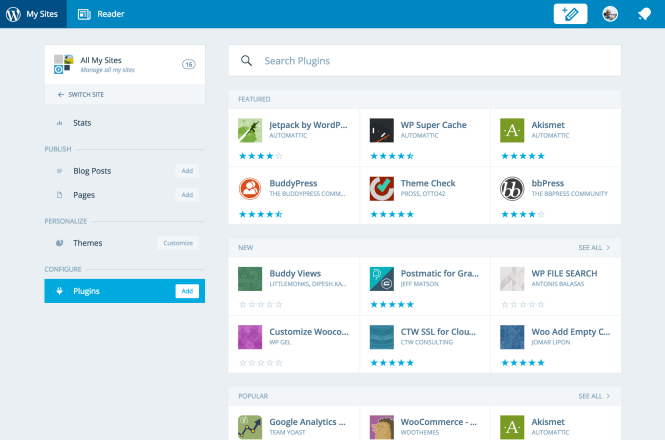
Until now, Jetpack sites with Manage enabled were only able to activate previously-installed plugins and set those plugins to autoupdate. Now, you can install new plugins as well as remove any plugins that are no longer being used.
In addition, we have dramatically improved the detailed view for a single plugin. You can see the compatibility with WordPress versions, ratings, descriptions, changelogs, and more!
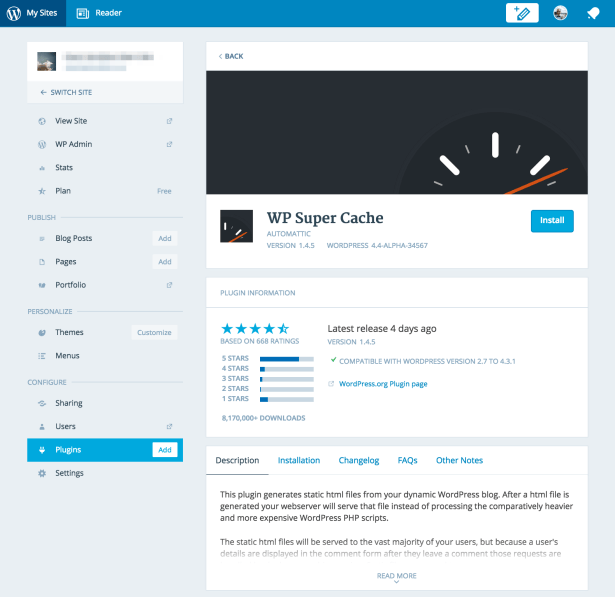
Pro tip: If you find yourself browsing the WordPress.org plugin repository and want to install the plugin on your Jetpack site, you can just replace the .org in the URL with .com and be taken to the new Plugin Browser where you can install the plugin with a single click. You will need to be logged into your WordPress.com already for this to work.