

Dépannage des méthodes de diffusion de CSS ou JavaScript concaténés
Dernière mise à jour :
Cet article explique comment Jetpack Boost diffuse les fichiers CSS et JavaScript concaténés, comment vérifier la méthode de diffusion utilisée et comment résoudre les problèmes liés à la diffusion directe et au mode de secours servi par PHP.
Jetpack Boost (version 3.9.0 et ultérieure) optimise les performances de WordPress en concaténant et en minifiant les fichiers CSS et JavaScript, puis en les diffusant directement depuis votre serveur web pour accélérer les temps de chargement.
Lorsque la diffusion directe n’est pas possible, un système de secours utilisant PHP permet de garder le contenu accessible pendant que l’optimisation se poursuit.
Comment vérifier la méthode de diffusion utilisée
Pour déterminer la méthode de diffusion actuellement utilisée par votre site, suivez ces étapes :
- Ouvrez une page de votre site web dans un navigateur.
- Affichez le code source de la page (faites un clic droit → Afficher le code source de la page).
- Recherchez les URL de fichiers CSS ou JavaScript :
- S’ils sont chargés depuis
/wp-content/boost-cache/static/, votre site est déjà configuré pour diffuser directement ces fichiers. - S’ils sont servis depuis
/_jb_static/, WordPress prend en charge la diffusion. Cela peut ralentir légèrement les requêtes, car PHP traite ces fichiers. La concaténation de plusieurs fichiers en un seul reste avantageuse, mais vous voudrez peut-être chercher pourquoi la diffusion directe ne fonctionne pas sur votre site.
- S’ils sont chargés depuis
Permaliens personnalisés et régénération des fichiers
Jetpack Boost s’appuie sur WordPress et son système de permaliens personnalisés pour régénérer ces fichiers concaténés. Si un fichier est manquant, WordPress détecte le problème et lance un processus de régénération dans Jetpack Boost. L’extension vérifie périodiquement si WordPress détecte des fichiers manquants dans l’emplacement wp-content du système de fichiers. En cas d’échec de cette vérification, les fichiers sont fournis à l’aide de la méthode /_jb_static/ via PHP.
Test manuel
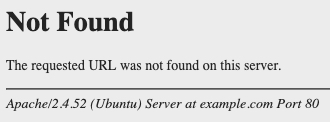
Si votre site utilise /_jb_static/ pour diffuser les fichiers concaténés, vous pouvez effectuer un test manuel en tentant d’accéder à une URL inexistante dans l’emplacement /wp-content du site. URL devrait ressembler à un fichier utilisé par l’extension, par exemple /wp-content/boost-cache/static/1234.css. Recherchez une page d’erreur 404 pour WordPress. Si vous voyez plutôt une erreur 404 standard du serveur web, cela confirme qu’un problème doit être résolu.
Quand le test automatique des erreurs 404 est-il exécuté ?
L’extension effectue une vérification lorsque les deux modules de concaténation (JS et CSS) sont désactivés et que vous activez l’un d’eux. Elle l’exécute également une fois par jour. Cela permet de surveiller en continu la diffusion des fichiers de votre site.
Le test automatique des erreurs 404 n’est jamais exécuté sur WordPress.com ni sur Pressable. Sur ces hébergeurs, Jetpack Boost utilise toujours une diffusion servie par PHP via la méthode /_jb_static/ car le serveur web peut répondre par une erreur 404 pour les fichiers manquants situés dans wp-content avant le chargement de WordPress. Comme WordPress ne voit jamais l’erreur 404, le test ne peut pas produire un résultat fiable à cet endroit.
Comment résoudre les problèmes liés à wp-content
Le problème provient probablement de la configuration du serveur web sous-jacent associée aux permaliens personnalisés.
Résolution sur Apache
Sur les serveurs Apache, les règles mod_rewrite gèrent cela et peuvent être désactivées dans le répertoire wp-content. Recherchez un fichier caché nommé .htaccess dans le répertoire wp-content. S’il est présent, recherchez la directive suivante :
RewriteEngine Off
Supprimer ou commenter cette ligne peut résoudre le problème. Si vous ne connaissez pas bien ces configurations, contactez votre hébergeur pour obtenir de l’aide.
S’il n’existe aucun fichier correspondant à .htaccess dans le répertoire indiqué par wp-content, votre hébergeur a peut-être désactivé les paramètres du serveur web dont cette extension dépend. Dans ce cas, l’extension utilise des techniques WordPress comme solution de secours pour diffuser les fichiers CSS ou JavaScript concaténés. Cette méthode est légèrement plus lente, mais elle reste bénéfique pour votre site.
Résolution sur les serveurs non Apache
Pour les serveurs non Apache comme Nginx, consultez la documentation de votre serveur ou contactez votre hébergeur pour savoir comment modifier les fichiers de configuration dans /etc/nginx/.
Options pour les développeurs : désactiver le test des erreurs 404
La section suivante s’adresse aux développeurs. Une modification incorrecte de ces options peut interrompre la diffusion des fichiers CSS et JavaScript de votre site. En cas de doute, contactez votre hébergeur avant d’effectuer des modifications.
Pour désactiver le test is_404(), définissez la constante JETPACK_BOOST_DISABLE_404_TESTER dans un mu-plugin. Voici un exemple de définition de cette constante :
<?php

if ( ! defined( 'JETPACK_BOOST_DISABLE_404_TESTER' ) ) {
    define( 'JETPACK_BOOST_DISABLE_404_TESTER', 1 );
}
Après avoir désactivé le test et vous être assuré que is_404() fonctionne dans le répertoire indiqué par wp-content, vous pouvez définir l’option du site jetpack_boost_static_minification sur 1. Définissez-la sur 0 pour utiliser l’ancienne méthode de diffusion de ces fichiers.
Ne définissez pas cette option sur WordPress.com ni sur Pressable
Ne définissez pas l’option jetpack_boost_static_minification sur 1 pour WordPress.com ou Pressable. Sur ces hébergeurs, le test des erreurs 404 n’est jamais exécuté ; forcer la diffusion statique empêche donc Jetpack Boost de détecter les réponses 404 du serveur web pour les fichiers manquants situés dans wp-content avant le chargement de WordPress. Si l’hébergeur répond à ces erreurs 404 au niveau du serveur web (par exemple avec l’option Lightweight 404 de Pressable), les fichiers CSS et JavaScript de votre site ne fonctionneront pas.
À partir de Jetpack Boost 4.7.0, l’extension ignore l’option jetpack_boost_static_minification sur WordPress.com et Pressable et utilise toujours une diffusion servie par PHP sur ces hébergeurs. Sur ces hébergeurs, la définition de cette option n’a aucun effet après la mise à niveau vers la version 4.7.0 ou une version ultérieure.
Si vous avez déjà défini cette option sur 1 sur WordPress.com ou Pressable et que les fichiers CSS ou JavaScript de votre site ne fonctionnent plus, redéfinissez jetpack_boost_static_minification sur 0 afin de rétablir la diffusion servie par PHP.
Si vous gérez un hébergeur qui assure lui-même le routage des erreurs 404 et que vous souhaitez remplacer ce comportement, utilisez le jetpack_boost_minify_use_static_cache_urls filtre. Il s’agit de la méthode de remplacement prise en charge pour les hébergeurs qui gèrent eux-mêmes leurs erreurs 404.
Résumé
Dans la plupart des cas où la diffusion directe ne fonctionne pas, un fichier correspondant à .htaccess dans le répertoire indiqué par /wp-content en est la cause. L’examen de cette configuration devrait rétablir le comportement attendu du test des erreurs 404 et permettre la diffusion directe de vos fichiers. Sur WordPress.com et Pressable, la diffusion servie par PHP est attendue et constitue le comportement correct.
Still need help?
Please contact support. We’re happy to advise.

