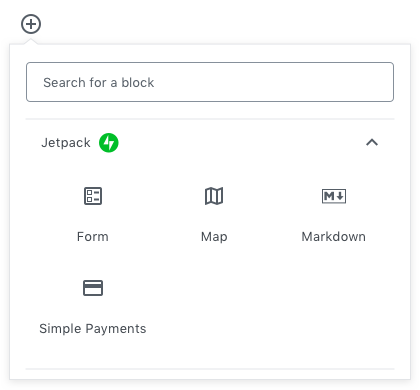
Today, we’re introducing the first wave of Jetpack blocks built specifically for the new WordPress editor, Gutenberg. The features you’ve come to rely on have been adapted for this new experience: payment buttons, forms, maps, and markdown.
The new WordPress editor, Gutenberg, will be available to you as soon as WordPress 5.0 becomes available. If you’d like to try the editor today, you can install the Gutenberg plugin on your site. Once you’ve done so you’ll have access to all the blocks mentioned below.
Simply get paid
A little over a year ago, we introduced the Simple Payments button on WordPress.com sites for folks on paid plans. It is a near-effortless way to accept credit card and debit card payments on a website. Now, we’re bringing it to both Jetpack and WordPress.com as a block. You can find out more about this block here.
Add the block, some content, an email address, and you’re ready to sell products, take donations, accept payments for services, and more.
Simple Payments are available as part of the Premium Jetpack plan. See what else you can get by upgrading.
The form has a fresh new interface
Who doesn’t need a form on their site? It’s the simplest way to engage with customers, fans, and sales leads. Add one to any page or post with a block.
No need for shortcodes — just edit the block directly in the new editor. Find out more about this new block in our support documentation.
Map it out
Maybe you want to show your store’s location on a map right on your home page. Perhaps you want to plot out your favorite restaurants, or the spots where you took those great photos. The map block can do all of the above.
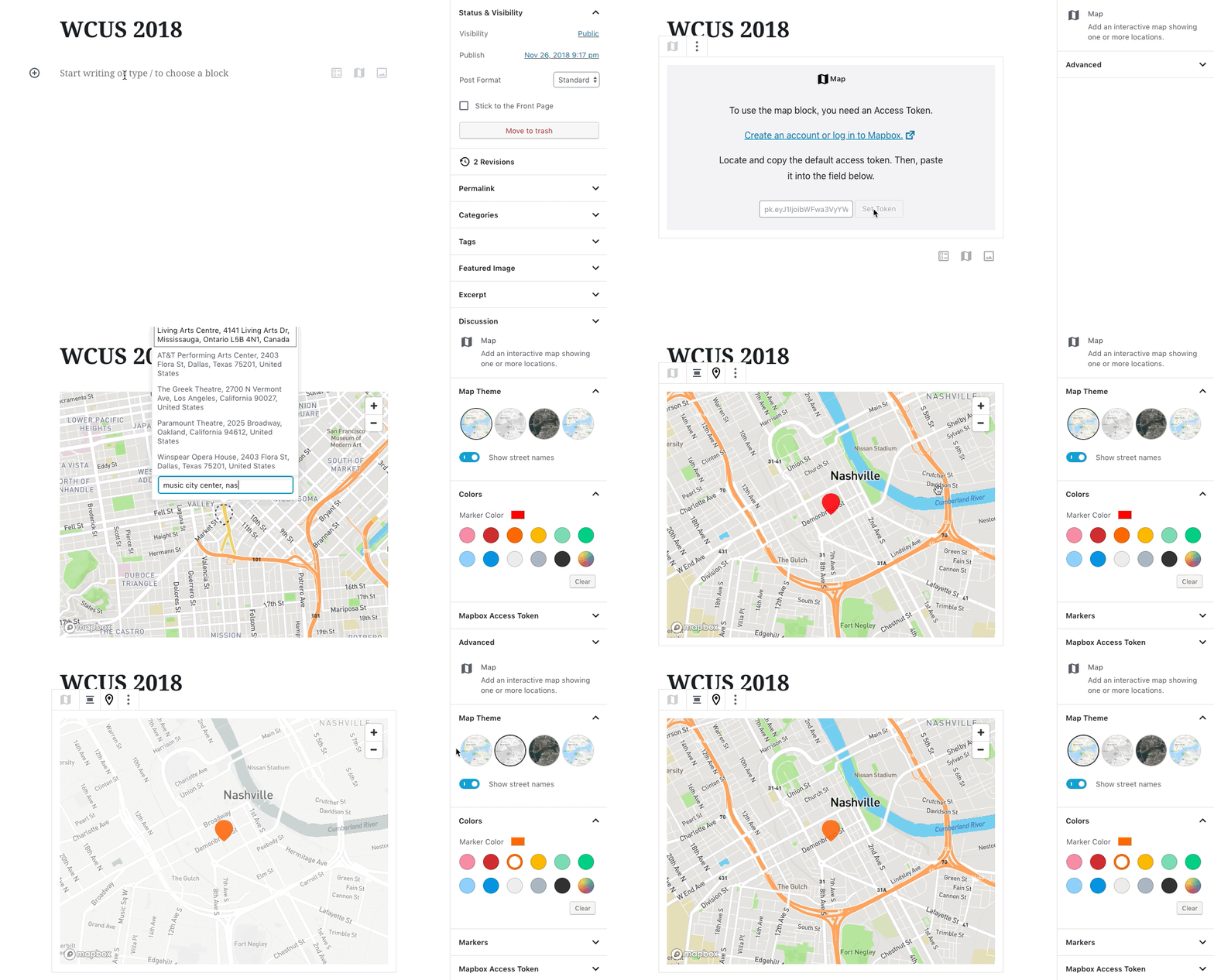
Drop in the map block, add your Access Token, enter your address, and, voilà: you have a visually stunning, interactive map!
If you need more information, check this support document.
### Dear Markdown lovers
We made a block just for you! It’s raw markdown with a preview, self-contained in a block so you can add other blocks around it with ease. And that’s it.
For those who aren’t familiar with Markdown, it’s a way to write and style posts and pages without writing any HTML. If you want a quick way to write and edit rich text without taking your hands off the keyboard, Markdown might be the right block for you.
And one more thing… Publicize is back!
Over a million posts are publicized every day with the oh-so-handy social sharing feature we call Publicize. Now, you can again connect your WordPress site to your social networks of choice and share your new posts automatically.
You’ll find the Publicize settings after clicking “Publish” in the pre-publish sidebar. Take it for a spin and let us know what you think!
Update to 6.8 today
As always, the full changelog offers more details on this update. If you’re ready to bring the latest version of Jetpack to your site, install Jetpack or update your existing installation right now.
It’s a block party!
Once you’ve updated, you can find these new blocks in the new editor’s block picker (it’s the little button with a + on it) under the Jetpack category. Searching for them by name or keyword is a great way to experiment with this new power and flexibility.
Welcome to the future of WordPress. Welcome to the future of Jetpack. We’ll continue bringing your favorite features to the new editor along with some new creations that make site customization simpler and – dare we say it – fun.
What would you like to see us build next?
A big thank you to everyone who contributed to this release:
Alex Mills, Allan Cole, Bernie Reiter, Brandon Kraft, Daniel Walmsley, Del Putnam, Derek Smart, Elio Rivero, Enej Bajgoric, Eric Binnion, George Stephanis, Jefferson Rabb, Jeremy Herve, Jon Surrell, Jorge Leandro Perez, Joshua Flowers, Joshua T Flowers, Justin Shreve, Marin Atanasov, Mark Uraine, Martin K., Michael Arestad, Michael D Adams, Michael Turk, Miguel Lezama, Mikael Korpela, Rob Landers, Rocco Tripaldi, Rodrigo Iloro, Thomas Guillot, Veselin Nikolov, Yaroslav Kukharuk