
Do you find yourself jumping through hoops just to get photos from your phone to your latest blog post?
We have a solution for you. Learn about the exciting new feature in Jetpack when using the Jetpack Mobile app that streamlines how you upload media. All you need to do is scan a QR code and you’ll be able to quickly upload photos and watch them automatically appear in the editor on your laptop or desktop device.
Why is this important?
With smartphones capturing over 90% of all pictures, getting those images from your phone onto your website can be difficult. Do you email the image, or send it to yourself over Slack or your favorite messaging platform?
Then you have to download it to your computer and upload it to your latest blog post. It takes time and effort.
Here’s how to do it faster
- Install the Jetpack app (or update to the latest version) on your mobile device and log into your WordPress.com account.
- While working in the editor on your laptop or desktop device, insert an “Image” or “Gallery” Block on your post/page.
- Click “Select Image”: From the dropdown menu, select “Your Phone.” (this option needs the latest Jetpack plugin installed).
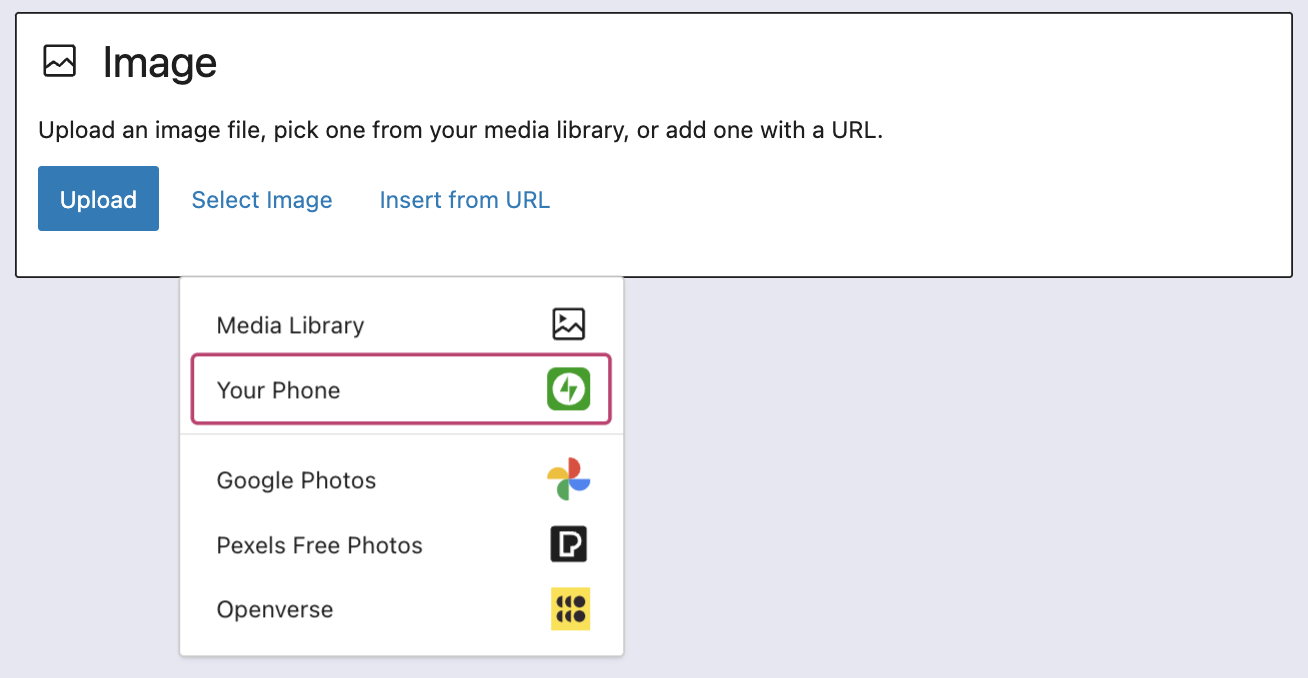
- Use your phone to scan the QR code: This will automatically open the Jetpack app and then your photo library.
- Choose your image(s): From there, simply click the image or images you wish to add to your post/page.
- Click “Add”: Watch your image(s) automatically appear in your desktop editor.
We’d love to know what you think of this new feature, please do leave a comment below and if you’re enjoying Jetpack please do consider leaving us a review and rate the Jetpack app on the App Store or Google Play Store.