


Get insights about your traffic
See how many visitors reach your website and find clear, concise, and actionable ways to grow your audience.
- Set up Stats in one click
- Review traffic for different time periods, posts, and pages
- Understand popular times, locations, and search terms

Write once, post everywhere
Share website content across your social media channels from one place.
- Auto-publish to Facebook, LinkedIn, Threads, Bluesky, Instagram, Mastodon, Tumblr, and Nextdoor
- Schedule social posts in advance
- Preview content before sharing

Beam content directly to their inbox
Turn blog posts into newsletters and reach subscribers without maintaining a separate publishing workflow.
- Grow a subscriber list with an easy signup form
- Publish to the web and email at the same time
- Let subscribers choose when to receive emails
- Create exclusive content for paid subscribers

Like lighter fluid for your best content
Find new fans by promoting posts and pages across millions of sites in the WordPress.com and Tumblr advertising network. Blaze campaigns use a separate campaign budget and are not included in the Jetpack Growth plan.
- Advertise your best content in a few clicks
- Reach more than 13.5 billion impressions per month from millions of daily visitors
- Expand your reach for as little as $5 per day
More tools for engagement and revenue
Turn attention into stronger relationships and sustainable income with tools built into WordPress.
Payment solutions
Sell products, accept donations, and collect subscription fees through Stripe or PayPal.
Explore payment blocksRelated posts
Automatically show related articles and products so visitors spend more time on your site.
Learn about related postsMake money with ads
Generate passive income through a high-quality advertising program designed for WordPress sites.
Learn about WordPress adsSocial
per month for the first year, billed yearly
Get SocialTailor every post to each network with custom messages, templates, and media.
What's included:
- Everything in the free plan
- Customize the message and media for each network
- Reusable message templates per connection
- Upload custom images or videos with your posts
- Automatically generate images with Social Image Generator
- Priority support
Stats
per month, billed yearly
Get Paid StatsThe most advanced stats Jetpack has to offer.
What's included:
- Discover your top performing post & pages
- Detailed insights on the referrers that bring traffic
- GDPR compliant
- Priority support
- Start with 10K site views per month (upgradable)
- UTM tracking, device stats, region & city locations
- Access to upcoming advanced features
Growth (popular plan)
per month for the first year, billed yearly
Save $8.33/mo vs buying individually
Get GrowthEssential tools to help you grow your audience, track visitor engagement, and turn leads into loyal customers and advocates.
What's included:
- All Stats features
- All Social features
- Display ads with WordAds
- Pay with PayPal
- Import unlimited subscribers
- 40+ Jetpack blocks
- Paid content gating
- Paywall access
- Newsletter
- 2% transaction fees
* Discount is for the first year only; all renewals are at full price.
Questions about Jetpack growth tools
Answers about understanding an audience, sharing content, newsletters, and promotion.
Which of these Jetpack features are free?
What insights does Jetpack Stats provide?
Which social media platforms can I automatically post to with the Jetpack’s WordPress growth plugin?
How do I connect to social media networks?
Click Connect next to the Social Network you want to connect to.
Log in to that Social Network site and authorize the connection. Facebook Tumblr LinkedIn After you add a new connection, you have the option to make the connection ‘global’, meaning it can also be used by any other user on your site who has the ability to publish posts. To make the connection available to all users, check the box labeled Connection available to all administrators, editors, and authors. By clicking the three-dot ellipsis to the right of the description, you can see the download and restore options.
How do I share a post on social media using Jetpack Social?
How does Jetpack Newsletter work?
What is Blaze?
How do I place ads through the Blaze ad network?
Where will my Blaze ads appear?
Do my Blaze ads need to be approved?
How much do Blaze ads cost?
Does every WordPress website need a CRM?
Why should I host my own CRM in WordPress?
Can I upload existing customers into the Jetpack CRM?
Which other services does Jetpack CRM integrate with?
Do you have a B2B (companies) mode?
How does Jetpack related posts feature work?
How do I configure the WordPress related posts feature?
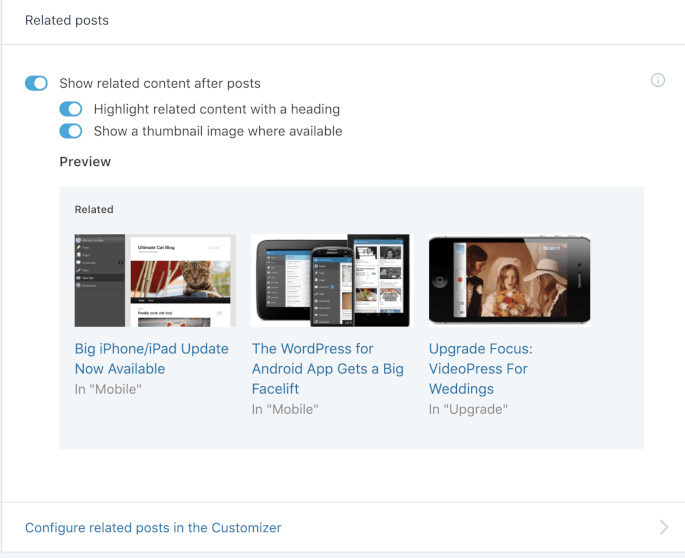 For more information, check out this support article. Most sites that activate this see an increase in traffic. Unlike many other related post plugins, we do all the analysis, processing, and serving from our cloud, so there is no additional load on your server. That’s why Jetpack Related Posts are allowed on web hosts even when similar plugins are banned.