
I asked ChatGPT and Claude if Jetpack’s MCP server is slow. Both said yes, and both pointed to the same test, one that put five everyday tasks at 11 minutes.
That didn’t match what I see on my own site. But that’s just a feeling, so I went ahead and timed it myself.
One call takes about a second. I ran 160 of them. The middle result was 931 milliseconds, and none failed.
A whole task takes longer, because the AI has to think and write too. I asked Claude which plugins needed updates and whether anything was wrong with my site. Claude Sonnet 5.5 took 8.5 to 12.5 seconds. Claude Opus 5.5 took 34 to 50 seconds.
Eleven minutes is 660 seconds. My slowest run only took 50 seconds.
To be fair, it isn’t the same test. That one had five tasks, and four of them made changes to the site. Mine was one task that only reads.
One call at a time
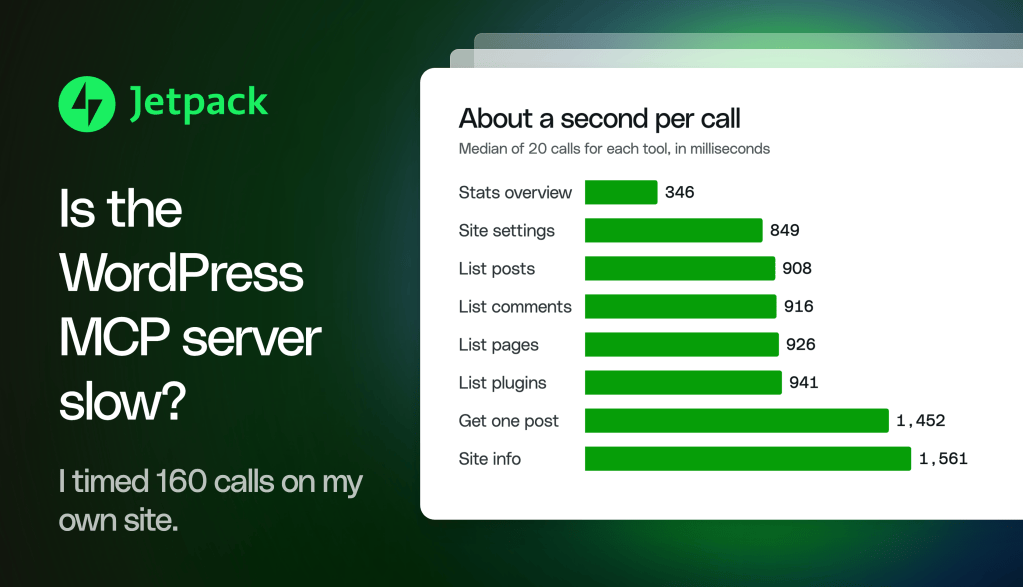
I timed eight tools, with 20 calls each.
| Tool | What it does | Median ms | p90 ms | Runs |
|---|---|---|---|---|
wpcom/jetpack-stats-overview | Views and visitors for today, the last seven days, and the last 30 days | 346 | 439 | 20 |
wpcom/site-settings | Site title, tagline, and general settings | 849 | 990 | 20 |
wpcom-mcp/posts-list | List the latest posts | 908 | 1,010 | 20 |
wpcom-mcp/comments-list | List the latest comments | 916 | 1,032 | 20 |
wpcom-mcp/pages-list | List pages | 926 | 1,044 | 20 |
wpcom/plugin-list | List all 16 plugins and which need updates | 941 | 1,242 | 20 |
wpcom-mcp/posts-get | Get one full post | 1,452 | 1,557 | 20 |
remote:core/get-site-info | Site info, answered by my site itself | 1,561 | 1,719 | 20 |
(Median is the middle result. p90 means nine out of 10 calls were faster than this.)
Stats came back fastest, in about a third of a second. The two slowest calls fetched a whole post, and asked my site to answer a question itself. That second one took about 0.7 seconds longer than the similar settings call. I think that’s just the trip out to my site and back.
I also made six plain calls to the WordPress.com API for the same site, with no MCP involved, from the same computer and connection. They took 0.65 to 0.83 seconds. So most of that second looks like the normal trip to WordPress.com and back, and MCP adds a little on top.
I gave it a whole task
I asked which plugins on my site needed updates, and whether there were any site health problems. I asked three times per model, in a fresh session each time, and timed it from send to final answer.
| Model | Run 1 | Run 2 | Run 3 |
|---|---|---|---|
| Claude Sonnet 5.5 | 12.5 s | 8.5 s | 12.5 s |
| Claude Opus 5.5 | 50.0 s | 49.3 s | 34.3 s |
All six runs found the same five plugin updates.
The model made the biggest difference. With the same server, site, and question, Opus took about four times as long as Sonnet. It made more calls and read the docs first. So if a simple task feels slow, try a faster model like Sonnet first.
How I ran it
- The site. My personal website. It’s hosted on Pressable, which is also part of Automattic, and connected to WordPress.com through Jetpack.
- The server. The WordPress.com MCP server. Self-hosted sites with Jetpack use the same one. There’s no separate Jetpack server.
- The script. A small Python script using the official MCP SDK. It signs in to WordPress.com, then times each call.
- The runs. For each tool, two warm-up calls I didn’t count, then 10 timed calls, then the same again about 12 minutes later.
- The whole task. I ran it in Claude Code, not the Claude or ChatGPT apps.
- When and where. Monday, November 23, 2026, 9:50 to 10:10 am Toronto time. Wired connection, MacBook Air, Toronto, Ontario.
- Read-only. The script only runs tools the server itself marks as read-only. I didn’t time any writes, or any other MCP servers.
I don’t know why that one test came out at 11 minutes. Maybe the write tasks take a lot more steps. Maybe it was the model, or the host. I’d honestly like to know, and if you time it on your own site, I’d love to see your numbers.
To compare features instead of speed, see Jetpack’s side-by-side look at seven WordPress MCP servers: https://jetpack.com/wordpress-mcp/
How to set it up
Written steps are in the WordPress.com MCP guide.