

Quick question: Are you a robot?
If you’ve tried to access a secure website recently, you’re familiar with this question, and you likely had to click all images containing traffic lights, type some distorted letters, or listen to a garbled audio clip. And it was probably irritating.
As a website owner, you can do everything right — from removing friction to improving your load times — but a CAPTCHA request could still prevent someone from filling out your form.
How? Asking site visitors to solve random puzzles to prove they’re human adds friction to their site experience. A lot of friction.
And the ironic part is that many artificial intelligence (AI) based models solve these almost all the time, defeating the purpose of using a CAPTCHA altogether.
If you’re looking for CAPTCHA and reCAPTCHA alternatives, welcome. We’ll explore six alternatives and provide handy evaluation criteria to help you choose the right one for your needs.
Why it’s time to consider alternatives to CAPTCHA and reCAPTCHA
Here are a few reasons why you need to stop using CAPTCHA and reCAPTCHA on your website:
It’s challenging for users with impairments
Many CAPTCHA solutions ask you to solve an image-based puzzle like this one:

Visually-impaired site visitors probably won’t be able to solve this puzzle whatsoever. It can also be very challenging for those with dyslexia or who struggle with pattern recognition. This can prevent a big chunk of your audience from being able to fill out your form or otherwise interact with your site.
The Americans with Disabilities Act (ADA) and similar international regulations require equal access to digital services for everyone. This means CAPTCHA accessibility is not just a user experience concern, but also a legal requirement. While many websites have started to offer audio-based alternatives, it’s still not enough. Most audio CAPTCHAs tend to have fuzzy sound, making them difficult to comprehend for those with hearing concerns.
It causes friction and user frustration
While a CAPTCHA may seem like just a minor annoyance, it can really impact your business. How many times have you, as a site visitor, abandoned a page because you’re unable to solve the puzzle?
A study from Baymard Institute found that CAPTCHAs have an 8% failure rate — but that could increase to 29% if a CAPTCHA is case-sensitive. There are a couple of reasons for this:
- Visitors are required to shift their attention from their task (like filling out a form)
- People are short on time, which makes CAPTCHA negatively impact conversions
- CAPTCHAs are more complex than they used to be, making them difficult to solve
And on a mobile device, the small screen and touch interface makes a CAPTCHA harder to see and more difficult to navigate. This added friction can ultimately result in lost conversions.
It can block legitimate users
CAPTCHA plugins can also experience false positives, since they take time to learn how to differentiate between actual traffic and bots. You can actually expect a pretty high false positive rate — as high as 22% in some cases.
These systems sometimes incorrectly flag legitimate users as bots, particularly when people:
- Access sites through VPNs or proxy servers
- Browse from regions with high bot activity
- Use privacy-focused browsers or extensions
- Connect through corporate networks with unusual traffic patterns
As a result, a CAPTCHA can block real, legitimate visitors, which can ultimately negatively affect your website or business.
There are privacy concerns related to data tracking
reCAPTCHA uses more than just cookies to analyze if you’re a real person, including:
- IP addresses
- User-agent strings
- Browser information
- Browsing history
- User interactions
This extensive use of personal data can violate privacy regulations like GDPR and CCPA, which can lead to legal ramifications and negative feedback from your audience.
Bots can bypass it using ML models
A 2020 study (pre-print) found that a deep learning model could solve these CAPTCHA challenges accurately. The accuracy rates were as high as 98.94% for numerical datasets and 98.31% for alphanumerical datasets. Considering that AI-based models will only get more sophisticated with time, this presents a major issue.
6 alternatives to CAPTCHA and reCAPTCHA
With all the problems CAPTCHA and reCAPTCHA bring to your site, looking for an alternative option makes sense. Here are the top ones available:
1. Akismet
Akismet, largely considered one of the best CAPTCHA alternatives, operates invisibly in the background. Because it eliminates the need for direct user interaction, it’s considered a sophisticated spam detection service that doesn’t make spam protection feel like a chore.
Initially developed for WordPress, Akismet now protects over 100 million sites globally on multiple platforms. It uses machine learning algorithms to analyze spam patterns across millions of websites. As a result, it has billions of data points to pull from. Akismet detects content patterns, IP addresses, and user behavior, effectively separating real users from bots.
As a cloud-based solution, Akismet doesn’t negatively impact your site’s performance. And it’s completely hands-off — just turn it on and spam protection will be taken care of for you. You won’t have to filter through comments or deal with spam form submissions. Based on your settings, it can either immediately delete spam or hold it for your review.
2. Honeypots
A honeypot is a bot detection technique that uses hidden form fields to detect bots. Bots can “see” and fill out the hidden field, while humans cannot. If that field contains data, the honeypot marks it as spam.
As a quick example, a contact form could include a field named “website_url” hidden from view using CSS. A human won’t fill it out, but a bot will.
That said, with sophisticated AI models and browserless technologies increasing in popularity, this approach is becoming less and less effective. Spammers program bots to skip honeypot fields.
3. Time-based form submissions
With this type of solution, if someone doesn’t submit a form within a given time limit, it’s marked as spam. Typically, you’ll choose an average threshold based on previous form completion times.
This approach works on the assumption that a real visitor takes time to fill out a form or access a website. But, you can’t always accurately predict that time limit, so it can be pretty easy to mark real submissions as spam.
4. Social media or email login
Authentication methods that rely on social media or email platforms identify real people from bots effectively. This works well if you’re trying to verify whether real people want to log in, submit a form, or make a comment.
This eliminates the need for a CAPTCHA system because you authenticate users through their existing social media accounts, like Facebook or LinkedIn. Since people already have accounts on these platforms, the act of logging in provides an authentic user identity record.
Take the WordPress.com website as an example. Users can log in with Gmail, Apple, or GitHub accounts.
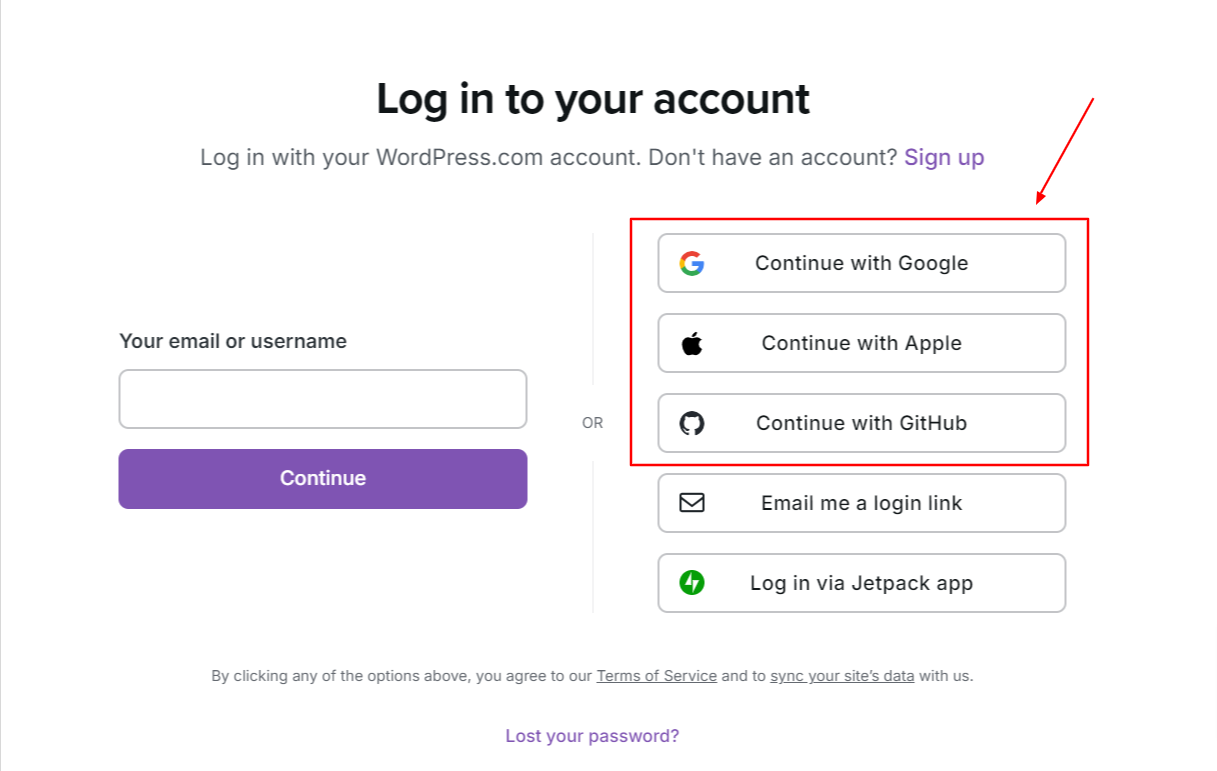
When you use this method, people don’t need to remember additional passwords or solve CAPTCHA puzzles. If they run into issues with their existing social media or email provider, however, this does prevent them from logging in or submitting the form. Also, you need to have a consent mechanism in place to ensure that people agree to share their app data with you.
5. SMS or phone verification
If you want to add another layer of security, use the SMS or phone verification method. This is great for preventing bots because they can’t receive a phone call or text message.
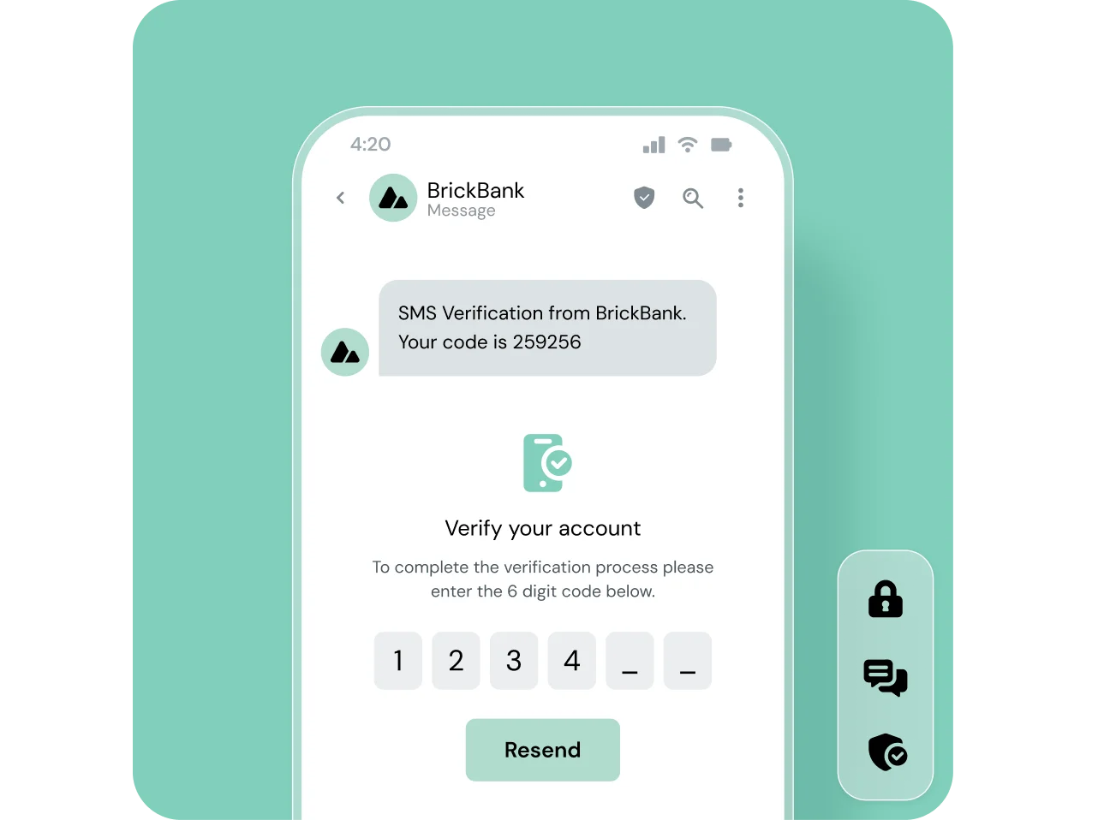
With this approach, your system triggers a verification code sent to someone’s phone. If they prefer audio, you can send the code via interactive voice response (IVR) systems that make an automated phone call. Since bots can create email addresses but not phone numbers, this reduces spam. The bots simply don’t get past the verification process.
Sinch offers a verification solution through an API implementation. The follow image shows what this looks like in action:
That said, AI dialers can bypass these systems. This also adds more friction to the form process for visitors. If their phone doesn’t have a signal, or they don’t have it with them, this can be quite frustrating.
6. Device fingerprinting
Device fingerprinting involves creating a digital fingerprint based on the user’s device and browser configurations. It uses parameters like:
- Screen resolution
- Installed fonts
- Browser plugins
- Timezone settings
- Hardware specifications
If multiple actions come from devices with identical fingerprints (which are familiar with bot networks) or with unusual configurations (like missing standard components or impossible combinations of features), the system flags the user as a potential bot. This is one of the most effective methods because spammers can’t spoof multiple variations of these configurations easily.
A comparison of CAPTCHA and reCAPTCHA alternatives
| Alternative | Description | Pros | Cons |
| Akismet | Cloud-based spam detection using machine learning. Works invisibly in the background. | – No user interaction – Highly accurate – Minimal performance impact – API available | – Internet-dependent – Focused solely on spam detection |
| Honeypots | Hidden fields trap bots that fill them out. | – User-friendly – Easy to set up- Invisible to users | – Easily bypassed by advanced bots – Limited scope |
| Time-based submissions | Flags forms completed too quickly or too slowly. | – Simple to implement – No user friction | – Requires precise time limits – May misidentify genuine users |
| Social login | Verifies users via social media or email accounts. | – No CAPTCHAs – Convenient for users | – Relies on third-party platforms – Issues with external accounts may block access |
| SMS/phone verification | Sends a one-time code via SMS or voice call. | – Strong bot deterrent – Adds security | – Frustrating for users without phones – Can be bypassed by AI dialers |
| Device fingerprinting | Creates unique user profiles based on device/browser settings. | – Highly-effective – Hard to spoof | – Privacy concerns – Can flag users with non-standard setups |
What makes a good CAPTCHA and reCAPTCHA alternative?
An effective reCAPTCHA and CAPTCHA alternative should be:
1. Efficient at identifying spam
Ideally, the right solution should have a high accuracy rate and learn from your website’s interaction patterns over time. This reduces your false positive rate and effectively stops spam over time.
Consider these factors before selecting a provider:
- False positive rate or the number of legitimate users incorrectly flagged as spam
- False negative rate or spam that gets through the system
- The response time for identifying new attack patterns
- The ability to handle high-volume traffic without degrading performance
2. Non-intrusive and low-friction
Choose an alternative to CAPTCHA that operates invisibly in the background. This allows legitimate users to do what they need without being interrupted.
Look for solutions that:
- Complete security checks within milliseconds
- Don’t require additional steps in the user journey
- Integrate with existing forms and workflows
- Avoid adding extra loading time to your pages
- Process verification in parallel with other operations
Also, this solution should notify you or your team only when it detects suspicious activity.
3. Accessible to all user groups
Your website must be accessible to all people, not just abled individuals. If people use screen readers, keyboard-only navigation, or similar assistive technologies, your CAPTCHA alternative should meet those needs.
Also, your solution should function without relying on audio or video challenges and across all devices, browsers, and related technologies.
4. Compliant with data privacy regulations
Privacy regulations continue to expand. At the very least, your CAPTCHA alternative should be GDPR and CCPA-compliant. Instead of relying on someone’s personal information to identify them, prioritize blocking bots by using non-identifiable information like interactions and IP addresses.
Cross-check how the tool collects, stores, and processes data. Akismet, for example, retains data only for 90 days and doesn’t sell information to third-party services. People can even opt out of tracking if they want to.
5. Cost-effective and scalable
Even though spam detection matters a lot, it shouldn’t be cost prohibitive to deploy it on your website. Look for a solution with transparent pricing that aligns with your website’s traffic patterns.
Keep the following in mind during evaluation:
- Total cost of ownership
- The pricing model
- Performance impact
- Technical support available
- Integration costs and complexity
- The ability to handle traffic spikes without additional charges
Frequently asked questions
What is Akismet?
Akismet is an advanced spam detection service that protects websites from spam without requiring any user interaction. Developed by Automattic — the people behind WordPress.com — it uses machine learning and pattern recognition to analyze comments, form submissions, and other content across millions of websites in real time.
Is there a way to avoid CAPTCHAs?
Yes, there are several ways to avoid using CAPTCHAs without compromising on security. Here are a few:
- Use invisible spam prevention tools like Akismet
- Add honeypot fields to forms
- Add time-based form submission validation
- Employ device fingerprinting
- Integrate social media login options
- Use phone or SMS verification for important actions
How can you prevent form spam without CAPTCHA?
You can prevent spam on contact forms using methods like intelligent spam detection with Akismet, deploying IP-based rate limiting, and implementing browser validation techniques. You could also detect submissions that happen too quickly to be human through timestamp validation.
Is there an extension to skip CAPTCHAs?
There are extensions that let you skip CAPTCHAs. However, using these extensions could compromise site security or violate its terms of service. That’s why website owners should consider alternatives to CAPTCHA like Akismet to reduce the potential for such issues.
Is CAPTCHA outdated?
As new CAPTCHA-solving models emerge, these puzzles become obsolete with time. Also, people continuously run into access issues and accessibility concerns, which only adds to the problem. If you’re looking for an alternative option to CAPTCHA, consider using Akismet, which works in the background to detect spam.

We guard your site. You run your business.
Jetpack Security provides easy‑to‑use, comprehensive WordPress site security, including real‑time backups, a web application firewall, malware scanning, and spam protection.
Secure your site Jetpack