

A solid SEO strategy helps your site rank higher in search results, increasing traffic and boosting your engagement. WordPress offers built-in SEO tools but, for optimal performance, a few modifications can make a big difference.
This guide will provide eleven essential steps to improve your WordPress SEO strategy, regardless of your skill level.
1. Choose an SEO-friendly WordPress theme
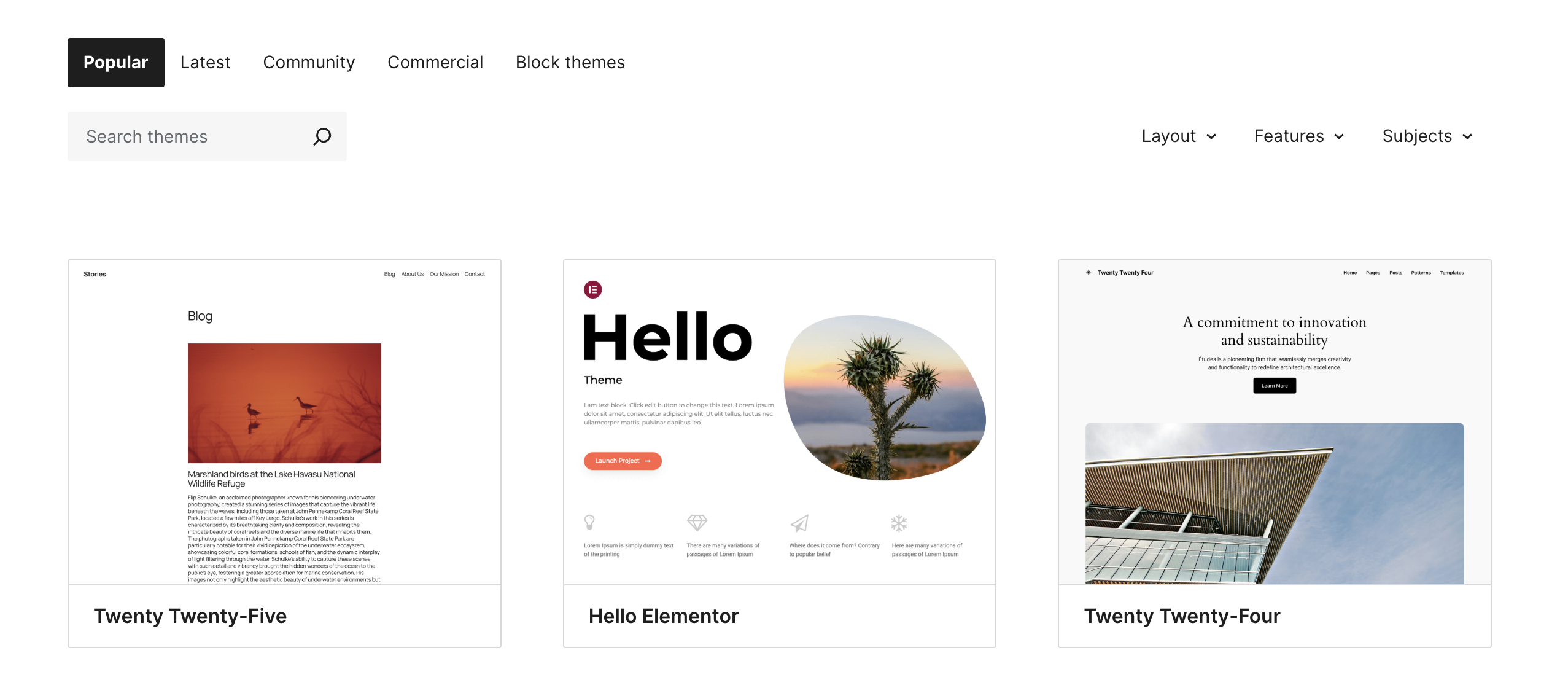
With more than 13,000 themes in the WordPress directory, it’s easy to pick one based on looks alone without considering SEO. Luckily, there’s a simple way to check if your favorite theme is SEO-friendly.
Most themes offer demo websites or preview content. Copy the demo link and run it through Google PageSpeed Insights to analyze its performance. This will give you a full breakdown of speed, responsiveness, and overall functionality — helping you make an informed choice.
Key considerations
- Mobile responsiveness: Your theme should automatically adjust to different screen sizes.
- Fast load times: Avoid themes bloated with animations or unnecessary scripts.
- Schema markup compatibility: Themes with built-in schema markup help search engines better understand your content.
- Clean code & HTML5 support: Well-structured, HTML5-compatible themes make it easier to crawl and index your site efficiently.
How to choose an SEO-friendly theme
- Browse the WordPress Theme Directory.
- Check the theme demo for loading speed and responsiveness.
- Run the demo URL through Google’s PageSpeed Insights.
2. Install a reliable SEO plugin
WordPress SEO plugins let you edit metadata directly on your pages, create sitemaps, improve your WordPress on-page SEO and technical setup — all without needing to code.
Popular plugins
- Jetpack: The ultimate toolkit for WordPress sites, offering meta tag customization, XML sitemaps, content analytics directly in the WordPress dashboard, page speed optimization, and so much more
- Yoast SEO: Offers content analysis, XML sitemap generation, and meta tag editing.
- Rank Math: Includes advanced schema support, keyword tracking, and an intuitive interface
- All in One SEO Pack: Provides beginner-friendly settings and automation features
The best part? All of these plugins have powerful free versions you can test out and upgrade later if needed.
How to install and configure an SEO plugin
- Go to Plugins → Add New.
- Search for Jetpack (or the plugin of your choice).
- Click Install Now.
- Next, click Activate.
- Once active, you can use the setup wizard to start optimizing your website.
3. Optimize permalinks for better readability
Optimizing your permalink structure makes your URLs cleaner, easier to read, and more SEO-friendly, which can improve your search rankings.
Steps to optimize permalinks
- Log in to your WordPress Dashboard.
- Navigate to Settings → Permalinks.
- Select Post Name (e.g. example.com/sample-post/).
- Click Save Changes to update the permalink structure.
For more tips and insights, check out this guide on WordPress permalinks.
4. Conduct keyword research and create SEO-friendly content
By using the right keywords in your content, you help search engines better understand and rank your site — increasing your visibility and engagement.
Keyword research best practices
- Research your audience: Use tools like Google Keyword Planner to discover what your audience is searching for.
- Choose the right keywords: Select primary and secondary keywords that align with your content and business goals.
- Place keywords strategically: Add keywords naturally into titles, meta descriptions, headers, and URLs.
- Focus on readability: Avoid keyword stuffing — keep your writing natural and user-friendly.
- Use LSI keywords: Include related terms to give search engines better context for your content.
- Leverage AI content creation tools like Jetpack AI Assistant to streamline content ideation, creation, optimizations, and even translations, for effortless high-quality and SEO-friendly content.
How to optimize blog posts for SEO
- Start with a keyword research tool: Find high-traffic, low-competition keywords.
- Write a click-worthy title: Use numbers, action words, and power words.
- Craft an engaging meta description: Summarize the content compellingly.
- Use header tags properly: Structure content with H2, H3, and H4 tags.
- Add internal links: Link to relevant pages to keep users engaged.
- Optimize images: Use alt tags with descriptive keywords.
5. Improve site speed and performance
Website speed is a key SEO ranking factor — and for good reason. Slow-loading pages can frustrate visitors and increase bounce rates.
Here are some simple yet effective ways to boost your site’s performance:
Optimization techniques
- Use a performance optimization plugin: Jetpack Boost is an all-in-one performance optimization plugin designed to enhance Google’s Core Web Vitals — key metrics essential for SEO success
- Use a caching plugin: Tools such as WP Super Cache store static versions of your site to speed up load times.
- Optimize images: Compress large image files with tools like Jetpack or ImageOptim.
- Enable lazy loading: Load images and other assets only when visitors scroll to them.
- Use a content delivery network (CDN): Jetpack CDN takes the load off your server and distributes it across a global network.

6. Fix Core Web Vitals (INP, LCP, CLS) on WordPress
- Measure field data: Open Search Console → Core Web Vitals → Mobile. Identify slow templates.
- INP: Remove unused JS, break up long tasks, defer third-party widgets, test no-plugin baseline.
- LCP: Compress hero media, preload hero image, inline critical CSS, serve via CDN, minimize render-blocking CSS.
- CLS: Set width/height for media, reserve ad slots, avoid late-loading UI shifts.
Tip: Re-test in PageSpeed Insights (mobile) after each change and track deltas.
7. Optimize meta titles and descriptions
Search engines use meta titles and descriptions to generate the preview snippets that appear in search results pages. These elements play a big role in your click-through rate (CTR) and can impact your site’s ranking.
Writing effective meta elements
- Keep titles under 60 characters.
- Keep descriptions between 150 and 160 characters.
- Include primary keywords naturally.
- Write compelling and action-driven descriptions.
8. Implement internal linking strategies
Internal links distribute link equity, enhance search engine crawlability, and guide visitors to related content.
Best practices
- Link to relevant content within blog posts.
- Use descriptive anchor text instead of generic terms like “click here.”
- Maintain a logical site hierarchy with pillar and cluster content.
9. Secure high-quality backlinks
Backlinks are links from other websites that point to your content. They signal trust and authority to search engines, making them a key factor in SEO rankings.
How to secure backlinks
- Guest blogging: Write for reputable sites in the same or related niche.
- Broken link building: Find broken links and suggest your content as a replacement.
- Digital PR: Get featured in industry blogs or news articles.
- Skyscraper technique: Improve existing content and reach out for links.
Just like with keywords, quality matters more than quantity — a few relevant, high-authority backlinks are far more valuable than dozens of low-quality ones.
10. Optimize for mobile usability
Google prioritizes mobile-friendly websites in its rankings, and with most visitors browsing on phones or tablets, optimizing for mobile is more crucial than ever.
Mobile optimization steps
- Prioritize fast loading speeds on mobile devices.
- Enable responsive design through a mobile-optimized theme.
- Ensure touch-friendly navigation with clear CTAs and spacing.
- Optimize font sizes and button placements.
11. Monitor SEO performance and analytics
It’s important to track performance and adjust your strategy based on real data. Regular monitoring helps you spot what’s working, fix what’s not, and stay ahead in search rankings.
Tools to monitor SEO
- Jetpack Stats and Google Analytics: Track traffic, user behavior, and conversions.
- Google Search Console: Monitor indexing, keyword performance, and technical issues.
- Ahrefs or SEMrush: Analyze backlinks, keyword rankings, and competitor insights.
Regular updates
- Fix broken links and remove outdated content.
- Refresh top-performing posts to keep them relevant and competitive.
- Test new SEO strategies and use the data to refine your approach.
Final thoughts on improving SEO on WordPress
As a WordPress site owner, you have access to powerful tools and settings to optimize your site speed, content quality, mobile-friendliness, and more — giving you everything you need to build a strong SEO foundation.
While SEO takes time and ongoing effort, following the ten steps in this guide will boost your search rankings, increase visibility, and deliver a better user experience across your site.
Frequently asked questions
Is a paid SEO plugin necessary for good rankings?
No, you do not absolutely need a paid SEO plugin to rank well. Free plugins like the basic versions of Jetpack or Rank Math are powerful and cover all the essential needs for most websites. These tools help with title tags, meta descriptions, sitemaps, and basic schema markup.
However, a paid plugin offers advanced features that provide a clear advantage when improving WordPress SEO. These premium features often include better schema support for different content types, internal linking suggestions, and automatic redirection managers which help you manage your site more effectively and compete at a higher level.
What is more important for WordPress SEO: content or technical fixes?
Both content and technical fixes are equally important for SEO. They work together. Great content will not rank if your website has technical problems that prevent search engines from finding or understanding it. A technically perfect site will also not rank if its content is thin or does not help the user.
A successful SEO strategy needs you to be good at both. Think of technical SEO as building a strong foundation for a house, and content as building the actual house on top of that foundation. You need both for a complete and sturdy structure.
How can I make my WordPress site load faster for better SEO?
To make your WordPress site load faster, you should focus on a few key areas. Start by choosing a lightweight theme and high-quality hosting. Then, compress your images using a plugin to reduce their file size without losing quality. You should also use a caching plugin, which stores a static version of your site so it loads faster for return visitors.
Another important step is to minify your CSS and JavaScript files. This process removes unnecessary characters from the code. Finally, using a Content Delivery Network (CDN) can greatly improve speed by serving your website’s files from servers located closer to your visitors.
What is schema markup and do I need it for my WordPress site?
Schema markup is a type of code that you add to your website to help search engines better understand your content. It tells Google what your information means, not just what it says. For example, you can use schema to identify a recipe, a review, an event, or a frequently asked questions section.
Adding schema to your WordPress site can help you get rich snippets in search results, such as star ratings or FAQ dropdowns, which can make your listing more visible and increase clicks. While it’s not required, using schema is highly recommended because it gives you a competitive edge.
How do I find the right keywords for my WordPress articles?
To find the right keywords, start by thinking about what your target audience would type into Google to find information on your topic. You can use a keyword research tool like Google Keyword Planner or Ahrefs to see how many people are searching for those terms and how difficult it is to rank for them.
Look for questions people are asking on forums like Reddit or Quora. Also, check the “People also ask” section in Google search results for ideas. A good strategy is to focus on long-tail keywords, which are longer and more specific phrases. They usually have less competition and attract visitors who are more ready to act.
Can I do WordPress SEO by myself or do I need to hire an expert?
You can definitely start doing WordPress SEO by yourself. There are many great free resources and plugins that make it easy to manage the basics. Tasks like optimizing titles, creating good content, and improving site speed are things you can learn and manage on your own.
However, SEO can become very complex, especially for competitive industries. If you find you are not getting the results you want, or if you need help with advanced technical issues or link building, hiring an experienced SEO expert can be a very good investment to help grow your site’s traffic and authority.
What is the difference between a “post” and a “page” in WordPress for SEO?
In WordPress, posts are for timely content like blog articles, which are usually organized by date and categories. Pages are for static, “evergreen” content that does not change often, such as your “About Us” or “Contact” page.
For SEO, posts are great for building topical authority and attracting visitors through regular updates and new content. Pages are better for foundational content that you want to rank for major keywords over a long period. Both are important for a complete SEO strategy, so use posts for your blog and pages for your core business information.
How does the E-E-A-T concept affect my WordPress site’s SEO?
E-E-A-T stands for Experience, Expertise, Authoritativeness, and Trustworthiness. It is a guideline used by Google to assess the quality of your content. For your WordPress site, this means your content must show you have real experience with the topic. It should be written by an expert, and your website should be seen as a trusted authority.
You can demonstrate E-E-A-T by including clear author bios, citing credible sources, showcasing customer reviews or testimonials, and writing content that is truly helpful and original. High E-E-A-T signals to Google that your site provides value, which can lead to better rankings.

 Jetpack