

On the web, milliseconds matter. Site visitors demand swift, responsive experiences, and just a few extra seconds of loading time can make the difference between a loyal customer and a lost opportunity. As website owners seek to improve their online presence, speed simply cannot be overlooked.
In this comprehensive guide, we’ll delve into the importance of website speed and offer five tried-and-true strategies to supercharge your site’s performance.
Five essential tips to quickly improve your website speed
Stepping into the practical realm of speed optimization, the vast array of potential improvements can be daunting. But we’ve distilled the information down to six pivotal strategies that have been tested and proven to yield substantial speed gains.
As we go through these vital areas, we highlight Jetpack Boost’s capabilities to demonstrate how WordPress website owners can quickly capitalize on these recommendations.
1. Optimize images
The importance of image optimization
Images often constitute the largest share of webpage content. While visually engaging, unoptimized images can hinder a site’s performance considerably. Efficient image compression and optimization ensures that visuals are delivered without compromising speed.
Lossless vs lossy compression
Two primary methods exist for image compression:
- Lossless Compression. This method reduces file size without any reduction in image quality. Here, redundant data is eliminated, allowing the image to be reconstructed perfectly when it’s displayed.
- Lossy Compression. With this method, some image data is removed, which results in a slight loss in quality. However, it achieves significantly reduced file sizes.
The choice between these methods depends on the website’s goals and the specific use of each image.
How to make the proper image format selection (JPEG, PNG, WebP)
Here are several options for image formats:
- JPEG. Best for photographs or images with gradients, it uses lossy compression, which can be adjusted to strike a balance between size and quality.
- PNG. Suitable for images requiring transparency or fine details, it employs lossless compression, preserving the maximum quality.
- WebP. A modern format introduced by Google, it offers superior compression and has been gaining widespread acceptance for web use. Tools like Jetpack Boost and its image CDN can automatically convert images to WebP.
Using responsive images and the ‘srcset’ attribute
Responsive images ensure that visitors get the optimal image size based on their device’s screen size and resolution. The ‘srcset’ attribute allows developers to specify multiple image variations, enabling browsers to select the best fit.
A spotlight on Jetpack Boost’s built-in image optimization capabilities
Jetpack Boost shines brilliantly in the realm of image optimization. The Image CDN offloads images, serving them from a global network and ensuring speedy delivery. The Image Guide provides concise best practices, and lazy image loading ensures that images load only when they come into the viewport, conserving bandwidth and enhancing speed.
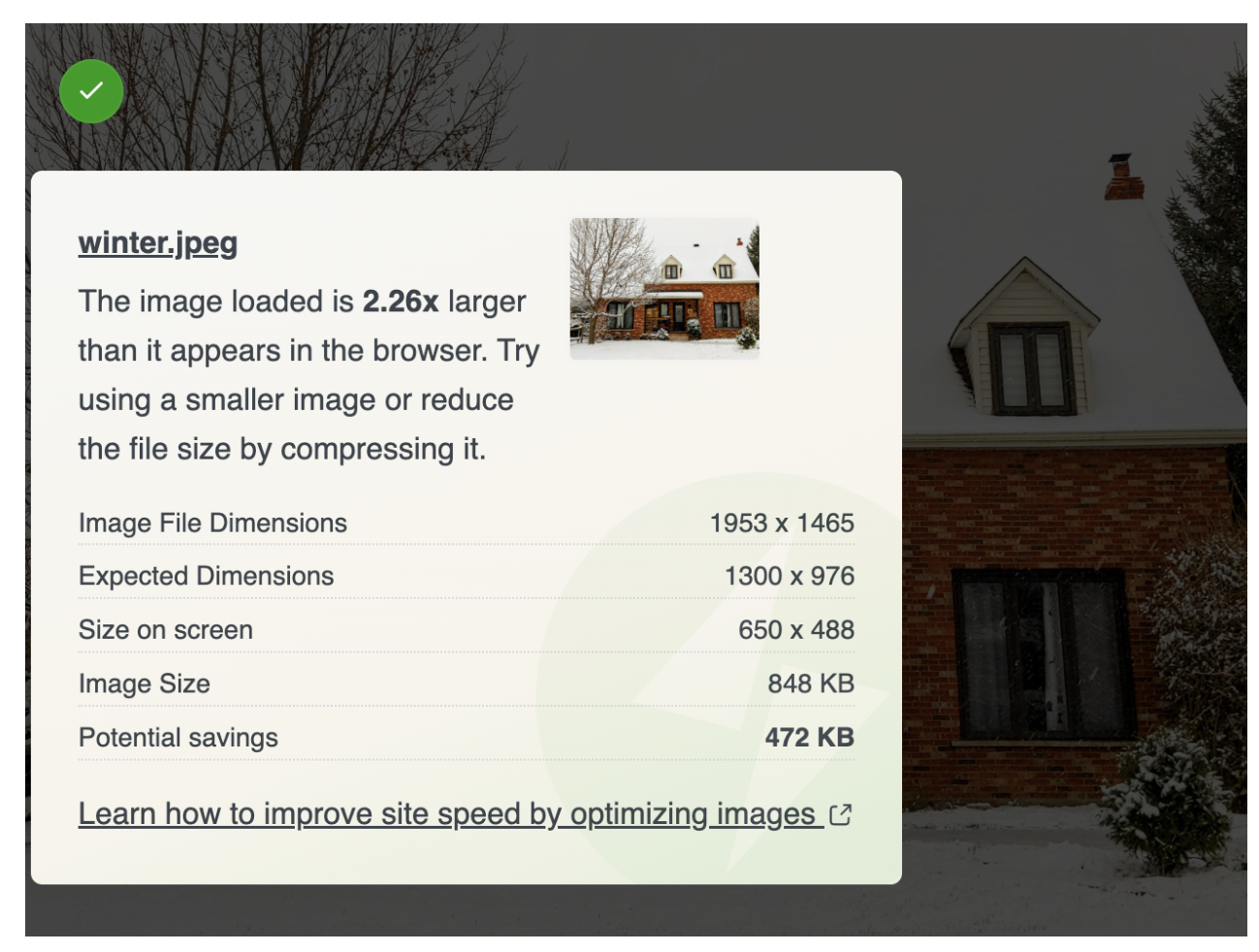
For WordPress users, Jetpack Boost is an indispensable tool in the image optimization toolkit.
Learn more about Jetpack Boost here.
2. Reduce your server response time
Factors affecting server response time
Server response time, sometimes referred to as time to first byte (TTFB), is the duration taken by a server to start delivering content in response to a visitor’s request. Here are some of the factors that can influence this:
- Web hosting. The physical server’s capabilities and configuration play a pivotal role.
- Traffic volume. An influx of simultaneous visitors can strain server resources.
- Web software efficiency. The efficiency of a CMS or web applications in use can make a big difference.
- Database management. Retrieval time from databases can add to delays.
The importance of quality hosting
High-quality hosting is the bedrock of speedy server response. Strong hosting solutions provide optimized hardware, efficient server-side software, and competent support. Moreover, they manage traffic spikes effectively and guarantee uptime.
Utilizing server-side caching
Caching refers to the practice of storing copies of files in easily accessible locations, so they don’t need to be reprocessed or fetched from scratch for each request. Server-side caching can be broken down into:
- Bytecode cache, which speeds up scripts by caching their compiled state.
- Object cache, which saves database query results.
- Page cache, which stores entire rendered HTML pages.
A spotlight on WP Super Cache for WordPress sites
WP Super Cache stands out as the optimal caching plugin for WordPress. By creating static HTML files from dynamic WordPress blogs, WP Super Cache significantly reduces server processing. This means that visitors are served a cached page, dramatically improving speed, without realizing they’re viewing a cached version.
This tool, combined with the prowess of Jetpack Boost, empowers WordPress users to achieve much faster websites.
3. Optimize CSS Delivery
The importance of a critical rendering path
The critical rendering path represents the sequence in which a browser processes HTML, CSS, and JavaScript to render a webpage. Critical CSS entails extracting and inlining the necessary CSS for rendering page content above the fold. By focusing on this, it ensures that visitors can see a page’s essential content quickly, even if the complete stylesheet hasn’t loaded.
Eliminating render-blocking CSS
Every CSS file referenced in an HTML document head is render-blocking by default. This means that the browser will halt rendering until it has fetched and processed these stylesheets. This can be circumvented by either inlining critical CSS or asynchronously loading non-essential stylesheets.
Using Jetpack Boost to optimize CSS loading on WordPress
Jetpack Boost offers tools tailored for WordPress sites to handle render-blocking CSS. The plugin identifies and optimizes CSS delivery, ensuring that a page’s visible content (above-the-fold) loads quickly. Jetpack Boost’s intuitive interface ensures that WordPress users, regardless of their technical acumen, can optimize CSS loading seamlessly.
4. Optimize JavaScript handling
Understanding JavaScript’s impact on performance
JavaScript is instrumental in creating interactive web pages. When mismanaged, however, it can become a significant impediment to load times. Browsers must not only download JavaScript files, but also parse and execute them. When these files are render-blocking, they delay the rendering of web pages, sometimes noticeably so.
Asynchronous and deferred loading of JavaScript
Two popular methods mitigate the render-blocking nature of JavaScript: asynchronous and deferred loading.
Asynchronous loading. Scripts set to load asynchronously will be processed at the same time as the rest of the page’s content. This means that visitors’ browsers won’t experience downtime because they’ll keep working while the code is executed in the background.
Deferred loading. When scripts are deferred, they maintain their appropriate order, so the first will be executed while the browser waits to load the others in turn.
Leveraging Jetpack Boost for efficient JavaScript loading
Jetpack Boost takes the intricacies of JavaScript loading into account. It offers features that automatically handle JavaScript files, ensuring that they don’t stand in the way of rapid content rendering.
With a few simple clicks, WordPress administrators can set up the optimal loading strategy for their scripts, enhancing site performance without getting into the complexities of JavaScript.
5. Use a content delivery network (CDN)
What is a CDN, and why is it beneficial?
A content delivery network, commonly referred to as CDN, is a network of servers strategically located across different parts of the world. These servers store cached versions of static content from websites, such as images, stylesheets, and JavaScript files.
When a user accesses a website, the CDN loads this content from the nearest server, reducing the distance that information needs to travel. The result? Faster load times, reduced strain on the primary server, and an enhanced user experience.
How CDNs work to improve site speed
CDNs use a principle of proximity. Without a CDN, every visitor to a site fetches content from the main server, which could be continents away. This distance leads to latency.
CDNs reduce this by duplicating and storing content across a vast network of servers. When a user makes a request, the nearest server responds, reducing the time taken to load the content.
A spotlight on Jetpack Boost’s image CDN
Jetpack Boost harnesses the power of a CDN specifically for images, a common culprit for slow site speeds. The Image CDN optimizes and serves images from a global network, ensuring that visuals load quickly and seamlessly regardless of where a visitor is accessing the site.
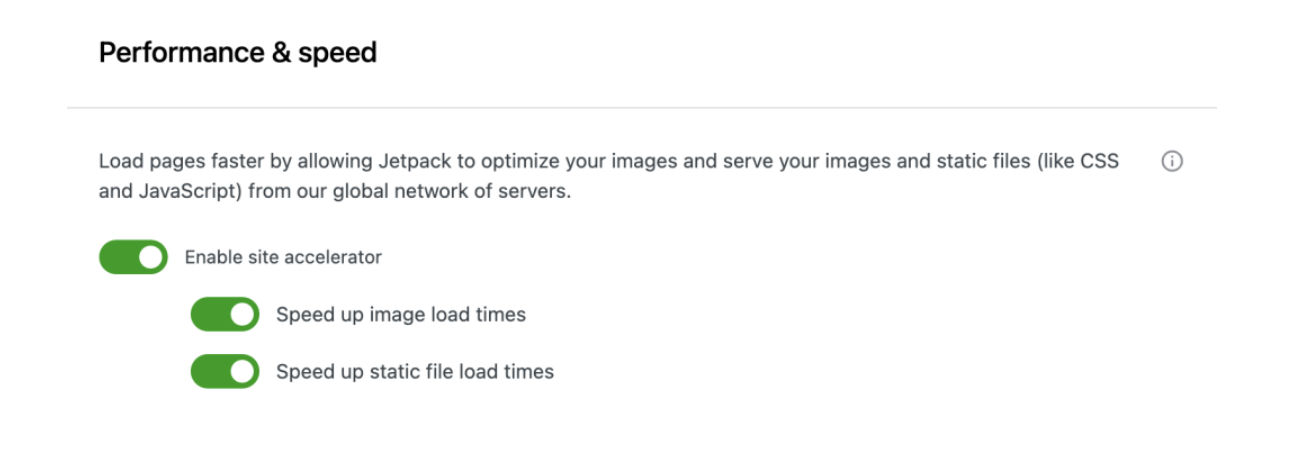
Additionally, it adapts images to the user’s device and connection speed, ensuring optimal delivery every time.
Best practices to follow when improving your website speed
1. Choose a fast SSD hosting provider
Selecting the right hosting provider is the first step towards ensuring a website’s high performance. Solid-state drive (SSD) hosting, compared to traditional hard disk drive (HDD) hosting, offers superior speed and reliability.
The core advantage of SSD hosting lies in its lack of moving parts, leading to faster data access times. The immediate benefit for a website is prompt page loading, resulting in a seamless experience for the end user.
2. Prioritize mobile website speed
With the exponential growth of mobile device usage, optimizing for mobile speed is no longer an option, but a necessity. Mobile users tend to be less patient, expecting near-instantaneous site loads.
Slow mobile speeds can drastically increase bounce rates and diminish user engagement. Ensuring that your site is responsive, with elements tailored for smaller screens, can significantly reduce load times and cater to this vast user segment.
3. Optimize your website’s Core Web Vitals
Google’s introduction of Core Web Vitals emphasized the user experience in terms of loading, interactivity, and visual stability. Meeting these benchmarks is not just about ticking boxes for search engine optimization. It directly corresponds to how users perceive and interact with your site. A site that excels in these metrics could see increased dwell times, lower bounce rates, and higher engagement.
The easiest speed optimization plugin for WordPress
Jetpack Boost gives your site the same performance advantages as the world’s leading websites, no developer required.
Boost your site for free4. Reduce third-party scripts (or host them locally)
Every script that a website runs can add to its load time, especially if these scripts are fetched from third-party sources. It’s prudent to evaluate the necessity of each third-party script. If they are crucial, consider hosting them locally, which provides more control over their loading and execution, ultimately streamlining the process.
5. If you’re on WordPress, install a speed optimization plugin
Speed optimization plugins fine tune various aspects of WordPress performance. This is where Jetpack Boost shines.
The Jetpack Boost advantage
WordPress site owners have a robust tool at their disposal in the form of Jetpack Boost. This WordPress speed optimization plugin is meticulously designed to tackle the typical speed challenges WordPress sites face. Here’s a brief overview of its offerings:
One-click features. Jetpack Boost doesn’t bury its features behind a maze of menus. With a simple and intuitive interface, users can activate key optimizations with a single toggle, making the process not only effective, but also time-efficient.
Core Web Vitals optimization. Recognizing the importance of Google’s Core Web Vitals, Jetpack Boost focuses its efforts on these pivotal performance metrics. From Largest Contentful Paint (LCP) to First Input Delay (FID) and Cumulative Layout Shift (CLS), this tool addresses the elements that matter in today’s SEO landscape.
Defer non-essential scripts. By delaying the loading of certain non-essential JavaScript until user interaction, Jetpack Boost ensures that the primary content loads rapidly, enhancing the user experience and improving perceived site speed.
Critical CSS generation. Jetpack Boost identifies and prioritizes the most crucial CSS for your site’s above-the-fold content, ensuring that it loads first. This improves site speed and offers users a smoother visual experience, eliminating the distracting shifts that can occur when non-critical CSS loads ahead of essential styles.
Image optimization. While images enhance the visual appeal of a site, they can also be significant contributors to slowdowns. Jetpack Boost addresses this challenge head-on, offering tools that optimize images without compromising quality.
How to benchmark your current site speed
1. Use tools like Google PageSpeed Insights, GTMetrix, and Pingdom
Before embarking on the journey of speed optimization, you must first identify where you stand. Several benchmarking tools can help assess your site’s performance from different perspectives.
Google PageSpeed Insights offers insights based on the latest web best practices, GTMetrix provides a combined analysis using Google PageSpeed and YSlow, and Pingdom delivers visual reports and performance grades.
2. Interpret the results and understand key metrics
While these tools generate comprehensive reports, it’s imperative to understand their metrics. Some key parameters to consider include:
- First Contentful Paint (FCP), which measures the time taken from the moment the page starts loading to when any part of the page’s content is rendered on the screen.
- Largest Contentful Paint (LCP), which indicates the point when the main content has loaded and is visible to users.
- Total Blocking Time (TBT), which captures the total amount of time that the main thread is blocked and can’t respond to user inputs. In other words, this is the amount of time that a site visitor is essentially unable to interact with anything on the site.
- Cumulative Layout Shift (CLS), which evaluates the visual stability of the site, checking for elements that shift unexpectedly.
Each metric serves a unique role in understanding the holistic health of your site’s speed and performance.
3. Use Jetpack Boost’s actionable performance scores for WordPress sites
Jetpack Boost enbales users to easily measure their WordPress website speed. It doesn’t just present you with data — it offers actionable solutions, enabling website owners and managers to swiftly optimize WordPress speed and performance.
With Jetpack Boost, WordPress site owners can leap from problem identification to solution implementation swiftly and effectively.
Why website speed matters
1. It impacts the user experience and bounce rate
When a visitor lands on your site, expectations are high. A delay in the site’s response may not be met kindly. People want sites to load in less than a couple of seconds. Any delay beyond this threshold, and the person is more likely to abandon the site, causing your bounce rate to skyrocket.
The bounce rate is the percentage of visitors who navigate away from your site after viewing only one page. This number is more than just a statistic — it reflects user satisfaction that can impact revenue.
2. There’s a direct correlation between speed and conversions
Studies have consistently demonstrated a direct link between site speed and conversion rates. For every second longer it takes your site to load, you could lose nearly 5% of conversions.
3. It helps determine search engine rankings
Search engines have one primary goal: to offer users the most relevant and efficient results. Site speed serves as an essential metric in determining these results because search engines recognize that visitors value speed and are more likely to spend time on a site that loads quickly.
Faster websites not only offer better user experiences, but also gain favor in search engine rankings. Google, the search giant, has explicitly stated that site speed is one of the signals used by its algorithm to rank pages. With SEO becoming more competitive, website speed optimization is no longer optional.
Frequently asked questions about website speed
Why is website speed important?
Website speed is crucial because it directly influences visitor satisfaction, bounce rates, and conversion rates. Fast-loading sites offer users a more seamless experience, leading to longer site visits and increased interaction. Conversely, delays can lead to decreased trust and reduced user engagement.
How does website speed impact user experience and conversions?
Website speed plays a decisive role in shaping first impressions. Visitors expect rapid, responsive interactions with web pages. Delays can trigger user frustration, causing them to abandon the site — resulting in missed opportunities for engagement, sales, or conversions.
How does website speed affect SEO?
Search engines, notably Google, consider page speed when ranking websites. Faster sites generally receive better rankings, increasing their visibility to potential visitors. A slow website can thus result in reduced organic traffic.
What are the main factors that slow down a website?
Multiple elements can bog down a site. Bulky images, excessive third-party plugins or scripts, unoptimized code, non-responsive design, inadequate hosting solutions, and not employing caching mechanisms are some prevalent culprits.
What should I fix first to speed up my website?
Start with a benchmark (PageSpeed + field data if available), then fix the biggest bottleneck shown in your report. For most sites, the fastest wins are oversized images, high TTFB, render-blocking CSS, and heavy JavaScript.
How often should I check my website’s speed?
It’s advisable to monitor website speed after any significant content or design update. However, as a best practice, performing a monthly check can help you preemptively identify and rectify any emerging issues.
Why does my PageSpeed score change even when I don’t change my site?
Lab tests vary by network/CPU conditions and third-party script behavior. Use multiple runs, compare trends, and validate with field data (CrUX/Search Console) when possible.
What are Google’s Core Web Vitals, and why are they crucial?
Google’s Core Web Vitals are a set of metrics that focus on user experience — loading performance, interactivity, and visual stability. As these metrics influence Google’s ranking process, it’s essential for website owners to optimize for them to ensure maximum visibility in search results.
What’s a good target for Core Web Vitals?
Aim for “Good” thresholds for LCP, INP, and CLS. Prioritize LCP for perceived load speed, INP for responsiveness, and CLS for visual stability. INP replaced FID as the responsiveness metric in March 2024.
How do I know if my website is mobile optimized?
Mobile optimization can be assessed using tools like Google’s Mobile-Friendly Test. An optimized site will be easy to navigate on mobile devices, with appropriately sized text and easily clickable elements.
What’s the difference between browser caching and server-side caching?
Browser caching stores website resources on a user’s device, reducing the need to fetch them during subsequent visits. Server-side caching, on the other hand, involves storing a static version of your website on the server, which can be served to users, reducing the need to generate a page dynamically for each visit.
How do images impact website load times?
Images often constitute the bulk of a webpage’s size. If not appropriately optimized, they can substantially increase load times. Compressed and properly formatted images ensure quick page loads while retaining visual quality.
How does hosting impact website speed?
The quality of your hosting provider plays a pivotal role. A robust hosting solution ensures fast server response times, efficient resource allocation, and a higher overall uptime, translating to a speedier website.
Does a CDN automatically make a site faster?
A CDN helps most with globally distributed visitors and heavy static assets (images, CSS, JS). It won’t fix slow server processing, heavy JavaScript, or unoptimized images by itself.
Can advertisements slow down my website?
Yes, advertisements, especially those fetched from third-party servers, can slow down your site. It’s essential to manage and optimize ad scripts, so they don’t degrade overall site performance.
What is the easiest way to speed up a WordPress site?
For WordPress users, employing a speed optimization plugin like Jetpack Boost can lead to immediate performance gains. This tool, with one-click features, streamlines the optimization process, addressing many common issues that slow down WordPress sites.

The easiest speed optimization plugin for WordPress
Jetpack Boost gives your site the same performance advantages as the world’s leading websites, no developer required.
Boost your site for free Jetpack