

Every business wants to be more data-driven. Though it seems like a bit of a buzzword, what this means for most real-world businesses is the ability to get the right information at the right time and use it to make better decisions.
None of this is possible, however, without first getting access to the right data. Most traditional analytics platforms fall short in delivering critical real-time info, leaving you in the dark when it matters the most.
Let’s say you’ve launched a major campaign or website update. You want to see the results, but when you log into your dashboard, you see data…from several days ago. This leaves you constantly behind with making critical campaign ad spend changes or site updates.
Worse yet, some platforms are rife with issues like sampling errors, low data quality, and processing discrepancies, which give a distorted view of your website’s performance.
In short, you’re making crucial decisions based on a blurry, outdated snapshot rather than crystal-clear, real-time numbers.
That’s why you need to start looking for a real-time analytics platform. But what is real-time analytics, and how does it work? Below, we’ll explain the concept and how it benefits any organization looking to make the most of their digital efforts.
What is real-time analytics?
Real-time analytics refers to collecting, processing, and displaying data as it’s generated. As a result, you get immediate insights and actions based on current user and customer behavior.
Regarding website and analytics capabilities, that means tracking and reporting on your visitor’s activities as they happen — without the usual data streaming delay that traditional platforms deal with.
The concept of real-time analytics works on three principles:
- Immediate data processing: Information is analyzed within seconds of user actions.
- Continuous updates: Dashboards and reports refresh automatically, often every few seconds.
- Instant accessibility: Stakeholders can view current data from any device, any time.
For example, if there’s a sudden drop in traffic on an important CTA due to a technical issue, you can act on it immediately because the data is streamed in real time.
How does real-time analytics work?
Many traditional analytics platforms collect, store and aggregate data, and then transmit or report it in batches. Real-time analytics platforms, however, continuously collect, process, and analyze data.
This process starts with data collection. When someone interacts with a website — e.g. loading a page, clicking a button, or making a purchase — data points are generated. In a real-time system, this data is immediately sent to the analytics platform, often through lightweight JavaScript tags embedded in the website’s code or server-side integrations.
After the analytics platform receives that data, it processes it using stream processing techniques. So, the dashboards you see are continuously updated (almost every second) since there’s no “intermediary,” so to speak.
What are the different types of real-time analytics?
There are a variety of different types of real-time analytics. Let’s take a look at two:
On-demand real-time analytics
On-demand real-time analytics gives you up-to-the-minute analysis when you request it, or when a predefined event triggers it.
Here, the analytics platform continuously collects the data but processes it from the memory only when you ask for it. For example, if you have a ten-second trigger switched on, it’ll only process the data every ten seconds.
It’s beneficial when you’re trying to save resources. It could introduce a slight delay between the request and insights, but not even remotely as long of a delay as you’d experience with batch processing methods.
Continuous real-time analytics
Continuous real time data analytics involves the ongoing processing and display of data as it’s generated — so you get a constant stream of insights. It’s the most immediate view of website performance and user behavior.
Here, your data is collected and processed continuously with no breaks whatsoever. You’ll get the data almost in real time — i.e., every few seconds.
Let’s say you’re running a flash sale on your ecommerce website. You could monitor performance in real-time to see how your audience reacts. If anything breaks, you’ll know immediately and can fix it as soon as possible.
That said, you also need a robust infrastructure or platform that’s capable of handling terabytes of data without any lag or downtime.
Real-time analytics vs. batch analytics: what’s the difference?
Simply put, batch analytics means you hold datasets in groups and process them all at once (based on specific time intervals). Real-time analytics continuously processes that same data.
With traditional analytics platforms, you can run into issues like limited flexibility in data analysis, querying only specific time windows, or working with batch-processed datasets (which could take days). This is what real-time analytics solves.
Here are some of the key differences:
| Differences | Real-time analytics | Batch analytics |
| Data processing | Done within milliseconds or seconds | Done daily, weekly, or at predefined intervals |
| Data freshness | Reflects the current state of the website | Reflects a slightly older state (depending on the analysis intervals) |
| Processing complexity | Simple, streamlined processing | Complex, resource-intensive tasks |
| Resource requirements | High operational costs and complex infrastructure needs | Cost-effective with less powerful systems |
| Data volume handling | Might have issues with large volumes of data due to processing speed | Excellent at handling large volumes of historical data |
| Accuracy and completeness | May sacrifice accuracy or completeness for speed | Provides more accurate and complete results |
What are the benefits of real-time analytics?
1. Faster decision-making with real-time insights
You don’t have to wait to make important decisions. Real-time analytics platforms let you dive into the data almost immediately. This allows you to respond to changing market conditions, website issues, or customer behaviors.
Let’s say you’re seeing a surge in demand for a specific product. You’ll get immediate alerts and can adjust pricing to maximize the opportunity and immediately act to increase inventory levels so you don’t run out. But with batch processing platforms, that’s not possible.
Real-time analytics removes the lag between data generation and analysis, reducing the risk of acting on outdated information.
2. Instant identification of market trends
You can also spot emerging trends instantly rather than after they’ve peaked. This capability lets you get ahead of potential opportunities before your competitors and gain more visibility.
3. Immediate detection of issues and threats
Real-time analytics also serves as an early warning system. It lets you identify and address issues right after they happen — allowing you to mitigate the impact quickly. You don’t have to wait hours to get notified, whether it’s a technical glitch, security threat, or customer experience problem.
For example, a website hosting service might instantly detect an unusual spike in server load, potentially indicating a DDoS attack. The host can take countermeasures immediately, minimizing downtime and protecting client websites.
4. Improved brand competitiveness
Agility is a differentiator these days. The faster you move, the better your visibility and ability to compete.
For example, Amazon uses real-time analytics to adjust prices on its products multiple times per day. This system analyzes various factors in real time, including:
- Competitor pricing
- Current inventory levels
- Customer demand patterns
- Time of day
- Seasonal trends
Also, you can provide personalized and responsive customer experiences using real-time customer data. Just like how Netflix offers instant recommendations, you can use behavioral data to provide better product recommendations.
What features should you look for in a real-time analytics platform?
Now that you know how real-time analytics platforms can help your business, let’s look at how to choose the right one.
Here are some of the core features you should consider:
1. An intuitive and accessible dashboard
The dashboard is the primary interface through which you’ll interact with your real-time data. So, it needs to capture the metrics you care about with clarity.
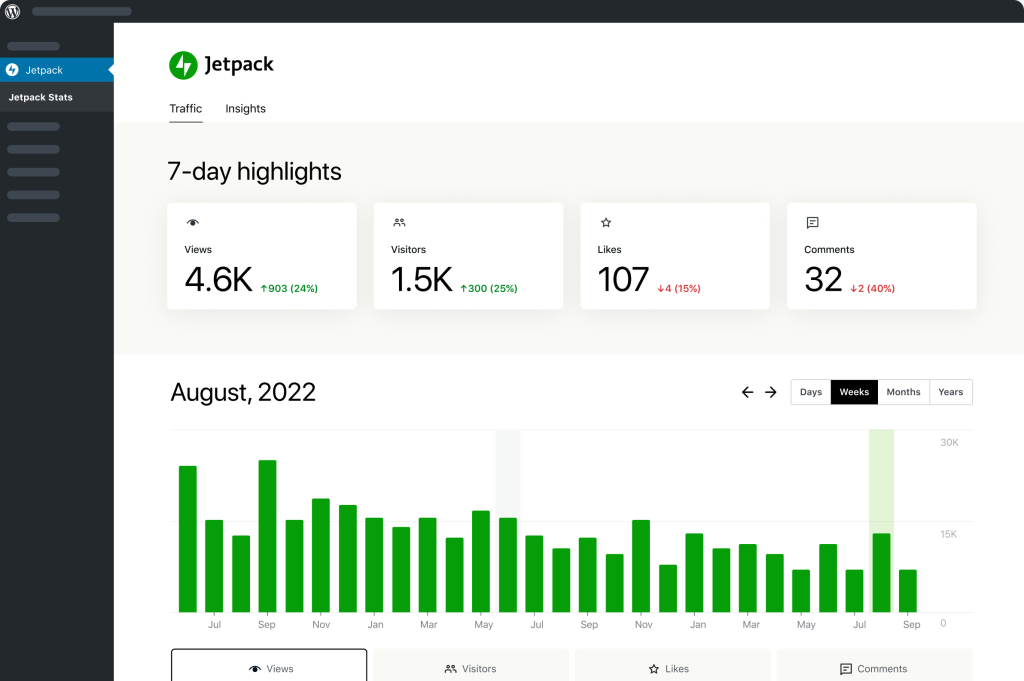
Ideally, you should look for a dashboard that offers basic metrics like page views, traffic volume, and bounce rate. But if needed, you should also be able to customize it to fit your needs.
While a marketing manager may care about engagement metrics, a conversion optimization specialist would care about the conversion data.
Also, the dashboard should be easy to navigate, and the necessary features should be simple to locate. Your platform provider should have guided tours or onboarding flows to orient you initially — but if you’re still unable to use it over time, it’s probably not the right fit for your skill set.
2. Real-time data visualization
Even though the data is processed in real time, some tools struggle to display those valuable insights immediately. Either they have standard dashboards with no customization capabilities, or the data itself doesn’t populate quickly.
Choose a tool that lets you customize the dashboard using different chart types and update the metrics as soon as the data comes in.
Also, it should give you the ability to make real-time comparisons using historical data. For example, you might compare today’s website traffic to the same day last week to monitor performance changes over time.
3. Content performance metrics
Your real-time analytics tool should give you data on the website’s performance as well as other channels. Tools like Jetpack Stats monitor your website and aggregate key data in one place so that you can see your audience engagement as a whole.
In terms of website metrics, it should track things like page views, time on page, and bounce rates. However, it should also pull more nuanced data, such as scroll depth, click-through rates on internal links, and interaction with specific content elements (like video plays or form submissions).

As for off-website metrics, assess if the tool you’re considering can track engagement indicators like shares, likes, comments, and click-throughs from social posts.
4. Easy exporting capabilities
Look for software that allows you to export data in various formats to suit different needs. Some of the most common formats include:
- CSV for spreadsheet analysis
- PDF for report sharing
- JSON for developers who want to use the data in other applications.
The export feature is handy as some teams need to build their own dashboards or use other business intelligence (BI) tools to manipulate the data. Look for a tool that sends automated reports with a downloadable file to take some work off your plate.
5. Seamless integration with your existing systems
Ideally, your entire tech stack should work in concert. That’s why you must find tools that offer integration capabilities with your current tech stack.
Tools like Jetpack Stats integrate with Tumblr, WooCommerce, and Jetpack Ads. This way, you don’t have to use another analytics tool to monitor action on those platforms or deal with duplicate datasets and the annoying work of cleaning them up later.
So, look for a platform that integrates data from various sources like your:
- Content management system (CMS)
- Customer relationship management (CRM) platform
- Ecommerce platform
- Marketing automation tools
- Ad management tools
- Social media accounts
- Business intelligence (BI) tools
If your tool of choice doesn’t have a specific integration, see if it offers pre-built connectors or APIs to connect proprietary hardware and software systems.
6. Data security and compliance with regulations
Look for software that prioritizes data protection and regulatory compliance. First, assess if it uses encryption protocols for in-transit and at-rest data. This includes using HTTPS for all data transfers and encrypting stored data using industry-standard algorithms.
Additionally, see if it’s compliant with standard privacy regulations like the:
- General Data Protection Regulation (GDPR)
- California Consumer Privacy Act (CCPA)
- Health Insurance Portability and Accountability Act (HIPAA)
If it’s not compliant with industry and general privacy regulations, it could pose considerable risks to your business — monetary and otherwise.
Also, ask your provider about their data residency and retention policies. Do they store it in specific locations? Can they store it in a location you specify? Additionally, how long do they retain data, and how often do they archive it?
These questions clarify if you can use the tool per applicable governmental and industry regulations.
Jetpack Stats: Real-time analytics for WordPress
If you’re looking for a real-time analytics solution, Jetpack Stats should be your first stop.
What is Jetpack Stats?
Jetpack Stats is a well-known WordPress plugin that provides detailed information about your website’s performance.
You can access real-time data on visitors, traffic sources, and content engagement without the need to parse complex spreadsheets or dozens of complicated toggles. It helps you track key metrics directly from your WordPress dashboard, like views, clicks, and user demographics.
Here are some of its features:
- Real-time site analytics: View traffic and visitor data instantly.
- Top-performing content tracking: Identify the most popular posts and pages.
- Traffic source insights: Track where your visitors are coming from (e.g., social media, search engines).
- Geographic and demographic data: Understand your audience’s location and behavior.
- UTM tracking: Measure the success of marketing campaigns.
- Responsive design: Access stats on the go.
- GDPR compliance: Get the user information you need without violating privacy regulations that could cost you thousands in fines.
What are the benefits of using Jetpack Stats for my WordPress site?
Jetpack Stats provides real-time data, enabling you to track site visitors, popular content, and traffic sources directly from your WordPress dashboard without needing to wait for daily updates or data processing.
You’ll also get information on engagement — likes, comments, downloads, and even video plays. Also, it integrates with WooCommerce, making it valuable for ecommerce sites — while its ease of setup and GDPR compliance ensure it’s both accessible and secure.
How can I install and use Jetpack Stats?
To get Jetpack Stats, you must first install the Jetpack plugin from your WordPress dashboard.
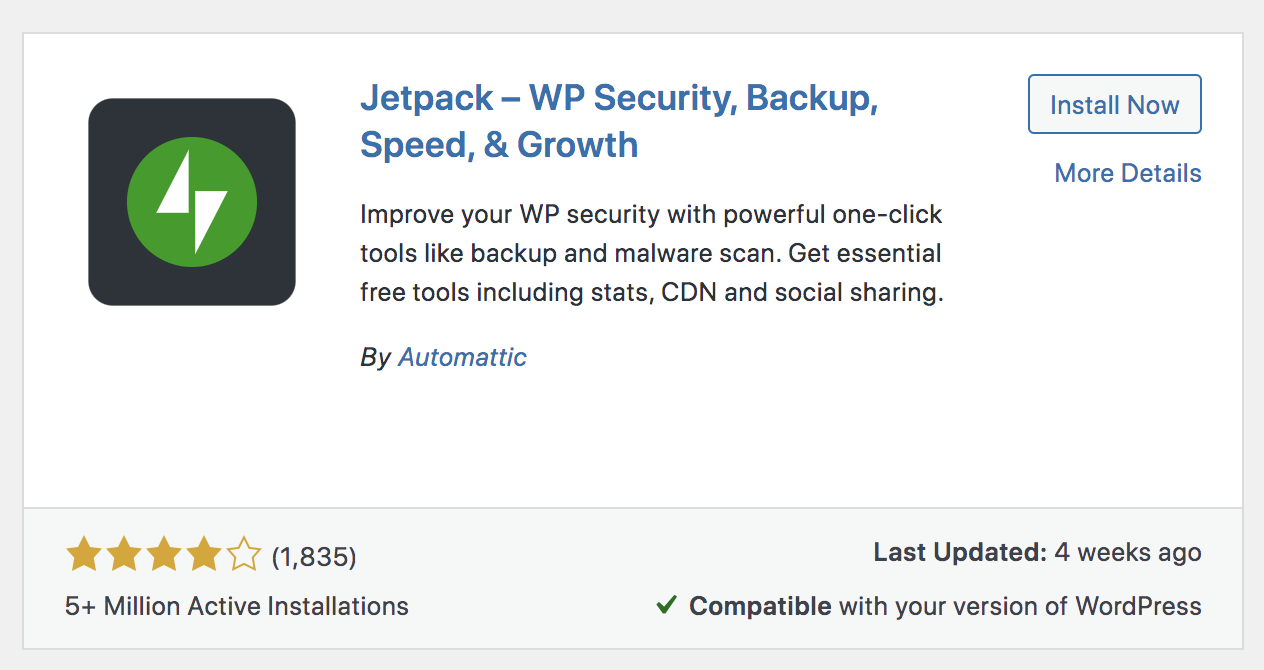
From your WordPress dashboard, navigate to Plugins → Add New. Search for “Jetpack” and click Install → Activate.
Once installed, go to the Stats tab to view your website’s analytics.
Jetpack Stats is available in both free and paid versions, but the free version is only available for personal websites. So, you need to pay for a plan before accessing the data if you’re a business.
Frequently asked questions
What types of data can be analyzed in real time with Jetpack Stats?
Jetpack Stats analyzes data points like:
- Ecommerce conversions
- Social media interactions
- Bounce rates
- Page views
- Unique visitors
- Traffic sources
What challenges might I face with real-time analytics?
While real-time analytics is hugely helpful for most users, it could be difficult to find the right solution to work with your CMS. If you’re using WordPress, Jetpack Stats is the ideal choice.
Real-time analytics may also go less in-depth than other analytics platforms due to the technical burden of continuously processing data.
Finally, as with all analytics tools, you’ll need to ensure that your pick complies with any applicable regulations (like GDPR).
What are some common real-time analytics tools?
Here are some of the most widely-used real-time analytics tools for site owners:
- Jetpack Stats: An end-user platform for WordPress site owners who want easy-to-understand, immediate stats about the health and performance of their online assets
For developers working on their own applications, the following are common tools:
- Apache Kafka: Used to build real-time data pipelines and streaming applications
- Amazon Kinesis: Used as a fully-managed data streaming platform for data exploration and machine learning use cases
- Druid: Used for sub-second queries of large datasets
Is Google Analytics 4 a real-time analytics tool?
No, Google Analytics 4 (GA4) is not a real-time analytics tool, at least not in the truest sense of the term. The data you receive is at least 30 minutes old, which isn’t ideal if you need real-time streaming capabilities.
What is Jetpack Stats for WordPress and how does it fit into real-time analytics?
Jetpack Stats is a real-time analytics tool that’s specifically made for WordPress websites. It’s part of the larger Jetpack system created by Automattic, the people behind WordPress.com.
It integrates directly into your WordPress website, which means you always get up-to-date data — without opening new tabs, pouring over spreadsheets, or violating privacy regulations.
What kind of real-time data can Jetpack Stats provide?
Jetpack Stats offers a range of real-time data points, such as:
- Website visits
- Likes and comments
- Referral sources
- Page views
- Visitor countries
- Link clicks
- Video plays
- File downloads
- Content vies
- Weekly and yearly trends
Where can I find more information about Jetpack Stats?
If you want to learn more about Jetpack Stats, visit its main webpage to review features, capabilities, pricing, and frequently asked questions.