

Welcome to What’s New With Jetpack, covering what we released in April. This month, we’re proud to introduce AI-generated featured images and fast media uploads from your mobile device. l’ll also touch on a new Live Webinar coming towards the end of May and a new developer.jetpack.com design. Read on to discover everything new this month.
Since the last update, we have worked on a lot of new stuff. In these What’s New updates I round up all the great things we’ve been working on here at Jetpack. I’d love to hear your thoughts on what we’ve been producing, so please do drop a comment below and let me know what you think.
AI Featured Image Generation
First, we’ve added a new feature to the Jetpack AI Assistant, which takes your post content and generates a featured image using AI. You can see it in action in the video below and I’m excited about this one. I often spend more time than I should looking through stock images or trying to design my own – I can now also use AI if the concept I want to illustrate doesn’t exist or is too hard to design.
It’s super quick to start generating images with AI
- Click the “Set featured image” under the Post options

- Choose Generate with AI from the options
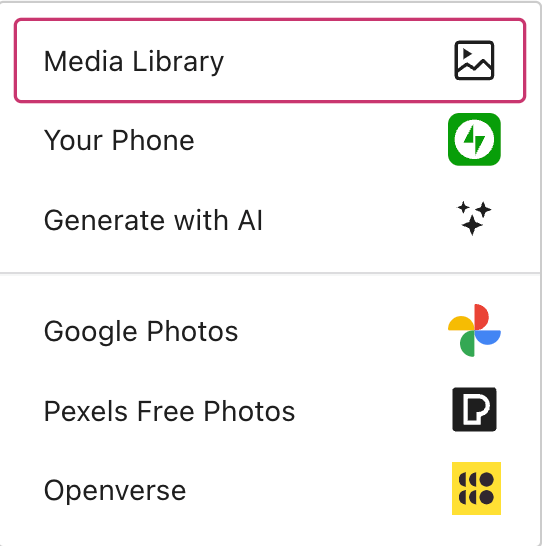
- It will then generate an image for you, and you can include optional instructions and generate a new image.

Easily add images from your mobile
With over 90% of images being taken on smartphones – getting those images into your blog post can often be time consuming. With the “Your Phone” option in the image options you can now scan a QR code using the Jetpack Mobile App and choose images from your phone’s gallery and they’re then added to the blog post you’re creating.
You can read more about how to do that in this post.
Jetpack Live Webinar: Get to know Jetpack
Jetpack is a teenager now, and we’ve grown from a single plugin to a brand with eight individual plugins and hundreds of releases over the years. At the end of May, I’ll be running a live webinar where you can join, learn more about Jetpack, and ask me your questions live.

Spaces are limited, so please click the button below to register for the webinar (it’s 100% free).
A new developer.jetpack.com
Did you know there’s an extensive developer resource over at developer.jetpack.com? It’s now been re-designed to be even easier to find what you need.
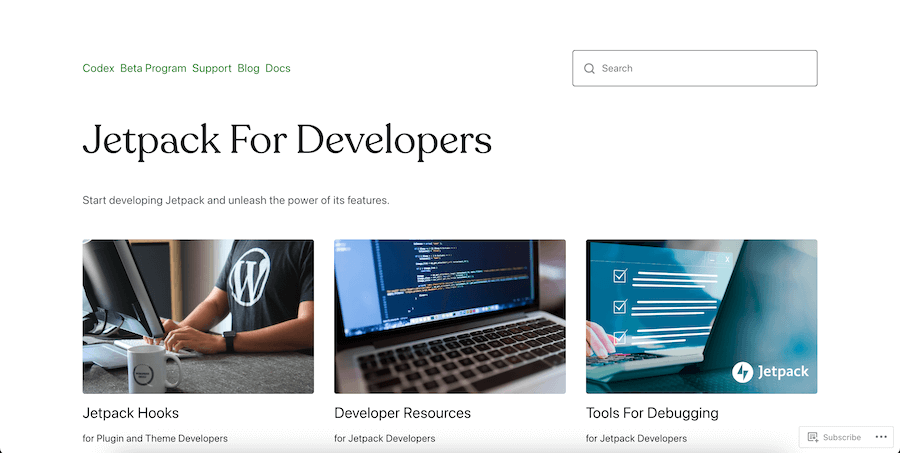
The website for developers has lots of great resources, including:
- A useful hooks reference for hooking into areas of Jetpack
- Lots of great information about Developing with Jetpack
- How to debug Jetpack and be part of the Beta program
You can take a look here, and do let me know what you think in the comments below.

 Jetpack
Fantastic 🥰
LikeLiked by 1 person
Thanks
LikeLiked by 2 people
How do the rights to these images work?
LikeLike
How do the rights to these images work? Is this only available in Gutenberg or is it available in the legacy interface?
LikeLiked by 1 person
Hi
There’s more info here
I believe it’s only in Gutenberg and not the classic editor – is there a reason why you’re still sticking with the legacy editor?
LikeLike
That’s too bad. Could you make it work with the classic editor? Or possibly in the media tab or somewhere else?
I haven’t seen a compelling reason to move to Gutenberg. That’s why I haven’t moved.
LikeLiked by 1 person
I’ll pass the feedback into the team, placement wise it would make sense when the media picker opens under the classic editor.
For me, (and I started with WordPress in 2010) moving from the classic editor to Gutenberg took me a while but with WordPress 6.5+ it’s a joy to use.
My most compelling reason is being able to move paragraphs around and quickly apply styles to the blocks as well as getting all the latest blocks and features like the AI assistant
LikeLike
I would also like to ‘add a vote’ for this feature to be added to the legacy editor. You seem surprised that anyone would still use it. I haven’t changed to Gutenberg because I spend my time on WordPress in another theme / editor so I see no point learning a new system I don’t use. Also, just because WordPress brings out a new system, doesn’t mean everyone should use it or even like it. It should be about choice.
I think there are probably enough users out there who still use the legacy editor, to make it worthwhile for Jetpack to add features to it and not leave us out of everything new.
Having said all of that, I really like this concept and I will definitely use it if it’s added to the legacy editor – thank you for coming up with a great concept that will save me time!
LikeLike
Hi Clare
Oh, I’m not surprised that people still use it. There’s 10m+ active installations of the legacy editor. Thanks for adding a vote for this to be added to the legacy editor too.
I’ll pass the feedback onto the team developing the AI features.
LikeLiked by 1 person
Disappointed to see Jetpack going all-in on the AI bandwagon. There’s enough AI-generated “content at all costs!” slop on the Internet already and the problem is only going to get worse as tools like this are shoved in front of people. Hopefully a “Hide all AI buttons forever” option is coming soon to Jetpack for those of us who still have the ability to be creative the “old-fashioned” way, because I don’t want any of this trend-chasing garbage. I just want Jetpack’s core functionality, which remains strong.
LikeLike
Hi
Thanks for the feedback. You don’t have to use any AI features if you don’t want to.
The hide AI buttons forever is feedback we’ve had before so I’ll be sure to pass this into the product team.
Mike
LikeLiked by 1 person
Pleased to hear this. A lot of tech companies are forcing AI features onto people who do not want them at all, so the option to remove them entirely will be very welcome. Thanks for your consideration!
LikeLike
That’s awesome!
How about copyrights? How owns the rights over the images generated with Jetpack’s AI?
LikeLike
Hi.
For a product to be copyrighted, a human creator is needed. AI-generated content can’t be copyrighted because it isn’t considered to be the work of a human creator.
There’s more guidelines here: https://automattic.com/ai-guidelines/
Mike
LikeLike
So, if I use AI to create an image that I directed AI to create… wouldn’t that image be my work? And wouldn’t the image that I directed AI to create be my creation? Thus, copyrightable by me?
LikeLike
Hi De
There’s more guidance here
https://automattic.com/ai-guidelines/
Hope this helps.
LikeLike
And if I create the image using AI and the AI thing is not copyrightable then I can use it however I wish, including on the cover of a book that I wrote, correct?
LikeLike
Hi De
I’m not a lawyer on whether you can use AI images as a book cover.
As far as I understand it, images produced from these models from a text prompt are public domain – but if you’re using this as a book cover it’s worth getting an independent legal opinion, especially if you’re taking the books to print.
AI won’t produce images of copyrighted characters for example if you ask it to create Mickey Mouse it’ll refuse.
There’s more info here: https://automattic.com/ai-guidelines/
LikeLike
Technically that isn’t correct. The datasets used to train the models contain copyrighted works, so the output isn’t 100% “non-human”. Hence why there’s so many lawsuits from artists going on.
LikeLiked by 1 person
Thanks, I’m not a lawyer and only time will tell as AI models adapt and court cases progress.
We’ll keep our eye on any legislation changes and update the FAQ / our guidance appropriately 👍🏻
https://automattic.com/ai-guidelines/
LikeLike
”takes your post content and generates a featured image using AI.”
So content then automatically becomes part of the training data for AI in generating this image. Do users give consent for this? Is my content being scraped through Jetpack as matter of course now, whether I use the feature or not?
This has really soured my trust for Jetpack & I really think I’m going to scrub it altogether if it’s scraping my content for LLMs etc.
LikeLike
Hi
No the data doesn’t become part of the training data for AI.
More info here: https://automattic.com/ai-guidelines/
LikeLike
”Your input will be shared with third party AI providers and may be used to train their models ”
It says this then goes on to say it won’t be used for training by OpenAI. That’s ambivalent at best.
LikeLike
Yes, that is contradictory. The key line is this
I’ll get that clarified in the guidelines.
LikeLike
Mike, this looks great and I look forward to having a play with it. However, at the moment I’m more interested in finding out how I can see my stats on the App: I get a screen with a ‘Enable Site Stats’ button and when I press it I get a message along the bottom of the screen ‘Unable to activate site stats’. The stats work on my computer. I have searched the help and asked the question but not joy. It would be greatly appreciated if you could point me in the right direction
LikeLiked by 1 person
Hi
Have you reached out to support about this?
Mike
LikeLike
Yes, but I’ll try again to see if I can get a response. I’d greatly appreciate it, if you were able to pass onto to someone who might be able to assist
LikeLiked by 1 person
Thanks – can you let me know which site this is in relation to?
LikeLike
Mike
Apologies I missed your last response. The site is: http://www.our-wanderlust.com
cheers
Michael
LikeLike
Thanks – if you head to here
/wp-admin/admin.php?page=my-jetpackThen at the bottom, under connections can you check that both the site, and the user are connected?
Another thing to check is whether your site is allowing the XML-RPC https://jetpack.com/support/jetpack-and-xml-rpc/
Of course, it could just be something to do with the latest update too, I see you’re liaising with support via the forum so best to keep it there if that’s OK so we don’t miss each other.
LikeLiked by 1 person
Mike
Apologies I missed your last response. The site is: http://www.our-wanderlust.com
cheers
Michael
LikeLiked by 1 person
I tried the AI image generator and received a stereotypical incoherent image. The post was on Medicare Part B enrollment. The AI image had a stopwatch (?) with incorrect number placement around the dial. The watch thing was a setting sun. In front of the clock thing was a very old man, looking confused. The message conveyed was that Medicare beneficiaries are old, confused, and near death. My target audience, stated in the post, are individuals over 65 who are leaving employer group plans. These people are not confused or near death. However, if I were to use the image, my business would be near death with the incoherent message presented by the AI image. I do use AI to generate some of the snippets and meta descriptions. I’ll stick to creating my own clunky feature images from images I have taken. I’m sure AI image generation will get better in the future. But for dense blog posts, AI may be able to understand the content within the post.
LikeLiked by 2 people
Thanks for sharing how the output has looked. That certainly doesn’t sound ideal based on the content.
Did you try giving additional instructions in the prompt box after the first generated image?
AI output can definitely seem surprising, we cover more in the first bullet here
https://automattic.com/ai-guidelines/
As you say, I’m sure it’ll get more accurate in the future based on understanding the content and context given to it as a prompt
LikeLiked by 1 person
Regardless of the output, it is fairly amazing that an image can be generated from scanning a title, meta description, and, I assume, the content. For less important posts, I may refine the conditions and criteria as you suggest.
LikeLiked by 1 person
Hi, I noticed many features in the app missing compared to when I used WordPress on PC years ago. But seeing this post, I am confused. I thought Jetpack replaced the WP app as the new official one? Is this not official then, but a plugin? I am a nee user & as you can imagine, quite preplexed. 🤔😵💫
LikeLike
Hi Elodin
The Jetpack app is the main app to use and brings you features like being able to upload images from your phone quickly. Jetpack itself is a suite of plugins.
Which features do you find missing?
LikeLiked by 1 person
Hi Mike! 😁
✨ Thank you for the explanation, I really appreciate your effort!
The missing features that I haven taken notice of are:
Inability to customize page titles or make them invisible (whilst not having the title in the page list in the editor empty, hence difficult to differentiate the pages) or replace them with a title graphic image which is my preference. I like to make my pages custom & pretty!
The other, important feature is the ability to sell digital items / create payment buttons, which according to a recent post by wordpress is possbile without a subscription or plugins, though just not the direct paypal donation option. Alas such blocks do not exist.
————————————
Also, since I am giving a bit of feedback, I would like to mention that posting GIFs is slow & somewhat buggy, which seemingly causes issues, I presume due to latency issues.
👑 Thank you for reading.
LikeLike
Hi Mike,
My reply seems to have been removed & the notification for yours is shown as unseen no matter how many times I open it. Hopefully you can still see the feedback I provided as an administrator.
Have a lovely day. ✨
LikeLiked by 1 person
Hi. It shouldn’t have been removed. Let me check.
LikeLiked by 1 person
It seems to be back now! 😊
LikeLike
Hi, it is back, but my reply in which I let you know it is back was removed.
LikeLiked by 1 person
I can see it above
LikeLiked by 1 person
Oh, okay!
LikeLike