WordPress site with Jetpack and WooCommerce

How Jetpack and WooCommerce Plugins Work Together

If you run an online store (or are about to launch one) you know that the right tools make the job much smoother. Jetpack has a host of useful features, and it really shines for store owners when paired with WooCommerce. The leading eCommerce platform and the ultimate WordPress toolkit work hand in hand to give you a secure, efficient store that converts.

Both tools are backed by teams of the world’s top WordPress engineers, so you benefit from trusted functionality and unrivaled support. Here are just a few of the benefits of combining Jetpack and WooCommerce. 

Continue reading → How Jetpack and WooCommerce Plugins Work Together

Posted in Ecommerce | Tagged , , , , , | 1 Comment
Jetpack plugin features

What Does the Jetpack Plugin Do?

One of the greatest benefits of WordPress is its extendability — there’s a plugin for nearly any task you could imagine so you can build a website that accomplishes anything that you want. 

Does this mean you should load up on plugins? No. The more plugins you have, the slower your site loads, which negatively impacts your visitors’ experience. And some plugins can conflict with one another or with your theme, leading to errors or downtime.

That’s why Jetpack is a great option for WordPress sites: with dozens of tools in a single plugin, it provides a ton of functionality without weighing down your site.

Continue reading → What Does the Jetpack Plugin Do?

Posted in Features | Tagged , , , | 4 Comments

Jetpack and the WordPress App: Manage Your Site On the Go

As a business owner, you have an endless to-do list and managing your website probably falls to the bottom of the list. Dealing with clients, working with employees, creating marketing plans, managing inventory, and calling vendors seem more immediate than editing a blog post or updating a plugin.

But managing your website and keeping it updated play a critical role in the success of your business. What happens if you neglect it?

Continue reading → Jetpack and the WordPress App: Manage Your Site On the Go

Posted in Features | Tagged , , , , | 2 Comments

How to Avoid Common WordPress Plugin Problems with Jetpack

One of WordPress’s biggest benefits is plugins, which let you expand your site’s functionality to meet your exact needs. There are no limits to the type or number of plugins you can install and activate on your WordPress website — there are currently thousands available in the WordPress repository

But with this unlimited flexibility comes responsibility, since each new plugin introduces its own set of potential issues, from site slowdowns to crashes and compatibility issues. With a little knowledge and a little Jetpack, you can resolve the three most common challenges — or prevent them from happening in the first place.

Continue reading → How to Avoid Common WordPress Plugin Problems with Jetpack

Posted in Learn | Tagged , , , | 2 Comments

Comparing Backup Solutions for WordPress Websites

As a website owner, you’ve spent months, maybe even years, developing content and getting your layout exactly the way you want. The last thing you want is to lose all of your hard work.

That’s where backups come into play. Regular, high-quality website backups are the best way to protect your valuable assets and restore your site if it ever goes down or is hacked.

Continue reading → Comparing Backup Solutions for WordPress Websites

Posted in Security | Tagged , , , , | 2 Comments
data examining Jetpacks plugin: image of cables

Is Jetpack Bloated? More Data that Debunks the Myth

This article was originally published on the BruteProtect blog. BruteProtect was a plugin designed to stop malicious IPs from accessing WordPress websites. The technology behind BruteProtect is now part of Jetpack’s security features, protecting millions of website from brute force attacks every day.


Thanks for all the feedback and shares on Part 1, see that post for more info on which modules in Jetpack are activated by default and which “Other” plugins we used to test against.

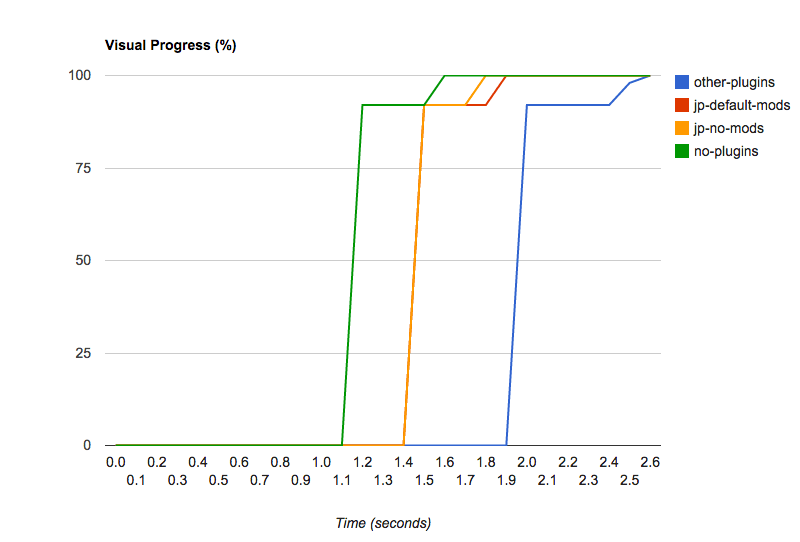
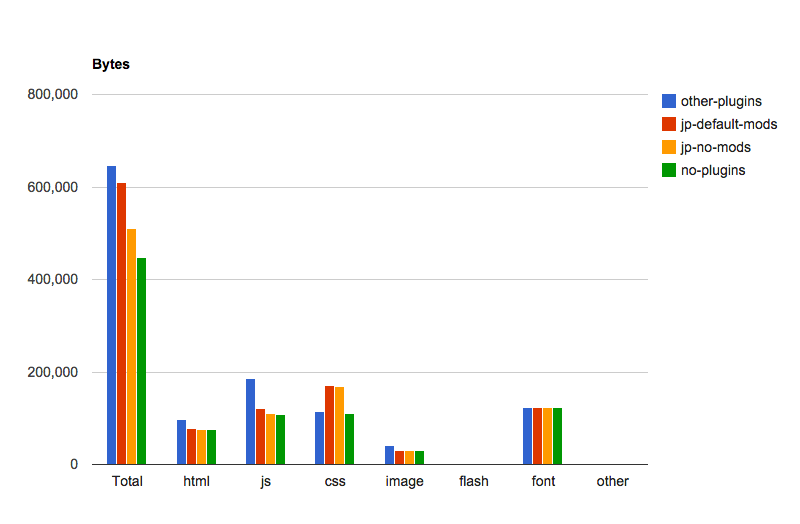
There have been a number of requests for us to show what WordPress core (with no plugins) and Jetpack activated but all modules deactivated looks like, so here we go.

Note that all of the numbers have changed a bit because we re-ran all tests from scratch with an updated version of WebPageTest.

 Other PluginsJetpack (with default modules)Jetpack (with no modules)WordPress Core, no plugins
First load, TTFB1103ms569ms470ms408ms
First load, Fully loaded2742ms1970ms1756ms1620ms
Jetpack vs. WordPress Core without Plugins
Jetpack timing tests
Jetpack Benchmark Assets
Jetmark Benchmark Visual Load
Jetpack Benchmark Bytes

About our testing methodology:
Tests were run from a private instance of WebPageTest, run from an EC2 instance within 1ms of our test subject server. Each test was run 27 times, and we used the median score for each factor. The test server had no other traffic on it while these tests were being performed.


Still have questions about the Jetpack plugin? Contact support or search documentation for quick answers.

Posted in Performance | Tagged , , , , | Comments Off on Is Jetpack Bloated? More Data that Debunks the Myth

Jetpack 3.3: A Single Home for all your WordPress Sites

With the release of Jetpack 3.3 this week, we bring you a new centralized dashboard from which you can manage all your WordPress sites — both your WordPress.com and your Jetpack-connected sites, regardless of where they’re hosted.


All Your Sites. One Dashboard.

From day one, Jetpack’s mission has been to bring feature parity between WordPress sites hosted on WordPress.com and those hosted elsewhere. With this release, your Jetpack sites appear alongside those hosted on WordPress.com and enjoy the same user interface, management, and posting functionality.
1
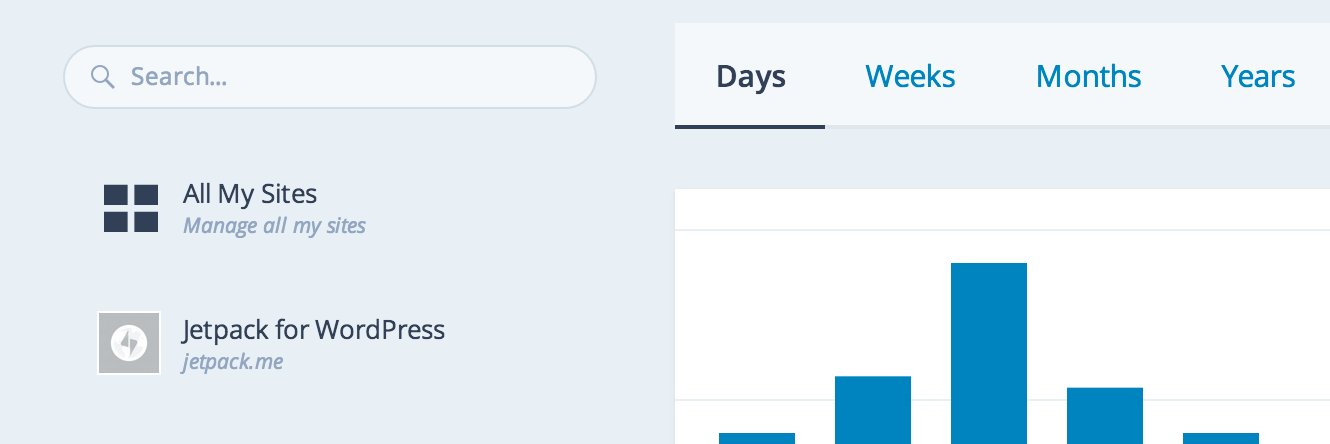
See all your sites on a single page and know at a glance if Jetpack or another plugin requires an update. Search through multiple sites to easily identify the one you’re after.


Initiate plugin updates

2

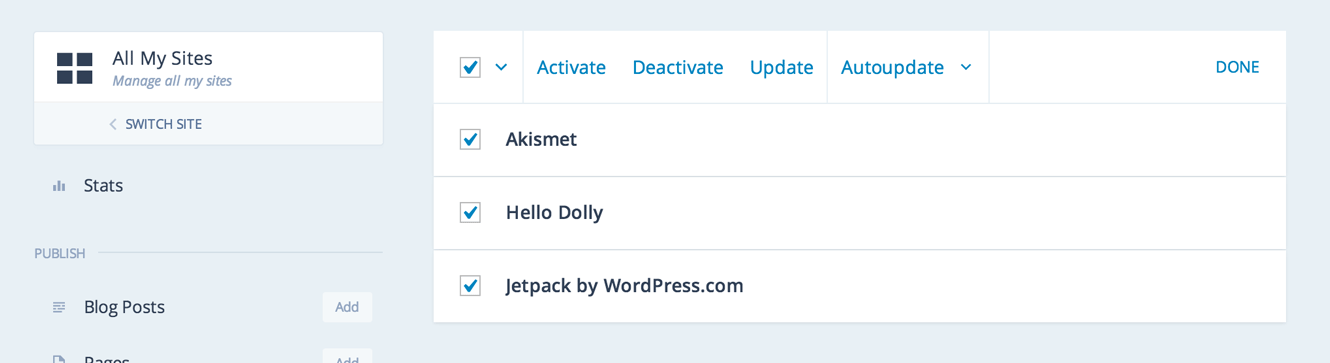
Initiate plugin updates for a single site or for all your sites at once. When a plugin is out of date, you will see a notification right away. Turn plugins on or off with one click — per site or in bulk.


Automatic updates
5

Ensure you’re always running the latest version of Jetpack — or any other plugin — turn on auto-updates. Again, you can do this on a per-site basis or in bulk.


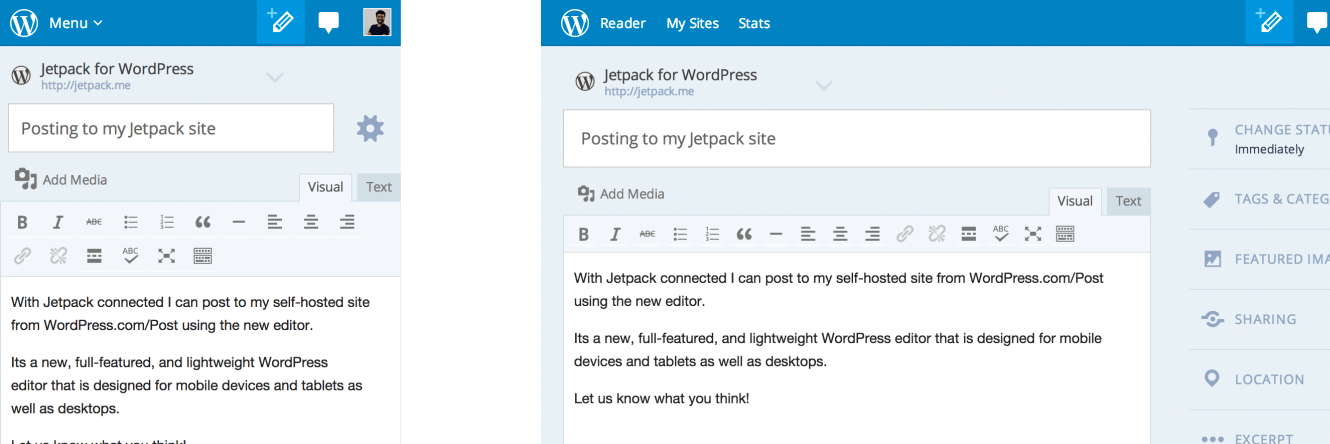
Centralized posting and mobile UI
4

Publish new posts to any WordPress.com or Jetpack site from the same editor available at WordPress.com/Post. We optimized everything from the ground up to work on all mobile and tablet devices. You can manage and post to your sites from anywhere, on any device, with a full-featured experience.


How to Update

Visit the Plugins page in your Dashboard and update Jetpack from there. Alternatively update all your sites in bulk from wordpress.com/plugins/jetpack.


How to Install

You can install Jetpack by visiting our install page or by searching for it in your Plugins page on your dashboard.


Feedback

Please give us your feedback by leaving a comment and letting us know what you love or what you’d like to see in future updates. If you find any bugs or issues, please file a new issue on GitHub, create a new forum post, or simply contact our support team.


Posted in Releases | Tagged , , , | 48 Comments
  • Enter your email address to receive news and updates from Jetpack

  • Join 98.9K other subscribers
  • Browse by Topic