Jetpack 3.6 – Updated Social Widgets, Jetpack CLI, and More!

Jetpack 3.6 has some great updates to the Extra Sidebar Widgets, improvements to Jetpack CLI, introducing a new Jetpack connection interface, and much more! Here’s a little taste of the great things we’ve added in Jetpack 3.6:

Extra Sidebar Widgets Updates

We’ve made some great improvements to a few existing widgets and added a new widget to the Extra Sidebar Widgets in Jetpack.

New: Social Media Icons Widget

socialiconsside

We’ve made it easy for you to add social media icons to your sidebar. Simply add the usernames of your respective social media accounts and we’ll take care of the rest. Once you save your additions, you can see the widget in action in your sidebar!

Currently supported social networks include Facebook, Twitter, Instagram, Pinterest, LinkedIn, GitHub, YouTube, and Vimeo.

Update: Facebook Like Box Widget
We’re excited to bring you a gorgeous new Facebook Like Box Widget! When you upgrade to Jetpack 3.6, you will have access to this new sidebar widget.

The Facebook Widget only works for Facebook Pages. In this widget, it will show your Page’s header image and now you will have the option to list your followers and recent posts to your Page’s Facebook wall as well:

FacebookWidgetSide

This new Facebook Like Box is only available in Jetpack 3.6, so upgrade today to use this great new widget.

We’ve also made some improvements to the Top Posts and Pages and the Display WordPress Posts widgets.

The Display WordPress Posts widget now gives you the option to have links open in a new browser window. The Top Posts and Pages widget now allows you to show/hide different page types from the widget. Only want to show post and page results in your widget? Simply check the boxes for “Posts” and “Pages” in the widget configuration area and save!

Jetpack CLI Improvements

Jetpack CLI is a command line interface for Jetpack, extending off of WP-CLI for WordPress. You can easily modify your Jetpack settings with a just a few simple commands.
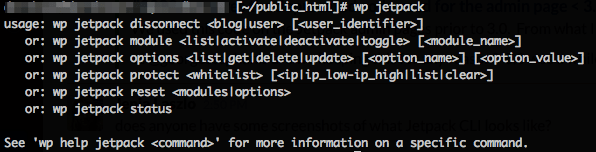
JetpackCLI

In Jetpack 3.6, we’ve greatly expanded the number of commands available for you to manage your Jetpack site using WP-CLI. You can read the full list of commands available here on our Jetpack CLI support document.

New Jetpack Connection Management

With this new version of Jetpack, we’ve added a new way for you to manage your Jetpack’s connection to WordPress.com. You’ll see a new button for “My Jetpack” in your menu bar under Jetpack -> Jetpack in your site’s Dashboard.

myJetpack

Clicking this button will take you to a configuration page where you can manage your site’s Primary User, see any other connected users, and/or manage your connection to WordPress.com.

We have plans to add even more features to My Jetpack in future Jetpack releases.

Other Notable Updates

A couple more notable updates in Jetpack 3.6:

  • Jetpack Mobile Theme now supports adding a Featured Image to Gallery Post Format and Pages.
  • Jetpack Protect now offers a captcha in the login flow. If you accidentally trigger Protect by entering the wrong login information, you’ll be given the option to enter your correct username and password with a captcha to prevent being fully locked out.

The full list of updates in Jetpack 3.6 can be seen here on WordPress.org.

Posted in Releases | Tagged , | 15 Comments

New: Beta Testing Jetpack

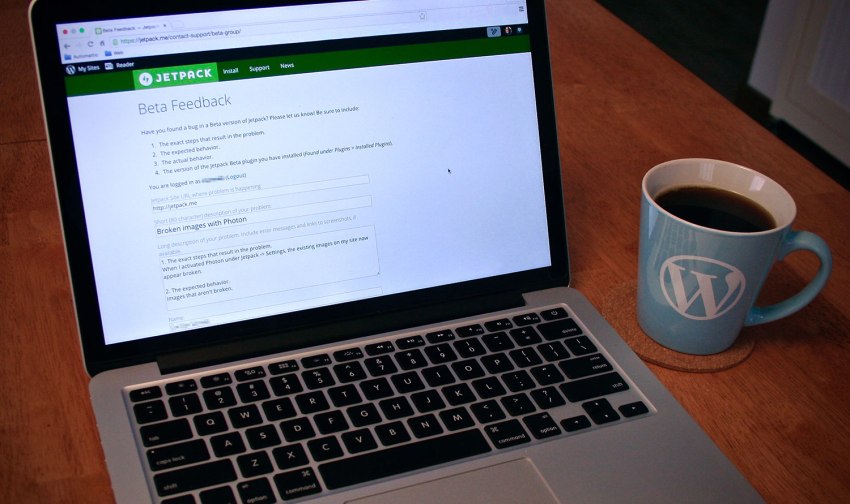
jetpack2 WordPress is an Open Source project built and maintained by members of the community. While Jetpack is built by the fine folks of Automattic to port features from WordPress.com to self-hosted sites, we embrace the same open source spirit by hosting its plugin source code and development publicly on GitHub. We’ve done a lot of great things so far, and we can do much more with your help! How can you help? Join our newly relaunched Beta program! As part of our Beta program, you help shape the future of the Jetpack plugin. The Beta program is 100% open to the public and we’re excited to get the WordPress and Jetpack user community involved. As a Beta tester, you’ll get a sneak peek at new features and be one of the first to try them out. You’ll also help us track down any bugs and other issues, and even suggest tweaks or improvements to existing features. We have a few surprises up our sleeves for our testers as well! 🙂 You don’t need to be a developer, or even need to know how to code to participate – if you use WordPress and Jetpack, you can be a Beta tester. Learn more about our awesome new Beta program by visiting the Jetpack Beta page. You can also help by spreading the word on Facebook, Twitter, and other social networks. Ready? Sign up now! If you have questions about the Beta program or contributing to Jetpack in general, please comment or contact us. And if you’re unsure about joining us as Beta tester, there are lots of other ways to contribute to the Jetpack community.
Posted in Jetpack News | Comments Off on New: Beta Testing Jetpack

Jetpack 3.5: Menu Management

Today we released Jetpack 3.5 which includes the ability to manage your site’s menus directly from WordPress.com as well as several bug fixes and enhancements.

Menu Management

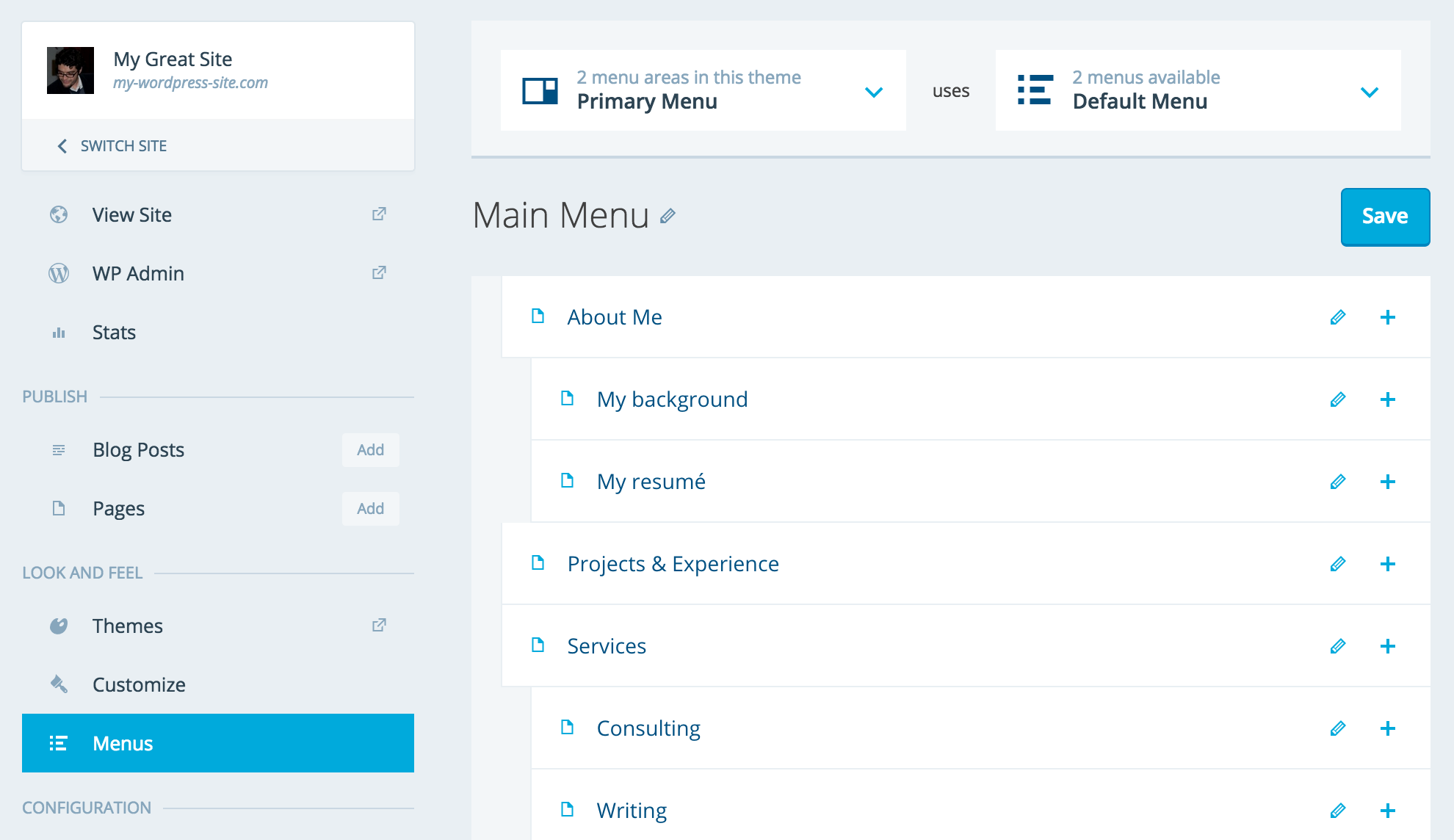
With this version of Jetpack connected, you can manage your site’s menus directly from wordpress.com/sites. This adds to our growing list of centralized site management features such as automatic and bulk plugin updates.

Jetpack Menu Management

How to Update

Visit the Plugins page in your Dashboard and update Jetpack from there. Alternatively, update all your sites in bulk from wordpress.com/plugins/jetpack.

How to Install

You can install Jetpack by visiting our install page or by searching for it in your Plugins page on your dashboard.

Feedback

Please give us your feedback by leaving a comment and letting us know what you love or what you’d like to see in future updates. If you find any bugs or issues, please file a new issue on GitHub, create a new forum post, or simply contact our support team.

Posted in Releases | Tagged | 18 Comments
Jetpack 3.4.3: Coordinated Security Release

Jetpack 3.4.3: Coordinated Security Release

Jetpack 3.4.3 contains a critical security update and you should update your sites and any you help manage as soon as possible.

Background

Sucuri notified us of an issue where improperly escaped URLs were being generated by a number of high-profile WordPress plugins, including Jetpack and Yoast. We’ve worked with the WordPress Security Team to coordinate a release which is being pushed out to all users. By the time we published this post (6pm GMT, April 20, 2015), if you haven’t opted out of auto-updates, your sites will update themselves automatically.

The Vulnerability

The vulnerability Sucuri discovered would allow an attacker to send a WordPress user with administrative rights a link which could execute malicious JavaScript. The vulnerability was introduced in Jetpack 3.0 and to date we have no evidence of this being exploited. However, now that this update is public, it’s more likely that exploits may occur. To avoid a breach, you should update your site as soon as possible.

How to Update

We have prepared and shipped updates to all affected versions of Jetpack. Unless you’ve opted out, your sites should update automatically – please check your sites to confirm that Jetpack plugin has been successfully updated to one of these versions: 3.0.3, 3.1.2, 3.2.2, 3.3.3, or 3.4.3.

If not, please visit the Plugins page in your Dashboard and update Jetpack from there or update all your sites in bulk from wordpress.com/plugins/jetpack.

Note: Not all plugins affected by this issue will be auto-updating, some will be releasing updates separately. For that reason, we highly recommend that you make ensure that all your plugins are up-to-date as updates are released over the next few days.

We also recommend updating any other plugins you may have installed to their latest version – not all plugins will be automatically updating (like Jetpack)

Feedback

As always, we greatly appreciate your continued use and support of Jetpack and we sincerely apologize for the inconvenience this has caused.

We take the security of your sites extremely seriously so please feel free to get in touch with our support team, create a new forum post, or leave a comment on this blog post if you have any concerns or problems updating.

We’d also like to extend our huge thanks to the crew on the WordPress Security Team who worked around the clock – and across timezones and several plugin teams – to coordinate today’s release.

Posted in Releases | Tagged | 3 Comments
Jetpack 3.4.2: Bug Fixes

Jetpack 3.4.2: Bug Fixes

 
Jetpack 3.4.2 includes a small number of bug fixes that previously required users to manually patch items in the plugin. Three of the issues were causing fatal errors in very specific circumstances (affecting less than 1% of our users). The fourth issue we addressed was related to JavaScript running unnecessarily on all admin pages, causing conflicts with other plugins and potential JavaScript errors.

This release is recommended for all users.


How to Update

Visit the Plugins page in your Dashboard and update Jetpack from there. Alternatively update all your sites in bulk from wordpress.com/plugins/jetpack.


How to Install

You can install Jetpack by visiting our install page or by searching for it in your Plugins page on your dashboard.


Feedback

Please give us your feedback by leaving a comment and letting us know what you love or what you’d like to see in future updates. If you find any bugs or issues, please file a new issue on GitHub, create a new forum post, or simply contact our support team.


Posted in Releases | Tagged , , | 1 Comment

Jetpack 3.4: Protect, Secure, and Simplify

With Jetpack 3.4, we’ve added new security features to protect your Jetpack-connected WordPress sites from bot net attacks. We’ve also taken some first steps to create a simplified interface for how you interact with Jetpack.

Your WordPress, Secured.

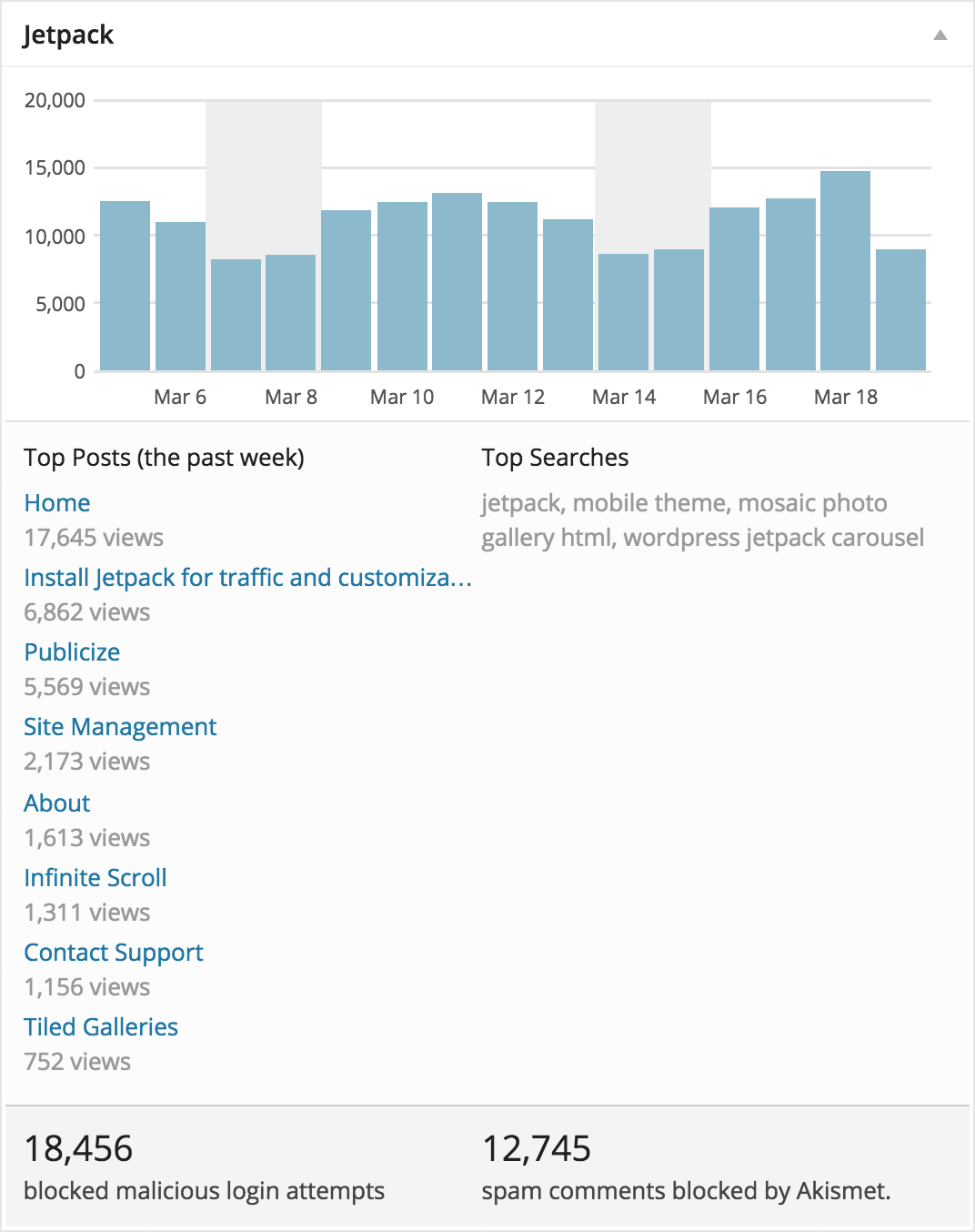
Brute force attacks are a growing concern for many website administrators. By integrating features from the WordPress plugin BruteProtect, Jetpack’s brute force protection can help you take control of site security and protect your site from this common attack vector.

jp-stats-3-4-retina-2

A Centralized Experience

Continuing Jetpack’s mission to bring feature parity between self-hosted WordPress sites and WordPress.com, you will soon be able to manage security features from either your site’s dashboard or a central interface on WordPress.com. Locked out of your site from too many failed login attempts? You can whitelist your IP address in WordPress.com.

jetpack-manage-security

Jump Start

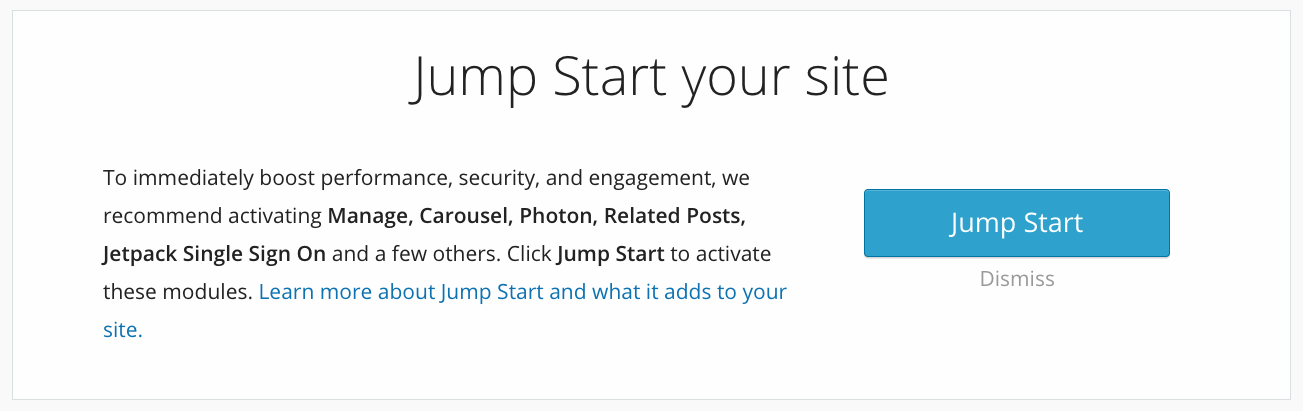
With the click of a button, you can immediately boost performance, security, and engagement to jump start your site with a curated set of Jetpack modules.  This feature is tailored for those who are new to the plugin or new installation of Jetpack.

jetpack-jumpstart

How to Update

Visit the Plugins page in your Dashboard and update Jetpack from there. Alternatively update all your sites in bulk from wordpress.com/plugins/jetpack.

How to Install

You can install Jetpack by visiting our install page or by searching for it in your Plugins page on your dashboard.

Feedback

Please give us your feedback by leaving a comment and letting us know what you love or what you’d like to see in future updates. If you find any bugs or issues, please file a new issue on GitHub, create a new forum post, or simply contact our support team.

Posted in Releases | Tagged , | 21 Comments
data examining Jetpacks plugin: image of cables

Is Jetpack Bloated? More Data that Debunks the Myth

This article was originally published on the BruteProtect blog. BruteProtect was a plugin designed to stop malicious IPs from accessing WordPress websites. The technology behind BruteProtect is now part of Jetpack’s security features, protecting millions of website from brute force attacks every day.


Thanks for all the feedback and shares on Part 1, see that post for more info on which modules in Jetpack are activated by default and which “Other” plugins we used to test against.

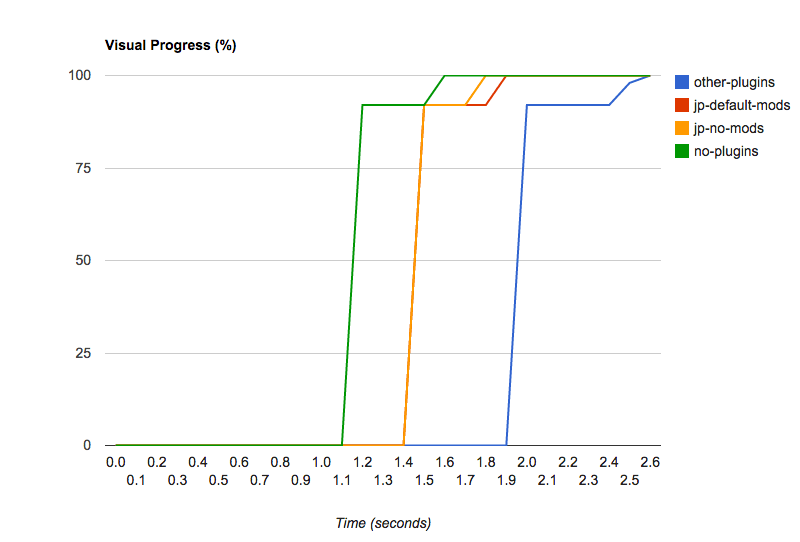
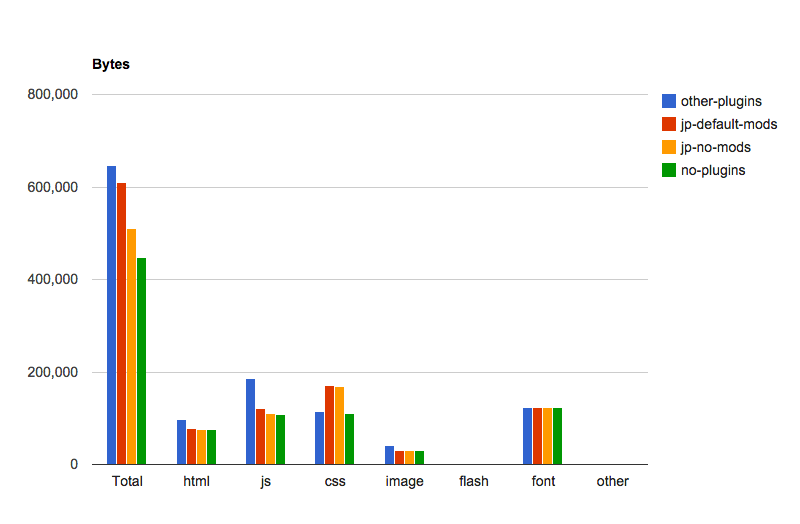
There have been a number of requests for us to show what WordPress core (with no plugins) and Jetpack activated but all modules deactivated looks like, so here we go.

Note that all of the numbers have changed a bit because we re-ran all tests from scratch with an updated version of WebPageTest.

 Other PluginsJetpack (with default modules)Jetpack (with no modules)WordPress Core, no plugins
First load, TTFB1103ms569ms470ms408ms
First load, Fully loaded2742ms1970ms1756ms1620ms
Jetpack vs. WordPress Core without Plugins
Jetpack timing tests
Jetpack Benchmark Assets
Jetmark Benchmark Visual Load
Jetpack Benchmark Bytes

About our testing methodology:
Tests were run from a private instance of WebPageTest, run from an EC2 instance within 1ms of our test subject server. Each test was run 27 times, and we used the median score for each factor. The test server had no other traffic on it while these tests were being performed.


Still have questions about the Jetpack plugin? Contact support or search documentation for quick answers.

Posted in Performance | Tagged , , , , | Comments Off on Is Jetpack Bloated? More Data that Debunks the Myth
  • Enter your email address to receive news and updates from Jetpack

  • Join 99.1K other subscribers
  • Browse by Topic