Adding reCaptcha to the Email Sharing Button

How do I add reCaptcha to the Email button

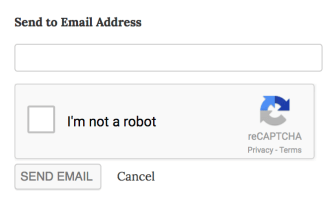
The Email button is great, and you can make it even better by adding a Captcha to the submission form: reCaptcha for Jetpack To add the Captcha to your site, follow these steps:
  1. Start by registering on this site. Upon registration for reCAPTCHA v2, you will receive a Public/Site and a Private/Secret key.
  2. Open your site’s wp-config.php file in your favorite text editor, and add the following constants with both reCaptcha keys right before /* That's all, stop editing! Happy blogging. */:
    define( 'RECAPTCHA_SITE_KEY', 'XXXXXXX' );
    define( 'RECAPTCHA_SECRET_KEY', 'XXXXXXX' );
    
  3. Voila! Your email sharing buttons are now protected against spammers!
Posted in Developers | 1 Comment
How to remove stylesheets added by Tiled Galleries and Carousel

How to remove stylesheets added by Tiled Galleries and Carousel

If you wish to use your own stylesheets instead of the ones that are automatically added to the posts where you’ve inserted a Tiled Gallery, or a gallery using Carousel, you can add the following code to your theme’s functions.php file, or to a functionality plugin. To remove Tiled Galleries’s stylesheet:
function tweakjp_rm_tiledcss(){
    wp_dequeue_style( 'tiled-gallery' );
}
add_action( 'wp_footer', 'tweakjp_rm_tiledcss' );
To remove Carousel’s stylesheet:
function changejp_dequeue_styles() {
    wp_dequeue_style( 'jetpack-carousel' );
}
add_action( 'post_gallery', 'changejp_dequeue_styles', 1001 );
Posted in Developers | Comments Off on How to remove stylesheets added by Tiled Galleries and Carousel
Enable Infinite Scroll in your theme using Masonry

Enable Infinite Scroll in your theme using Masonry

To enable Infinite Scroll in your theme, you can follow the steps described here. However, if your theme uses the Masonry library you’ll need a few extra steps. Luckily, WPTheming put together a great tutorial: Jetpack Infinite Scroll + Masonry
Posted in Developers | Comments Off on Enable Infinite Scroll in your theme using Masonry
How to change the credit link in the Infinite Scroll footer

How to change the credit link in the Infinite Scroll footer

If you’d like to change the default credit link appearing in the Infinite Scroll footer, you can use the infinite_scroll_credit filter, like so:
function tweakjp_cust_credit() {
	return '<a href="http://example.com">My Custom Link</a>';
}
add_filter( 'infinite_scroll_credit', 'tweakjp_cust_credit' );
Once you add that code to your theme’s functions.php, a new link will appear instead of the default “Powered by WordPress” link.
Posted in Developers | Comments Off on How to change the credit link in the Infinite Scroll footer
Jetpack 2.2.1: Now with Extra Development Mode

Jetpack 2.2.1: Now with Extra Development Mode

Howdy Jetpackers,

We’ve put together a spring cleaning release for you today. A number of bugs have been fixed, which you can see in the changelog.

Of note is the new Development Mode in Jetpack. With this, features that do not require a connection to WordPress.com servers can be activated on a localhost WordPress installation for testing. This has been one of the most demanded features from developers; we are very happy to provide this first iteration today.

Turn on Development Mode right now by adding define( 'JETPACK_DEV_DEBUG', true); to your wp-config.php file.

Update: Alex Mills, the developer who added Development Mode, notes the following in the comments below:

A quick note: development mode automatically gets enabled if you don’t have a period in your site’s hostname, i.e. localhost. If you use a different URL, such as mycooltestsite.local or something, it is then that you will need to define the JETPACK_DEV_DEBUG constant.

Another note is the new filters for shortcodes and widgets. Jetpack loads a lot of shortcodes and widgets; until now, it was an all or nothing module. Now, you can filter the shortcodes and widgets that Jetpack loads with a mini-plugin of your own.

Use the new jetpack_shortcodes_to_include or jetpack_widgets_to_include and exclude the widgets or shortcodes that you do not want. Or include new ones!

We hope that you like the new Development Mode and other bug fixes work well for you. If you are in need of assistance, please get in touch with us on our support forums.

Posted in Releases | 25 Comments
Jetpack 2.1.2

Jetpack 2.1.2

Dear Jetpack Community,

Today we released Jetpack 2.1.2. This is mainly a bug fix release to get some outstanding issues squashed. We have resolved 34 bugs and added 2 enhancements, by my count. That’s pretty impressive, for a point release!

The highlights for this release are:

– the new TED shortcode. You can now copy and paste the shortcode offered on http://ted.com/talks and embed it directly in your WordPress+Jetpack-powered post or page.

– filters for Infinite Scroll. These filters allow themes and plugins to provide additional assets that should be loaded before a new set of posts is appended to the DOM.

You can read the full changelog here. Get in touch with us via our support form if you need any assistance.

Posted in Releases | 7 Comments

Jetpack Comments Now Available at a Launchpad Near You

The wait is finally over. You’ve been asking for it for months and we are finally ready to ship it.

Jetpack Comments has arrived!

We’re breaking down the barriers between you and your audience. When someone reads an article on your site and wants to comment, they can now use one of their existing social networking accounts to post a comment. No longer do they need to create yet another account and profile.

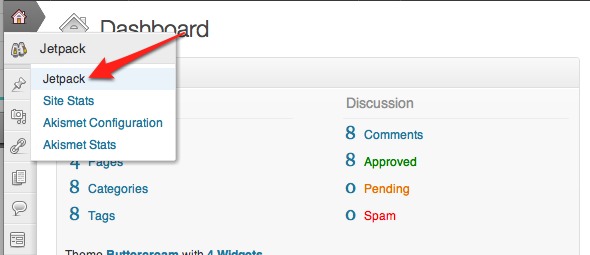
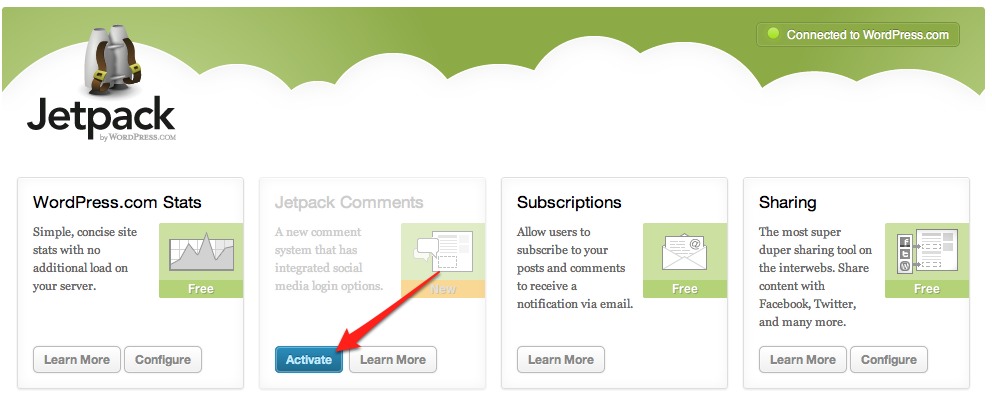
Since it is a large change, we are making Jetpack Comments opt-in. To activate it, just visit the Jetpack menu on your Dashboard and click the Activate button inside the Jetpack Comments box.
When activated, Jetpack Comments takes the place of your theme’s comment form in this nifty, sleek form:

To leave a comment, just click in the box and start typing.

After a visitor has written a comment, they will have several ways to identify themselves. A visitor can leave a comment as a guest¹, or they can choose to use their WordPress.com, Twitter, or Facebook account. For example:

You can also change the “Leave a Reply” heading and the color scheme of the Jetpack Comments form under the Settings → Discussion menu.

Bug Fixes

We’ve also fixed a few outstanding bugs in this release:

  • Multiple fixes for Sharing, such as updates for language locales on the Facebook Like button and making the More button more reliable.
  • Updates to the YouTube and Audio shortcodes for better URL escaping.
  • Update the YouTube shortcode to respect the embed settings in Settings → Media when appropriate.
  • Code clean up for After the Deadline.

You should see the update available in your WordPress dashboard shortly. Alternatively, you can always download the latest version of Jetpack here at jetpack.me as well.

Remember to contact support if you need help.

On the Horizon

We’re always excited to bring more features to Jetpack. While we can’t provide any estimates on when these will be included in Jetpack, here are some of the additions or improvements that we are planning:

  • Increased customizability of the Subscription feature’s emails.
  • A better Jetpack management interface.
  • A refresh of the Sharing options.

¹ Guest commenting is still controlled by the options in Settings → Discussion; if you disable guest commenting, visitors will not be able to use this option in Jetpack Comments.

Posted in Features, Releases | 193 Comments
  • Enter your email address to receive news and updates from Jetpack

  • Join 99.1K other subscribers
  • Browse by Topic