Multiple vulnerabilities in Workreap theme by Amentotech

Recently the Jetpack team found some infected files in one of our hosted customers’ sites, and quickly traced the source of infection back to the Workreap theme by Amentotech. We started an investigation and uncovered a number of vulnerable AJAX endpoints in the theme; the most severe of these was an unauthenticated unvalidated upload vulnerability potentially leading to remote code execution and a full site takeover.

We reported the vulnerabilities to the Amentotech team via the Envato Helpful Hacker program, and the issues were addressed promptly by them. Version 2.2.2 of the theme was released on June 29, 2021 that fixes the found vulnerabilities.

TL;DR

Due to the seriousness of the vulnerabilities, we highly recommend all users of the Workreap theme to upgrade to version 2.2.2 or later as soon as possible. 

Download the upgrade from the theme website and install it manually, or upgrade automatically via the Envato market plugin.

Continue reading → Multiple vulnerabilities in Workreap theme by Amentotech

Posted in Vulnerabilities | Tagged , | Comments Off on Multiple vulnerabilities in Workreap theme by Amentotech

Six Newsletter Ideas to Connect With Your Readers

You just set up an email subscription sign-up form on your website. What should you do next? Email marketing can seem like an overwhelming concept for those just getting started, but it doesn’t have to be this way!

One of the most popular forms of email marketing is sharing a weekly or monthly newsletter. Let’s take a look at two of the most pressing decisions for beginners: what newsletter content should you create and how should you format it to achieve your goals?

Continue reading → Six Newsletter Ideas to Connect With Your Readers

Posted in Tips & Tricks | Tagged , , , , | Comments Off on Six Newsletter Ideas to Connect With Your Readers
Jetpack New Release

Jetpack 6.1: General Maintenance

Happy May and welcome to Jetpack 6.1. This month brings us another general maintenance release, so you won’t find any big surprises here, but there are still some important improvements to learn about.

The new things you’ll find in 6.1 are:

Privacy information links added

Jetpack’s position regarding its users and their visitors’ privacy has been enhanced in the process to make all of Automattic’s software GDPR-compliant.

You will now will see a footer on the “More Info” popover that appears next to each feature setting. These link to specific sections in our support docs describing privacy implications in the event you want to learn more about them.

Stats and Do Not Track changes

We now offer the users a way to have a clear map of the privacy implications of each Jetpack feature. We also introduced a new filter that will honor the Do Not Track feature for visitors that choose to take advantage of it.

Note that this only affects Jetpack’s own Stats feature and nothing else.

WordAds improvements

There are two improvements to the WordAds program to share this month. First, we’ve added support for the ads.txt file.

Second, we’ve introduced a new shortcode, [wordads], which allows you to include an ad inline on any given post or page content. This will give you even more flexibility in defining where your ads appear on your site.

Additional performance enhancements

There are a few bugfixes and enhancements in this release, but the main issues we tackled are the following:

  • When a post transitions to publish, Jetpack used to add Publicize post meta to all posts, whether or not it was a Publicize-able post type. This has been adjusted.
  • We removed the Sharing and Like display functionality from WooCommerce’s Cart, Checkout, and Account pages.
  • Users running their site on PHP 7.2 were seeing notices on their logs related to language features that were updated with this latest release of PHP. These notices should now be addressed.

Full changelog and thanks

As always, you can read the full changelog and see what else we have improved in this release.

Install Jetpack on your site or upgrade to 6.1 today to experience the latest and greatest!

Thanks to all the contributors to this release:

Aaron Douglas, Alex Mills, Allen Snook, Anthony Bubel, Brandon Kraft, Daniel Walmsley, David Newman, Derek Smart, Eric Johnson, Egill R. Erlendsson, Elio Rivero, Enej Bajgoric, Eric Binnion, George Stephanis, Igor Zinovyev, Javi Alvarez, Jacopo Tomasone, Jason Johnston, Jeremy Herve, Jeff Bowen, Jeff Stieler, Joan Rho, Justin Shreve, Lance Willett, Michael D Adams,  Michael Turk, Miguel Lezama, Mikael Korpela, Mike Jolley, Niels Lange, Oscar Lopez, Peter Westwood, Rastislav Lamoš, RC Lations, Rob Landers, Rocco Tripaldi, Taegon Kim, Tugdual de Kerviler, Yaroslav Kukharuk, and Žiga Sancin.


Posted in Releases | Tagged , , | 2 Comments

Tips for Managing Your Site from Your Mobile Device

Since the advent of the smartphone, it’s rare to find a website that isn’t optimized for use on mobile devices. Managing your website via your phone or tablet, however, is still a fairly new concept.

Managing your site from a mobile device makes running a business more convenient. It’s beneficial for photographers who want to upload photos from their smartphones, bloggers who are inspired by their surroundings on-the-go, ecommerce sellers who want to keep tabs on their site stats, and any other type of website owner.

Let’s take a look at a few ways you can manage your WordPress site from your mobile device, and some tips for getting the most out of your mobile experience with Jetpack.

Continue reading → Tips for Managing Your Site from Your Mobile Device

Posted in Tips & Tricks | Tagged , , , , , | 4 Comments

Jetpack 5.4: Date Picker in Contact Form, Comment Improvements, and Welcome Screens

Today’s release of Jetpack 5.4 includes the addition of a new field to our Contact Form editor, display improvements to Comments and how they integrate with themes, and welcome screens for users of our paid plans. We’ve also added a new search feature, currently in beta, that Jetpack Professional customers can help us test.

Let’s take a closer look at what we’ve included in this update.

Date picker added to Contact Form editor

We added a new field to the Contact Form editor that allows you to add a date picker to your forms.
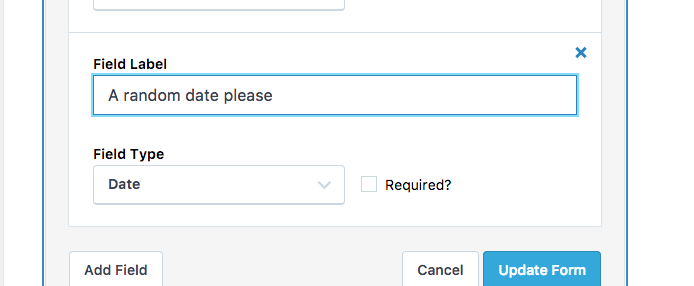
You can now create forms with date pickers.

This allows you to ask visitors to submit delivery dates, their birthdays, the best day to contact them, or anything else you can think of.

Improvements to Comments and theme compatibility

We’ve made some improvements to how the Jetpack comment form is displayed in some themes.

When enabled on your site, the Comments feature should now display a form with a default height. There should also be no extra white space below it. Comments entered into the form will cause the height of the form to expand automatically.

Welcome screens added to paid plans

When purchasing a Jetpack Personal, Premium, or Professional plan, you’ll now see a welcome screen with some tips to help you make the most of the plan you just purchased.

Here’s what you might see if you purchase a Personal plan.

Jetpack Search (Beta) available for Professional plan customers

If you’ve purchased a Professional Plan for your Jetpack site, this new release will give you access to a new feature we’re currently still testing: Jetpack Search, powered by Elasticsearch.

To get started, go to Settings > Traffic on WordPress.com, and select a site using Jetpack 5.4 and a Professional plan. Scroll down to the bottom of the page and enable the search feature.

This feature is still in beta, and we’d love to hear your thoughts and feedback if you give it a try.

Miscellaneous updates and fixes

Finally, here are a few more updates we’ve made in 5.4:

  • Fixed some UI issues within the Jetpack settings interface for the Internet Explorer 11 browser.
  • The Simple Payments button received some minor display improvements.
  • Facebook embeds have received display improvements.
  • RTL style fixes for some shortcodes.
  • Added a new “Time Unit” setting to available widgets.
  • Third party plugin and theme authors can add new menu items to the WordPress.com toolbar.

Full changelog and thanks

The changelog provides the full list of updates and changes in this release. If you have questions or feedback, please get in touch.

Install Jetpack on your site or upgrade to 5.4 today and let us know what you think!

Thank you to the contributors to this release:

Alexander Concha, Allen Snook, Andrew Duthie, Anthony Bubel, Daniel Walmsley, Derek Smart, Donna Peplinskie, Elio Rivero, Enej Bajgoric, Eric Binnion, Erick Hitter, George Stephanis, Igor Klimer, Igor Zinovyev, Umang Vaghela, James Fraser, James Nylen, Jeremy Herve, Justin Shreve, Kirk Wight, Lance Willett, Marko Andrijasevic, Michael Turk, Miguel Lezama, Nick Daugherty, Nicole Kohler, Oscar Lopez, Paul Sieminski, RC Lations, Rastislav Lamos, Rob Landers, Rocco Tripaldi, Sam Hotchkiss, Scott Stancil, Stanimir Stoyanov, Steve Seear, Takashi Irie, and Thomas Guillot.

Posted in Releases | Tagged , , , , , , | 10 Comments

Securing your Site with Jetpack

jetpack-security

Website security is important, although it can seem daunting or tedious — it doesn’t have to be. These six simple and effective best practices will help you protect your WordPress website from malicious, unwanted attention (hint: Jetpack can help!).

Continue reading → Securing your Site with Jetpack

Posted in Security | Tagged , , , , , , | 5 Comments

New Plugin Browser

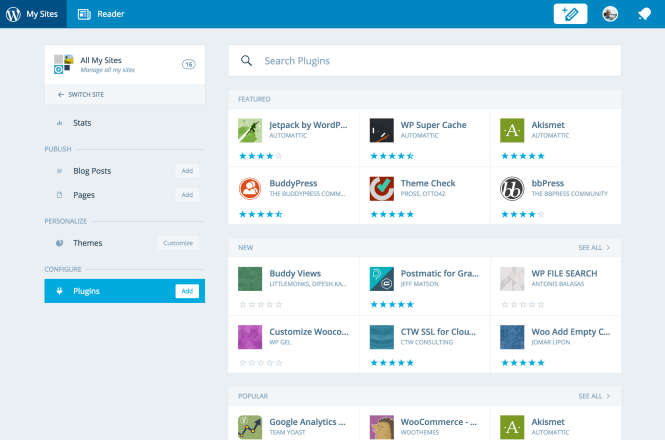
We are thrilled to announce the launch of the new Plugin Browser for your Jetpack sites. Now, you can install plugins from the WordPress.org plugin directory on all of your Jetpack sites from a single interface. You can also manage updates, and remove plugins you no longer need.

New Plugin Browser

New Plugin Browser

Until now, Jetpack sites with Manage enabled were only able to activate previously-installed plugins and set those plugins to autoupdate. Now, you can install new plugins as well as remove any plugins that are no longer being used.

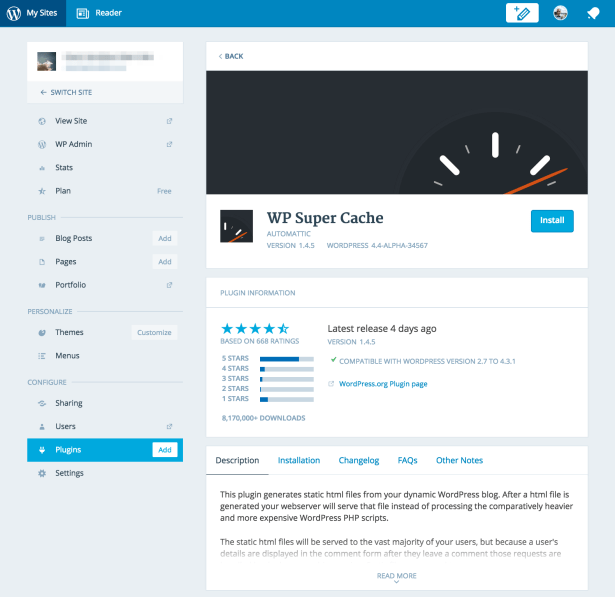
In addition, we have dramatically improved the detailed view for a single plugin. You can see the compatibility with WordPress versions, ratings, descriptions, changelogs, and more!

Screen_Shot_2015-09-29_at_2_02_32_PM.png

WP Super Cache ready to be installed.


Pro tip: If you find yourself browsing the WordPress.org plugin repository and want to install the plugin on your Jetpack site, you can just replace the .org in the URL with .com and be taken to the new Plugin Browser where you can install the plugin with a single click. You will need to be logged into your WordPress.com already for this to work.


Posted in Releases | Tagged , , , | 8 Comments
Automattic Acquires BruteProtect

Automattic Acquires BruteProtect

I’m excited to announce that Automattic has acquired BruteProtect, a plugin and service that protects your sites from malicious logins, saves server resources so your site runs faster, and keeps all your sites on the latest and greatest versions of WordPress core, plugins, and themes.

The plugin and service are currently available, but over the coming months we’re going to build their functionality into Jetpack and retire BruteProtect as a standalone thing.

BruteProtect also has a premium service that starts at $5 a month per site — effective immediately, that will be free for every BruteProtect user and Jetpack-enabled site. If you’re already a BruteProtect subscriber we’ll be in touch soon to send you a surprise thank you for your early support. You can download and get started with Jetpack here.

The BruteProtect team is based in Bath, Maine and they’re long-time contributors to the WordPress community. We’re excited to see them join forces with the Jetpack team and up the level of security, protection, and peace of mind we’ll be able to bring to the millions of sites already using Jetpack.

Though Automattic is known for its consumer-facing services like WordPress.com and Jetpack, the infrastructure behind them is the bottom part of the iceberg. Taking services to web-scale is another one of Automattic’s specialties, whether it’s the 8 billion Gravatars we serve every day, the Simperium sync service, or the countless spam that Akismet has blocked (and time it has saved).

This is internet plumbing: when it works it’s completely invisible, and we love that. We’re now pushing 450 terabytes of data a day from 9 datacenters around the globe.

Welcome, BruteProtect! You can read more about the acquisition from Sam on their blog.

Posted in Jetpack News | Tagged , | 12 Comments

“Hear it from us first”: Why every site should run Jetpack

Jetpack is a WordPress plugin that helps you optimise your site on various fronts: traffic, development and user experience amongst others. There is one feature however which I feel is critical: Jetpack Monitor. Simply put, Jetpack Monitor keeps tabs on your site and alerts you the moment that downtime is detected.

angryclients2

Like a lot of people who work in web, before I joined the Jetpack team I did quite a bit of client work: both freelance and at agencies. For me the absolute worst thing in this business is receiving a call from a client, most likely while you’re relaxing on a beach or just waking up, desperately asking you to fix her site because she’s losing money, clients or brand value while her site is down.

Jetpack Monitor might not do away with the frantic scrabbling you’ll need to do to fix the site but it will put you back in the driving seat. Because you get notified first you can turn the tables around and call your client yourself, calmly saying “Hey, as I’ve been keeping tabs on your site I noticed it just went down 10 seconds ago. Don’t panic, I’m on it.” At times the problem might even be a trivial one meaning that you can actually call your client and say that its already sorted!

Of course the same applies if you maintain your own site. You’ll get notified by us rather than by one of readers (or customers) making it more likely you can fix the problem before it affects too many of your users.

That’s it. With Jetpack Monitor, if your site goes down, you’ll hear it from us first.

Its entirely likely, indeed desirable, that you will turn this feature on when you install Jetpack and then never think about it again. But if, for whatever reason, your site or your client’s site does go down you will be thanking your lucky stars this feature is enabled.

Try Jetpack for yourself by connecting it to your site or by downloading the plugin files directly if you prefer that route. Oh, and do let us know in the comments if you have any questions or suggestions.

Posted in Features | Tagged , , , | 14 Comments
  • Enter your email address to receive news and updates from Jetpack

  • Join 98.8K other subscribers
  • Browse by Topic