Automatically share content to Instagram & Mastodon with Jetpack Social

Dedicating time to publish content on all your social media platforms can be tedious and time-consuming. That’s why Jetpack has been working hard to create robust tools to help you automatically share more content across more platforms, with less effort. Now you can connect your Instagram Business & Mastodon accounts to Jetpack Social, and your content will be shared the moment you hit publish.

Jetpack Social now allows you to auto-share your WordPress content to Instagram, Mastodon, Facebook,
LinkedIn, and Tumblr!

Continue reading → Automatically share content to Instagram & Mastodon with Jetpack Social

Posted in Social Media | Tagged , , , , , , | Comments Off on Automatically share content to Instagram & Mastodon with Jetpack Social

Jetpack 9.0: Continue sharing Facebook and Instagram posts on your site

In this month’s release, we’re offering new ways to transform your content and extend your reach. Now it’s easier than ever to move content from your site to social media and vice versa. 

Even better, all updates included in Jetpack 9.0 are available for free.

Read on
Posted in Releases | Tagged , , , , , | 20 Comments
Jetpack & Bluehost for better site management

Bluehost and Jetpack: Working Together for Better Website Management

Hosting companies play an invaluable role in building and managing your website. Not only are they responsible for storing the files that make web pages available to people around the world, they have a significant impact on site speed, security, and scalability. 

The hosting landscape is competitive, so providers work hard to offer effective tools that add value to every site they host. That’s why we’re honored that Bluehost recommends Jetpack as an essential WordPress plugin.

Continue reading → Bluehost and Jetpack: Working Together for Better Website Management

Posted in Features | Tagged , , , , , | 3 Comments

Repurposing Content On Your Site with Jetpack

Note: Publicize is now auto-share and is part of Jetpack Social.

Do you have a great site filled with useful content, but you’re not sure what to write about next? Even if you’re experiencing writer’s block, you can still make a meaningful contribution to your website by revisiting and refreshing your existing content.

Repurposing content is not only a quick way to dive into writing on days when you are suffering from a creative ebb, but can be a great and efficient way to keep your site relevant and engaging.

In fact, you might consider building out, updating, and improving your existing content, depending on what your site visitors want to be reading.

Here are some ideas for how to breathe new life into your existing content.

Continue reading → Repurposing Content On Your Site with Jetpack

Posted in Tips & Tricks | Tagged , , , , | Comments Off on Repurposing Content On Your Site with Jetpack

Share It Again: New Social Media Features for Premium and Professional Customers

Note: Publicize is now auto-share and is part of Jetpack Social.

Sharing your posts on social media is a great way to ensure your site or blog gets traffic. Our Publicize feature makes it easy to automatically share your new posts on Facebook, Twitter, and other social media networks.

But what about your previously published posts? For posts that are always relevant or valuable to new readers, you may want to share them again — weeks, months, or even years later.

That’s why we’re excited to introduce Re-Publicize, a new feature for our Jetpack Premium and Professional users. Re-Publicize allows you to share previously published posts on social networks — with custom messaging for each service, as well.

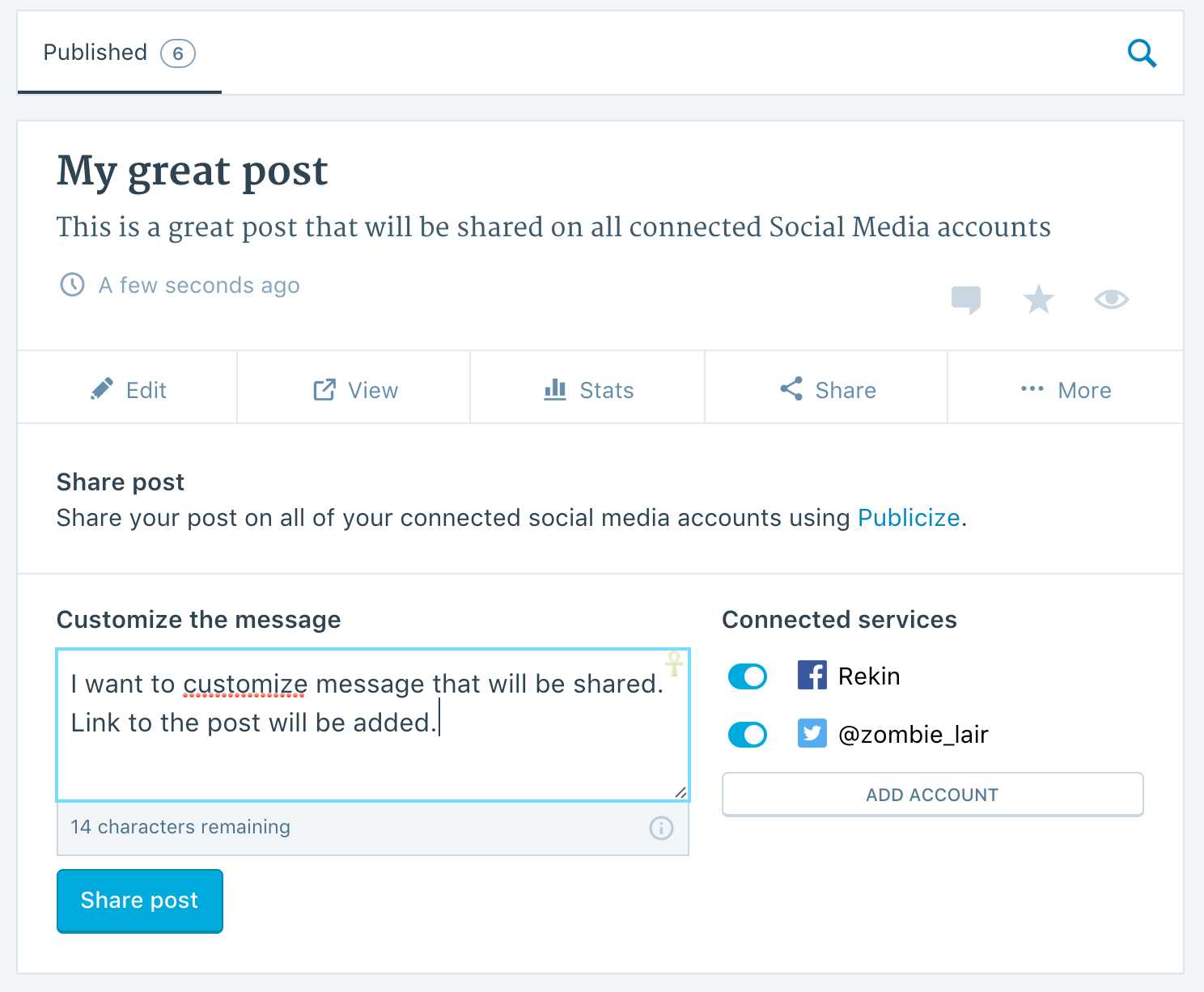
This is part of the suite of services Jetpack sites can use on WordPress.com, including the ability to manage your site and plugins, write content, and now re-share your posts. Just go to the Blog Posts section of your site on WordPress.com, select Share, and you’ll see the new sharing menu for reposting to your social accounts:

zrzut-ekranu-2017-02-14-o-16-27-30

Then you’re all set!

As a Premium or Professional customer, using Re-Publicize, it is now easier to automatically share existing posts to social media, allowing you to make the most of your content.

We’re excited about this new feature, and we hope you enjoy using it.

Posted in Features | Tagged , , , | 27 Comments

Jetpack 4.6: Google Analytics Integration, PHP 7.1 Compatibility, and Publicize Improvements

Welcome to Jetpack 4.6, available now for upgrade or installation. This release includes:

  • Google Analytics integration
  • PHP 7.1 compatibility
  • Publicize improvements
  • Enhancements to shortcodes and widgets

Continue reading → Jetpack 4.6: Google Analytics Integration, PHP 7.1 Compatibility, and Publicize Improvements

Posted in Releases | Tagged , , , , | 16 Comments
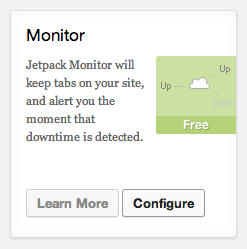
Jetpack Monitor Module Card

Jetpack 2.8: Introducing Markdown and Improving Monitor

We’re thrilled to announce that our latest update is out the door! Jetpack 2.8 includes improvements to Jetpack Monitor and also introduces a brand new Markdown module.

Jetpack Monitor Module Card

Improved Jetpack Monitor notifications

Multiple users can now receive Jetpack Monitor email notifications. As an admin user linked to WordPress.com, you can opt in to receive these notifications right from your dashboard. Just navigate to the Jetpack page, find the Monitor module card, and click on Configure. Then, check the “Receive Monitor Email Notifications” setting and save your changes. Now if your site ever goes down you will receive notifications to your WordPress.com linked account email!

Write more efficiently with Markdown

Since introducing Markdown on WordPress.com, we’ve had a lot of requests to bring it over to Jetpack. Well, queue the trumpets, start the drumroll, Markdown is here!

For those who don’t know, Markdown is a quick way to add formatted text without writing out any HTML. Markdown lets you compose links, lists, and other styles using regular characters and punctuation marks. If you want a quick, easy way to write and edit rich text without having to take your hands off the keyboard or learn a lot of complicated codes and shortcuts, then Markdown might be right for you. We do strongly suggest sticking with the “Text” tab in the Editor when using Markdown.

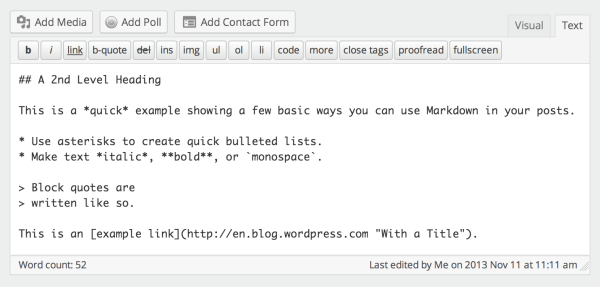
Here is an example of Markdown in the text editor:

Markdown in text editor

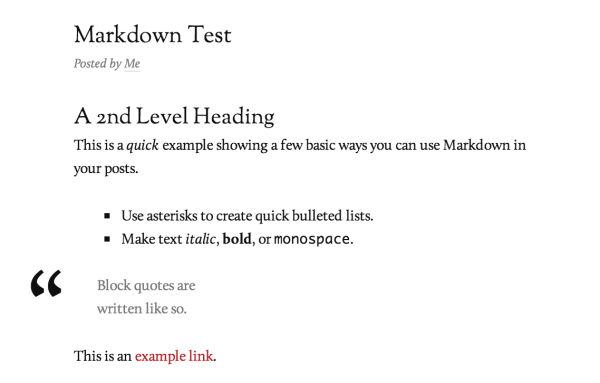
And here is that same Markdown converted to HTML in the Reddle theme:

Markdown converted to HTML in Reddle

Isn’t that pretty awesome? You can check out the announcement post over at WordPress.com for more information about Markdown and see our Markdown support page.

Publicize Support for Custom Post Types

For our developer friends out there, we’ve added Publicize support for custom post types, allowing you and your clients to automatically post new entries from any CPT to your social media networks. You’d need to make one small tweak in the code defining the CPT—just add 'publicize' to the CPT’s 'supports' array.

For example, to enable the title, editor, Publicize, and Jetpack’s new support for Markdown: 'supports' => array( 'title', 'editor', 'publicize', 'wpcom-markdown' ),

As always, if you notice any issues with this release, just give us a shout over at the forums or send us a message through our contact form. Thank you for flying with Jetpack!

Posted in Releases | Tagged , , , , , | 29 Comments
Jetpack 2.7: Share your content on Google+

Jetpack 2.7: Share your content on Google+

We recently released a slew of Google+ integrations for WordPress, and mentioned that Google+ Publicize support would be coming soon to Jetpack users. Publicize makes it easy to share your new posts on other social networks (like Facebook and Twitter). Using it is a great way to build your readership and expose your content to new audiences.

Well, the wait is over — we’re excited to announce that you can now share your latest content on your Google+ Profiles and Pages!

Improved overall performance

Jetpack 2.7, which has just been released, adds Publicize to your site. In order to connect your account(s), head to your dashboard, then go to Settings → Sharing. Clicking on the “Connect” button next to the Google+ logo will prompt you to authenticate your account. Once you have, you can start enjoying the benefits of publishing your content to Google+ — just make sure that you’ve enabled the Publicize module.

Jetpack 2.7 also contains multiple bugfixes and other little features. You can view a full changelog of these updates by visiting this page.

We hope you enjoy Jetpack 2.7!

Posted in Features, Releases | Tagged , , | 44 Comments
  • Enter your email address to receive news and updates from Jetpack

  • Join 98.8K other subscribers
  • Browse by Topic