Argent theme from Jetpack

How Jetpack Empowers DIY Site Owners

“Do it yourself” is a wonderful, empowering phrase.

But, it also doesn’t mean much without context; because, while hiring a professional website or theme developer can be expensive, doing it yourself can end up costing a lot as well — especially if you do it incorrectly.

For those on a budget, Jetpack’s many features are here to help. Since its launch, WordPress site owners have been using Jetpack to add a diverse range of crucial capabilities to their sites.

Let’s review four Jetpack features that can help you develop your site on your own, so that you don’t need to pay someone else to do it for you.

1. Theme options

One popular reason why people hire developers is because they want custom theme development. However, even Jetpack’s free plan comes with more than 100 professionally-designed themes.

For example, Argent comes with the tools you would need to highlight your photography portfolio.

Argent theme from Jetpack

Additionally, Dyad 2 is a great option to feature images from your restaurant, cafe, bakery, or bar.
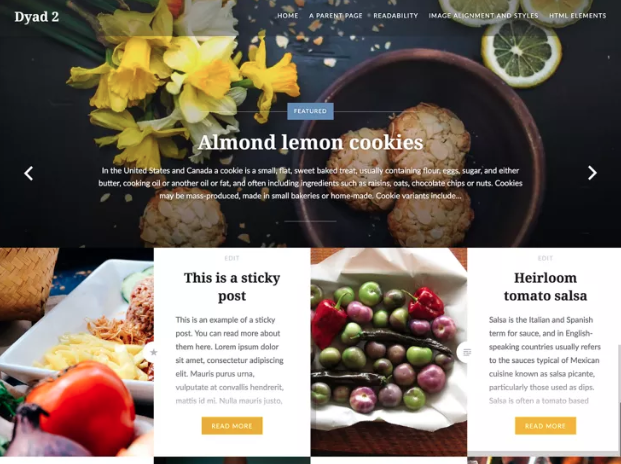
Dyad 2 theme

For website owners who notice a lot of mobile site traffic, Professional plans come with more than 200 premium, mobile-friendly WordPress themes. These themes will make your website look great to those who browse your site on their phones.

Radiate is just one example.
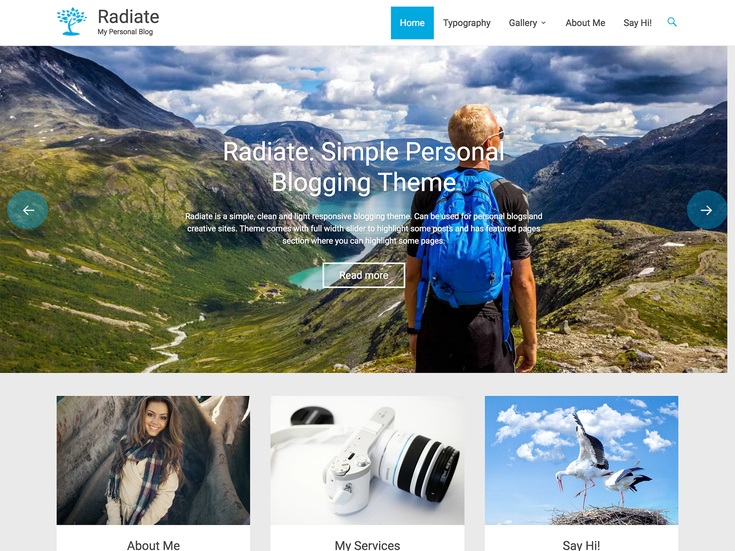
Radiate premium WordPress theme

Designed especially for blogs, it features a content slider and page templates that make it well-suited for personal or business use.

You can browse through, implement, customize, and change Jetpack themes at your discretion. What else could a DIY site owner ask for?

2. PayPal payments

Monetization is a primary goal for many WordPress website owners. If this includes you, then you’ll eventually want to integrate PayPal into your site so that you can accept online payments.

PayPal integration can be tricky, depending on the options that you want to have available. You definitely cannot afford to make mistakes when processing transactions that contain sensitive user information, like names, addresses, and credit card numbers. This will eliminate all trust that customers put into your hands.

Jetpack Premium will manage all aspects of Simple Payments for you. In fact, it’s as simple as clicking an option within your WordPress admin dashboard.

3. Enhanced site search

As your site evolves, giving your audience easy and intuitive access to the posts in your archive will become more important. Once you acquire a loyal fanbase, they may want to go back and look at your past posts, in addition to your recent ones.

Delivering an optimized site search experience is another feature that you could pay a website developer to add, but it also comes bundled into a Jetpack Professional plan.

What distinguishes Jetpack’s Elasticsearch-powered search? It delivers instant, more relevant results to your users, and indexing is completed in real-time, meaning that your site’s search index will update within minutes of any site changes. It’s important to note that this tool is only available with Professional plan subscriptions.

4. Priority Support

Approaching your website with a DIY mindset comes with a lot of benefits, but there can also be drawbacks, such as feeling helpless or overwhelmed if you can’t figure out how to resolve an issue.

Access to timely, one-on-one technical support is one of the most important, underrated benefits of hiring a website developer. But, what if you could get that kind of support without paying those kinds of prices? This is another way that Jetpack can potentially save you thousands of dollars.

With Jetpack’s Priority Support features, Personal plan users will have access to the help they need, including support for the theme options, PayPal payments, and enhanced site search features mentioned above. If you want even more robust support, consider Jetpack Premium or Professional plans, which both include one-on-one concierge setup services.

Everything you need to DIY

The four features included above are just the tip of the iceberg. With Jetpack, both novice and experienced site owners are equipped to create beautiful, functional websites without relying on a third party.

As a DIY site owner, are there other Jetpack features that you’ve found useful? Comment below and let us know!

Posted in Learn | Tagged , , | 1 Comment

Looking Back at Jetpack in 2017 – and Forward to 2018

2017 has been an incredibly productive year for Jetpack. Tons of discussions, user feedback, and hard work have resulted in updates and new features that make your sites even faster, safer, and more engaging. These features also set the groundwork for exciting developments in 2018.

Here are some of the highlights of the year worth looking at again, plus what we’re looking forward to in the next twelve months.

Continue reading → Looking Back at Jetpack in 2017 – and Forward to 2018

Posted in Jetpack News | Tagged , , , , , | 24 Comments

Four Jetpack Features Worth Exploring

Even if you’ve been using it for years, you might be unfamiliar with some of Jetpack’s features. With the wide range of capabilities offered, it’s too easy for some of the coolest — and perhaps the most useful — tools to go unnoticed.

Today we’re going to look at four features that are lesser known, but just as powerful as those you might already be familiar with. These features will ultimately enhance your WordPress site in new ways, from improving its design to taking the hassle out of maintenance.

Continue reading → Four Jetpack Features Worth Exploring

Posted in Tips & Tricks | Tagged , , , , , , | Comments Off on Four Jetpack Features Worth Exploring

Indispensable Jetpack features for theme developers

Jetpack offers a number of great features for theme developers that help you cut down both development time as well as load times. Most of these features work right out of the box, but you can also get under the hood to apply tweaks and customisations that really take your theme to the next level.

This article introduces you to:

  1. Speeding up your theme with Photon
  2. Showcasing posts with Featured Content
  3. Automatically loading posts with Infinite Scroll
  4. Instantly applying a Mobile Theme
  5. Customising CSS
  6. Providing Sharing functionality
  7. Integrating Social Links
  8. Showing similar content with Related Posts
  9. Additional resources


1. Speeding up your theme with Photon

Jetpack for developersPhoton is a free image CDN offered by Jetpack. As soon as Photon is enabled, it automatically serves the images found in posts and pages from WordPress.com’s speedy servers around the globe.

But did you know that you can use it to save bandwidth and speed up load times for images within your theme, too? You can link to a Photon-ized version of an image by calling the jetpack_photon_url() function. Its quite straightforward and we’ve put together some step-by-step instructions to make it even easier.


2. Showcasing posts with Featured Content

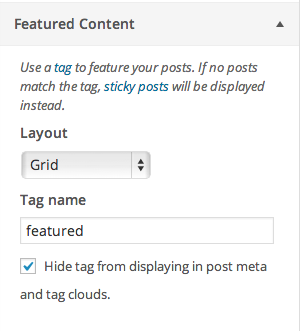
Featured Content SettingsFeatured Content is one of Jetpack’s lesser known features. But it’s a really powerful tool for theme development because you can use it to create a completely custom area in your theme for users to showcase posts. The appearance and placement is completely up to you, the theme author.

Your users can then specify which posts to show in that area simply by selecting a tag of their choice. There’s even an option to hide the tag from post meta and tag clouds.

Whether you are building an image slider on your homepage, or want to allow users to highlight specific posts, Featured Content makes it easier than rolling your own custom functionality. You can see a few examples of the feature in action here.


3. Automatically loading posts with Infinite Scroll

With Infinite Scroll active, users no longer have to click a link to get to the next set of posts on archive pages. Instead, your theme loads the next set of posts automatically into view when the reader approaches the bottom of the page. You’ve probably seen similar functionality on other sites, and thanks to Jetpack, it’s a snap to add it to your theme.


4. Instantly applying a Mobile Theme

Jetpack Mobile Front PageMobile internet usage is growing exponentially and any theme worth its salt should work on mobile devices. That’s why you’ll be happy to know that Jetpack ships with a full Mobile Theme ready-to-go out of the box.

Just use the .mobile-theme CSS class to style the mobile theme or take things a step further and use jetpack_is_mobile to target mobile visitors.

That way you can build the best user experience for your theme, no matter what device visitors are using.

Check out this article on customizing Jetpack’s mobile theme to learn more.


5. Customising CSS

If you’ve published a theme before you most likely know that users often want to customize its appearance. Savvy users might create a child theme, but more often than not, users will simply edit your theme’s files directly.

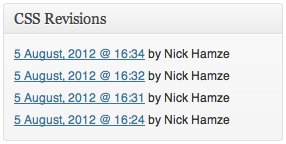
revision_listThat can get messy when you release a theme update that overwrites users’ modifications. But thanks to Jetpack, a much more user-friendly alternative is available through the Custom CSS feature which also includes a revision history.

After activating the feature, a ‘Custom CSS link’ is added to the Appearance menu in the Dashboard. From there, users can add their own Custom CSS, without touching the theme’s files. They can even use their favorite CSS pre-processer, as support for both SASS and LESS is built right in.


6. Providing Sharing functionality

The Sharing feature allows you to add social media sharing buttons to your theme. There are multiple display options built in and you can opt to use your own custom styles as well.

In this way you can integrate social sharing buttons in your theme, and keep complete control over their appearance. You can even alter the functionality with some jQuery magic. Our friends over at ThemeShaper have a great article with more information about this.


7. Integrating Social Links

Jetpack also makes it easy to include Social Links within your theme. After a user connects their social media accounts through Publicize, you can automatically use links to their accounts in your theme. You can add support with add_theme_support() and then use the Theme Modifications API to pull the data into your theme.


8. Showing similar content with Related Posts

Related posts in visually striking modeRelated Posts is one of Jetpack’s newer features. When activated, this adds a section to single posts that includes automatically generated links to similar content.

By default the section appears at the bottom of your content, but you can also move it to the top with a filter. In addition users can add a shortcode wherever they want the section to appear.

This means that you can include styling for the Related Posts section in your theme and then users are able to drop in a custom Related Posts section that matches the rest of their site wherever they want.


9. Additional resources

Finally, we’d love to see what you’ve done yourself and what you think of Jetpack. If you have questions, comments or your own tips drop us a comment below! In addition to that, we’re always open to suggestions, so feel free to get in touch. Thanks for flying with Jetpack!

Posted in Features, Tips & Tricks | Tagged , , , | 6 Comments
Photon and Themes

Photon and Themes

Theme crafters often ask whether Photon — the free Image Content Delivery Network module in Jetpack — can be used to speed up page loads and save on bandwidth when delivering images from their themes. The short answer: Yes! Read on for the how-to.

Continue reading → Photon and Themes

Posted in Features | Tagged , , | 20 Comments
  • Enter your email address to receive news and updates from Jetpack

  • Join 98.8K other subscribers
  • Browse by Topic