

Cross-site scripting (XSS) is one of the most common vulnerabilities reported in web applications. It often results in hackers stealing information (like login credentials) or changing content on your website — which can lead to further problems and reputation damage.
When it comes to WordPress websites, there are several ways to prevent XSS attacks. For starters, you can keep software up-to-date, implement a web application firewall (WAF), and use an activity log to detect suspicious activity.
On this page, we’ll take a closer look at cross-site scripting and the risks associated with it. Then, we’ll show you how you can use Jetpack Security to defend against WordPress XSS attacks, and discuss some additional security measures you can take. Let’s get started!
What is cross-site scripting (XSS)?
Cross-site scripting is a type of injection attack that involves the attacker planting malicious code into trusted websites. These scripts are often executed by a legitimate visitor who is tricked into clicking on harmful links, but scripts can sometimes run automatically upon a page load — requiring no user input at all.
In fact, any element that requires user input (like a signup or search form) can make your site susceptible to XSS attacks. Upon interaction with the form, attackers typically send links that direct visitors to vulnerable pages.
It’s important to be aware of the risks associated with XSS attacks in a WordPress environment, since cross-site scripting is the most reported type of vulnerability within bug bounty and disclosure programs. It has also remained the preferred attack vector for global hackers since 2019.
There are also different types of WordPress cross-site scripting attacks — stored, reflected, and DOM-based. With stored attacks, the malicious script is hosted on the server and impacts people as they visit the site, potentially leading to more widespread damage. With reflected attacks, however, people are tricked into clicking on a URL that leads to a script. DOM-based attacks attempt to inject malicious code into a visitor’s browser when they interact with the site by submitting a form or performing a similar action.
One of the most concerning problems with XSS attacks is that they can cause far more damage than other types of threats.
They can also deface or tamper with website content. Plus, if they aren’t resolved quickly, these attacks can result in reputational damage and a loss of trust with customers.
Three common types of XSS attacks
Now that you know a bit more about WordPress cross-site scripting, let’s take a more in-depth look at the three main types of XSS attacks.
1. Stored (persistent)
Stored XSS attacks are when websites receive data from untrusted sources, and that data is later included within HTTP responses.
The data can be submitted to the application in a number of ways. Most often, it’s submitted via HTTP requests in the form of blog post comments, chat room nicknames, or contact details attached to online orders. But it can also arrive from untrusted sources.
Then, attackers use HTML5 applications (usually HTML databases) to store harmful scripts. The malicious script is stored and executed each time the visitor accesses the target website, which is why stored XSS attacks are considered persistent.
2. Reflected (non-persistent)
Reflected XSS is the simplest form of WordPress cross-site scripting attacks. Similar to stored XSS, this attack occurs when websites receive data in an HTTP request. In this case, that data is immediately included within the HTTP response. This makes it non-persistent.
The website doesn’t perform any other data processing, so it’s easy for a hacker to quickly construct an attack. And if visitors click on the malicious URL, the script executes in the browser as part of the HTTP response.
Then, the script can carry out other actions that compromise legitimate users. Plus, the hackers can view and retrieve any sensitive or confidential information that the user has access to. Typically, these XSS attacks target error messages or search results pages.
3. DOM-based XSS
Unlike the other two types of XSS attacks, DOM-based XSS doesn’t store or deliver malicious scripts to the server. Instead, the user’s browser is the sole vulnerability. These attacks are more sophisticated, rare, and difficult to overcome.
When websites contain client-side JavaScript that processes data from untrusted sources, DOM-based attacks can occur. Input fields are particularly at risk, since the attacker can easily construct a malicious value that causes the script to execute. Then, the attack is carried out using the malicious URL in the same manner as reflected XSS attacks.
The risks associated with XSS attacks
At this point, you’re probably starting to understand why XSS attacks are such a problem. Now, let’s take a closer look at some of the main risks associated with this type of attack.
1. Data theft and exposure
A common aim of XSS is to access or steal sensitive data (like personal details or financial information). Plus, these attacks can be used to perform unauthorized actions like siphoning funds.
There are various ways this can be achieved. For instance, the attacker could use an XMLHttpRequest object to force the visitor to send money.
For websites that implement anti cross-site forgery request tokens, attackers can access this information by reading server responses or accessing cookies. The attacker can use the JavaScript to form valid requests and then force the victim to perform unauthorized actions.
2. Account and site takeover
Another reason for XSS attacks is to hijack legitimate accounts by stealing session cookies. This way, attackers can pose as the user, and access any sensitive data or functionality.
Usually, this occurs when the attacker inserts JavaScript code into a vulnerable field. Then, when the visitor accesses the page, the browser makes an HTTP request to the attacker’s server, which allows the attacker to steal cookies.
At this point, all the attacker has to do is set the cookies in a browser to impersonate the legitimate visitor and take over the session. This is especially dangerous if it’s an administrative account, since the hacker can gain full access to the web application.
3. SEO damage
Although some of the other effects of XSS can be more dangerous, it’s important to be aware that WordPress cross-site scripting attacks can also impact search engine optimization (SEO). There are multiple ways this can occur.
As an example, attackers can tamper with website content, inserting links to untrusted or spammy websites. Search engines may then penalize the website for promoting irrelevant or suspicious content.
Additionally, if websites are identified as containing malicious links previously injected via an XSS vulnerability, there’s a risk that search engines may blocklist them from the search results. This can severely impact the volume of organic traffic they receive.
What’s more, attacks can drastically disrupt the user experience (UX). This is likely to result in less engagement and high bounce rates, which signals to search engines that the website lacks value.
4. Reputational loss
Not only can XSS attacks affect SEO, but they can also cause lasting damage to a website’s reputation. In turn, this can lead to trust issues with customers and stakeholders.
If an XSS attack exposes sensitive user data, it’s easy to lose credibility and permanently damage customer relationships. Plus, even attacks that deface or tamper with content can negatively influence brand perception, especially if inappropriate content is displayed.
5. Legal and compliance issues
Finally, XSS attacks can result in legal and compliance issues. Data protection and privacy regulations like the general data protection regulation (GDPR) enforce strict requirements for companies to safeguard user data.
If an XSS attack results in a data breach that leads to non-compliance, businesses can face hefty fines and legal consequences. For instance, businesses can be liable for any harm suffered by customers. Meanwhile, industry bodies or certification authorities may dole out penalties.
Why WordPress is a common target for XSS attacks
WordPress is one of the most popular content management systems (CMS), and is used by 43.2 percent of all websites. While the platform is inherently secure, its popularity makes it a target for attacks. In the eyes of an attacker, the larger the audience, the more potential damage that can be caused.

What’s more, the open-source nature of WordPress means it has all kinds of developers who contribute to the ecosystem. This also means there’s more room for error.
Another reason WordPress is a common target of XSS attacks is that its contributing developers share regular community updates. In these updates, software security issues and vulnerabilities are often revealed, which hackers can then exploit.
Overall, WordPress core is quite robust and unlikely to have XSS vulnerabilities in core software. Unvetted or poorly-maintained plugins are more likely to have issues, so users should be discerning with their choices.
What are the common XSS vulnerabilities on WordPress?
Next, we’re going to take a look at the most common WordPress XSS vulnerabilities.
1. Outdated and poorly-coded plugins
Most WordPress websites consist of the core software, themes, and plugins. The problem with plugins, as discussed before, is that the developers behind them may have varying levels of expertise and abilities to provide continued support. So vulnerabilities may not be patched quickly.
In fact, there are almost 60,000 free plugins available via WordPress. It’s inevitable that some contain vulnerabilities at any given time.
Active developers will patch vulnerabilities with their next update, so the easiest way to prevent hackers from taking advantage of security gaps is to keep plugins up to date and delete the ones you no longer use. Additionally, it’s best to choose plugins from trusted developers and from the official WordPress repository or other vetted sources.
2. Outdated and poorly-developed themes
Themes affect the overall design of your WordPress website. Similar to plugins, poorly-coded themes can be exploited to carry out WordPress cross-site scripting attacks.
Out-of-date themes (and plugins) can also become easy targets. This is because, just like plugins, newer versions of themes and plugins often contain security patches and bug fixes discovered in the previous version.
Additionally, since older versions of the themes have been available for longer, it gives hackers plenty of time to identify existing vulnerabilities and exploit them. Therefore, it’s important to keep themes up to date, and only install them from trusted sources.
3. Core WordPress vulnerabilities
The WordPress core software is constantly being updated and re-released, often with security updates. But many website owners fail to update the core software when it’s available. In fact, only 66 percent of websites are running the latest version of WordPress.
The good news is that WordPress core software is very secure. In fact, according to the latest WPScan stats, only 2% of disclosed vulnerabilities come from the core software. Plus, when vulnerabilities are discovered, contributors often work very quickly to fix them.
For instance, there were four WordPress releases in 2022, and one of them (6.0.3) patched 16 vulnerabilities in one go. With this in mind, it’s important to update WordPress as soon as you can. If you’re worried about problems arising from updates, you can make a complete backup of your website and run the update in a staging environment first.
4. Unrestricted file uploads
There are many types of websites that enable visitors to upload files, usually via forms. But unrestricted file uploads provide attackers with opportunities to upload malicious files (like scripts or executables), which can compromise the security of a website and its visitors.
Unrestricted file uploads are also a target for stored WordPress XSS attacks. When this occurs, the malicious code can be executed each time a visitor accesses the compromised page, which can lead to data theft and session hijacking.
The good news is that you can prevent XSS attacks by enabling file verification, so attackers are unable to upload files that don’t use legitimate file extensions. You can also limit file sizes, and authenticate user sessions with multifactor authentication tools.
5. Vulnerable Rest API endpoints
A REST API uses HTTP requests to interact with data while conforming to the REST guidelines (which allows data to be exchanged between clients and servers). REST APIs communicate over the HTTP protocol and return responses (usually in XML or HTML formats) to take further action.
This makes REST APIs popular for building web applications, as well as mobile applications that need to interact with back-end servers. Plus, they’re highly-scalable, flexible, and can be used with any programming language. But without proper security measures, sensitive data can be left open to unauthorized access or manipulation by attackers.
For instance, an attacker could place malicious JavaScript code into the comments section of a blog post, which can then be executed by unaware visitors to steal user credentials. You can mitigate this by validating and sanitizing all inputs to the API, and using parameterized queries.
Five ways Jetpack Security defends against XSS attacks
Now that we’ve discussed some of the main WordPress XSS vulnerabilities, let’s take a look at how you can defend your website against XSS attacks. The easiest option is to install a WordPress security bundle like Jetpack Security.
This provides a suite of useful features for identifying and recovering from attacks and, even better, preventing them in the first place. In this section, we’ll discuss some of the main ways Jetpack Security protects websites against WordPress cross-site scripting attacks.
We guard your site. You run your business.
Jetpack Security provides easy‑to‑use, comprehensive WordPress site security, including real‑time backups, a web application firewall, malware scanning, and spam protection.
Secure your site1. An enterprise-grade web application firewall (WAF)
A web application firewall (WAF) sits in front of your website and filters all incoming traffic. Therefore, it can detect bad bots and hackers. This enables you to prevent a whole range of cyberattacks like XSS attacks, malware attacks, and SQL injections.
The good news is that if you use Jetpack Security, you’ll get access to an around-the-clock WAF. This adds a vital layer of protection to your site, especially when attackers attempt to exploit unpatched vulnerabilities.
With Jetpack’s WAF, you can configure rules, or even block specific IP addresses (regardless of the rules). Once Jetpack is installed on your site, you can go to Jetpack → Settings → Security → Firewall to enable the firewall.

Here, you can block or allow specific IP addresses.
In 2023, Jetpack’s WAF blocked well over eight million attacks.
2. Real-time malware detection and one-click fixes
Another way that Jetpack protects websites against XSS attacks is through real-time malware detection. This is automated, so it starts working as soon as you’ve successfully activated an applicable plan (like Security) with the Jetpack plugin or Jetpack Protect (a dedicated vulnerability and malware scanning plugin).
You can view scan results in a centralized location, where you can fix many of the issues with just one click.

If Jetpack does identify a problem during scans, you’ll immediately be notified by email, so you can resolve it right away.
Once using the feature, if you want to access one-click fixes like malware removal, you’ll need to provide your server credentials, which also makes scans faster and more reliable. You can easily locate the Scan interface by going to Scan within your WordPress dashboard.
There, you can move to the Scanner page to get a quick overview of your website’s current status or initiate a new scan. Meanwhile, the History tab enables you to view a list of threats that your website has suffered in the past.
3. Real-time, off-site backups
One of the easiest ways to recover from WordPress XSS attacks is to have an up-to-date copy of your website on hand. This way, you can revert to a backup, replacing all tables and files with older versions that are free from malicious code.
With Jetpack Security, you’ll get access to real-time backups that automatically save every change you make on your site.

Your web hosting provider may provide backups, but these are stored in the same location as your regular site files — so they may be compromised along with your site.
Plus, they can be very limited. You may only get backups once a day.
But with Jetpack, backups are taken in real time and stored in the cloud — which offers more protection. What’s more, Jetpack is built specifically to handle WordPress and WooCommerce websites. Therefore, not only does Jetpack back up tables and files, it also covers customer and order data.
4. One-click backup restores
As mentioned earlier, Jetpack offers real-time backups to help defend against XSS attacks, but you’ll also get access to one-click restores. This means you can get your site up and running again quickly to minimize the disruption and preserve your reputation.
Plus, you can specify the exact point in time to restore your site, thanks to the WordPress activity log. Restores keep all orders and products current. Better yet, you can access unlimited restores.
Jetpack VaultPress Backup is available on its own through the Jetpack plugin, with a Security or Complete plan, or through a dedicated plugin.
5. Activity log to monitor suspicious activity
Some XSS attacks can be carried out by unsuspecting users. Therefore, it can be a good idea to keep an activity log which enables you to monitor suspicious activity and identify the actions (or people) that cause security issues.
Paired with real-time backups, this makes debugging and restorations much easier. Plus, it enables you to effectively manage and repair your website. The list of actions is extensive, but you’ll be able to view plugin activations, attachment uploads, menu updates, and more.
Even with the free version, you can view the last 20 events that took place on your site. For large websites, you might prefer Jetpack Security, which keeps a full 30-day log and one year of archives.
How to install Jetpack Security now and protect your site (in three steps)
Now that you know the benefits of using Jetpack Security to prevent WordPress XSS attacks, let’s take a look at how to install this powerful tool on your site.
Step 1: Install Jetpack and activate Jetpack Security
Before you install Jetpack, it’s important to make sure you’re running the latest version of WordPress. Additionally, you’ll need to create a WordPress.com account (even if you use the self-hosted WordPress platform).
Then, go to Plugins → Add New and enter “Jetpack” into the search bar. Look for Jetpack – WP Security, Backup, Speed & Growth and click on Install Now → Activate.
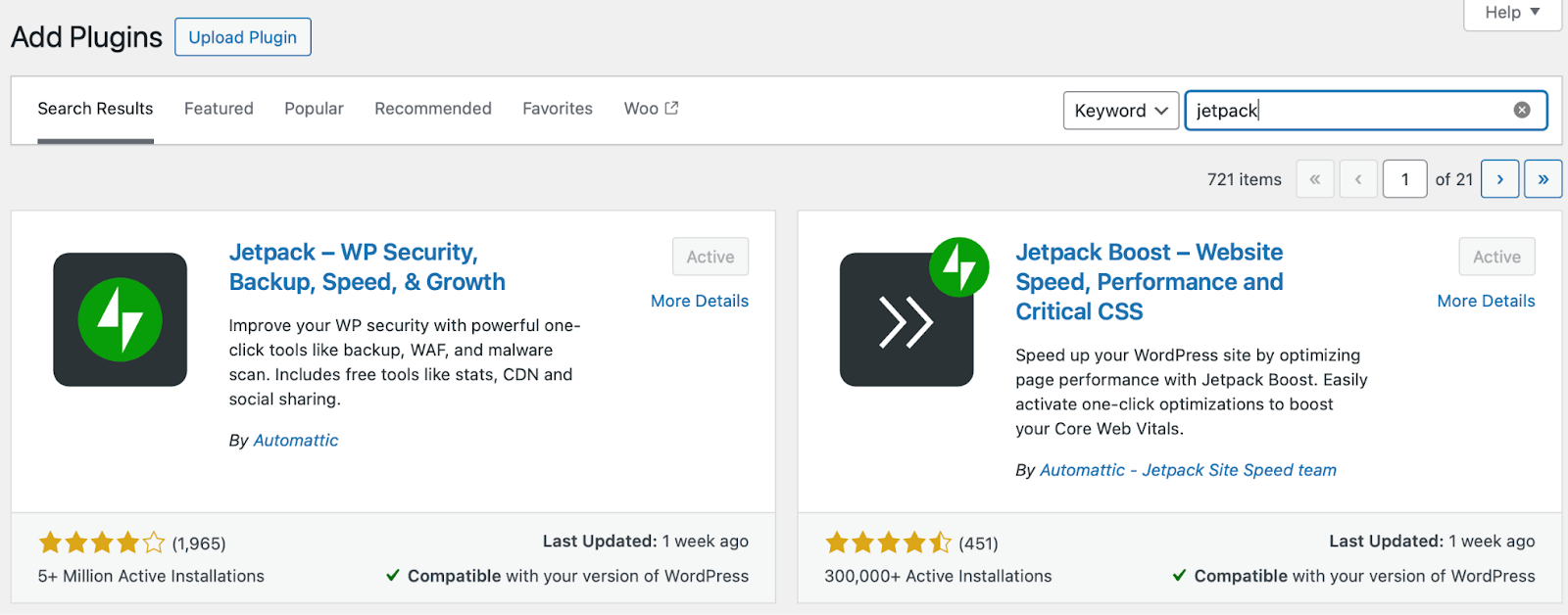
At this point, you’ll be prompted to set up Jetpack. Click on the button to get started.
Step 2: Connect to your WordPress.com account
Once you click on the Set up Jetpack button, select Approve to connect to your WordPress.com account. This is necessary to use some of Jetpack’s features.

You’ll need to log in to your existing account, or create a new one. Once the connection is established, you can choose a Jetpack plan on the pricing page.
The free version of Jetpack offers many helpful tools on its own. But to get the comprehensive protection, you’re looking for, you’ll need to purchase Jetpack Security or Jetpack Complete. These provide access to premium features like real-time backups, malware and vulnerability scanning, anti-spam tools, and more.
Note that it’s also possible to pay for just the premium features you want à la carte. So if you just need some of the functionality Jetpack provides, that’s totally possible.
Step 3: Complete the setup process
To make sure Jetpack is connected to the right WordPress.com account, you can go to Jetpack → Dashboard → At a glance and scroll down to Connections.

If this worked, you’re now ready to configure the settings to meet your needs. To get started, you can visit Jetpack → Settings → Security to turn on downtime monitoring, activate Jetpack’s WAF, and enable brute force protection.
Once you’re happy with your selections, just make sure to save your changes. It’s as simple as that!
Three additional security measures to prevent XSS attacks
Jetpack Security is a complete solution for defending WordPress websites against XSS attacks. Still, you can never be too safe. So, here are some additional measures you can take to further secure your site.
1. Keep your software updated
As we’ve discussed, outdated software is at risk for many security threats, including WordPress cross-site scripting attacks. This is because it lacks the newest security updates, and hackers may have learned how to exploit existing vulnerabilities.
Therefore, it’s important to update software regularly. It’s also a good idea to back up your website before you run updates. For extra safety, you can run updates first in a secure staging environment.
Then, from the WordPress dashboard, you can go to Dashboard → Updates to see if any plugins, themes, or core software have updates available.

You can click on the Check again link to make sure there are none. And if you see any plugins or themes listed below, simply check the boxes next to the relevant options, and then select the Update Plugins or Update Themes button.
2. Enforce strong password policies
Another way to prevent XSS attacks is to enforce strong password policies across your website. This prevents attackers from gaining access to legitimate user accounts.
This can actually be more difficult than it sounds. For instance, even a six-character password that uses a mix of uppercase and lowercase letters, numbers, and symbols can be cracked instantly. But if you double the length of the password (and keep all other parameters the same), it’s estimated to take 34,000 years to crack.
On top of this, you can educate users about the importance of strong passwords, and what makes a password weak. It’s also helpful to regularly evaluate user roles and permissions. Plus, you might want to implement additional measures like multifactor authentication to verify user identities.
3. Follow secure coding practices
Bad code (or gaps in code) can be exploited by attackers and used to carry out WordPress cross-site scripting attacks. That’s why it’s important to follow secure coding practices.
For instance, it’s a good idea to validate user input, which analyzes and rejects any malicious or unexpected characters or patterns. It’s also important to encode output data, which converts the user inputs into a safe format that can’t be interpreted as code.
Additionally, it’s best to avoid user-generated HTML. Although you may be tempted to let visitors create content with HTML tags (in posts or comments), attackers can insert malicious scripts or links in the content. Instead, it’s best to use alternatives like Markdown or BBCode.
Frequently asked questions
Although we’ve tried to cover all the information you need to know about WordPress XSS attacks, you might still have some questions. In this section, we’ll answer the most common ones.
What exactly is an XSS attack, and how does it affect WordPress websites?
Cross-site scripting (XSS) attacks usually involve malicious code or scripts that are injected into web pages that will be viewed by legitimate visitors. Often, these scripts are then executed by unsuspecting victims. For instance, to function they might need a visitor to click on a link or fill out a form.
Attackers can steal cookies to impersonate legitimate visitors too. This can result in data theft, content manipulation, and more. Falling victim to this type of attack can have lasting effects on SEO and brand reputation.
How can I tell if my WordPress site has been targeted by an XSS attack?
WordPress cross-site scripting attacks can be difficult to detect (especially DOM-based XSS attacks). But a good starting point is to review your website’s code, and search for all places where input from an HTTP request could make its way into the HTML output.
It’s easier to detect XSS attacks if you use an activity log, which you can access via Jetpack Security. This way, you can view any changes made to your site, and identify the user account that made the changes. Plus, you can store these actions for up to 30 days.
What steps should I take immediately if I discover an XSS attack?
The easiest way to recover from WordPress XSS attacks is to restore a backup of your website. With Jetpack Security, you can restore backups with just one click, and choose the exact version of your site to which you’d like to restore. Additionally, it’s a good idea to update your login credentials.
How does Jetpack Security protect my WordPress site against XSS attacks?
Jetpack Security is a complete security solution that provides a range of features to defend your site against XSS attacks. For instance, you can filter all incoming traffic using Jetpack’s enterprise-grade web application firewall (WAF). Plus, you can access real-time malware scans, automatic backups, one-click restores, and more.
Jetpack Security: The leading security plugin for WordPress sites
Cross-site scripting (XSS) is one of the most concerning types of WordPress security threats. That’s because it enables hackers to gain access to your entire website, and can result in data theft, reputation loss, and even legal issues.
With this in mind, it’s important to protect your site against XSS attacks. To do that, you can regularly update software on your website, implement file upload restrictions, and follow coding best practices. Better yet, you can install a complete solution like Jetpack Security.
Jetpack Security is a robust WordPress security plan that offers all the features you need to prevent XSS attacks. When you install it on your site, you’ll get access to real-time cloud backups, regular malware scans, and an enterprise-grade WAF to filter incoming traffic. Get started today!

We guard your site. You run your business.
Jetpack Security provides easy‑to‑use, comprehensive WordPress site security, including real‑time backups, a web application firewall, malware scanning, and spam protection.
Secure your site Jetpack