Jetpack AI brings site logo generation to your WordPress.
Requirements for Jetpack AI site logo generation
The Jetpack AI Logo Generator requires a subscription to the paid Jetpack AI plan or the Jetpack Complete bundle, and a website connected to Jetpack (Jetpack plugin version 13.7 or higher) using the block editor with Jetpack Blocks activated. For more details, check the Requirements.
Cost and Usage limitations
The Jetpack AI Logo Generator requires a subscription to the paid Jetpack AI plan or a Jetpack Complete bundle.
The Logo Generator allows you to use AI to enhance the prompt used for the logo. Each usage of the Enhance prompt feature counts as one request.
For more information about upgrading, please refer to our detailed Usage limitations and upgrades guide.
Generate a custom site logo with Jetpack AI
The tool is available directly in the Block Editor as an extension of the Site Logo Block. It works on the Site Editor as well.
To generate a site logo:
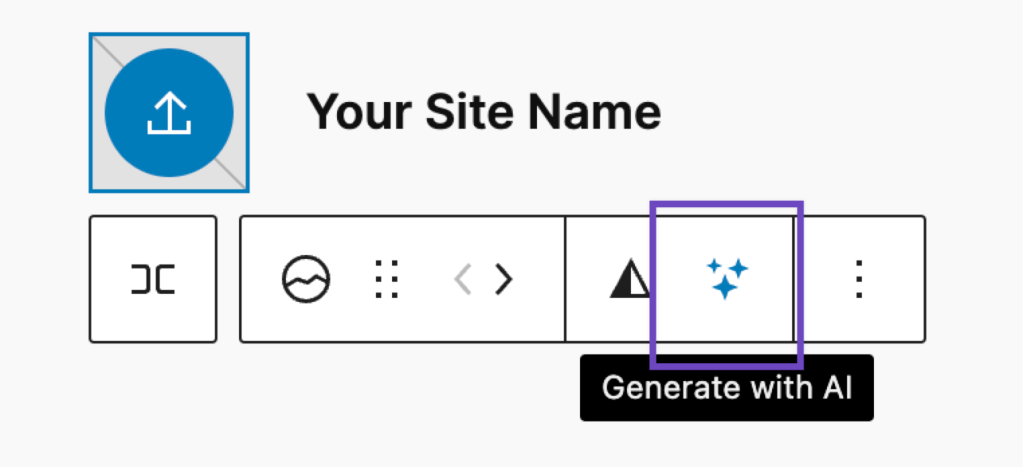
- Insert a Site Logo block in your post or page editor, or select an existing Site Logo block to modify it.
- Locate the Generate with AI icon in the block toolbar – it looks like stars or sparkles ✨.
- Click the sparkles ✨ icon.
- The AI Assistant will open a pop-up window.
- You can describe your site in the prompt field and choose one of the available styles (such as Line Art or Origami) from the dropdown.
- Click the Generate button. The screen will show a loading animation while the logo is created.
- Once ready, you can accept the image as your logo (click Use on block) or generate another one. Before clicking Generate again, you can modify the prompt and style. Previously generated images remain available for selection.
Modify your prompt to fine-tune your site logo
The initial prompt for your first logo is generated for you automatically, based on your site’s name and description. For subsequent logo generations, you can modify the existing prompt or create a new one.
You can also click on the “Enhance prompt” link in the upper right of the description. This will add further definitions and design choices to the prompt as suggestions, enclosed in square brackets for easy modification. Each prompt enhancement is generated by AI and counts as one request.
Specifics about your Jetpack AI-generated site logo
Logos are generated in PNG format with a resolution of 1024×1024 pixels.
All images are automatically saved to your Media Library, allowing you to use them later as logos or within your post content.
Still need help?
Please contact support. We’re happy to advise.
 Jetpack