

WordPress is one of the most used website building platforms because of its wide range of potential applications. You can build an online store, host a blog about your favorite hobby, create a community through forums, or represent a large corporation.
But however you use it, a primary responsibility is keeping your site safe from hackers. That’s why it’s important to understand how to prevent Structured Query Language (SQL) injection attacks.
The good news is that there are plenty of steps you can take to protect your WordPress site from this malicious code. Learning how to detect, remove, and prevent SQL injections can help you effectively secure your valuable data and make you less susceptible to attack.
What is an SQL injection and how does it work?
To understand how the injections work, it’s helpful to first learn what SQL is. This is a common language used in database development.
Your website uses it to retrieve critical information from your database and generate dynamic content. Some of the SQL databases include MySQL (WordPress sites), MongoDB, and SQL Server.
Your WordPress website uses a database to manage your site’s essential data and content, like your pages, posts, and comments. It arranges this information in tables.
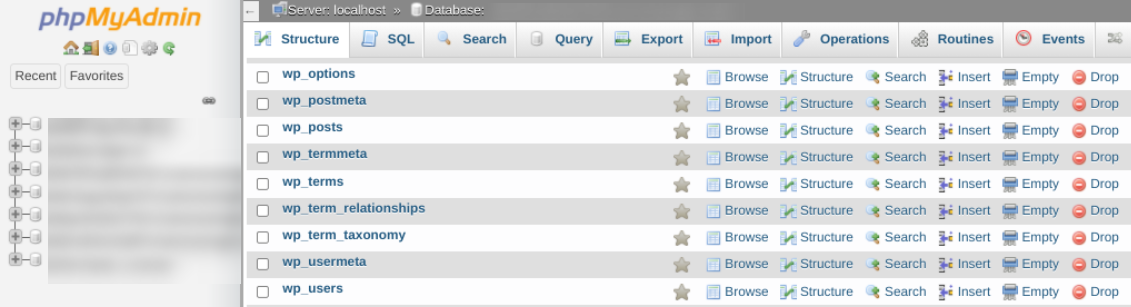
Your database is where your most sensitive data is stored. Therefore, any attack that exposes it can have severe consequences.
SQL injection (SQLI) is a type of hacking method cybercriminals use to infiltrate and manipulate WordPress databases. Essentially, hackers can exploit loopholes in the backend coding of websites and insert malicious code into data entry fields.
This code allows nefarious actors to execute SQL commands to the database servers via web requests using query strings, cookies, and <input> elements. This means that they can create, access, change, and eliminate data from your WordPress database.
There are many different entry points where this can occur. The most commonly-used entry fields include signup, login, and contact forms, as well as search bars and shopping carts.
Let’s say you have a form on your website where visitors can enter their phone number. Cybercriminals can use that entry field to insert malicious code that requests the admin username and password.
Types of SQL injections
There are several different types of SQL injections. One category is what’s known as “in-band.” This is the simplest type of injection and includes error-based attacks.
With this technique, hackers use the injection to gain details about the database structure and table names. For instance, an error message may provide the table name included in a query. Then the hacker can use this information to create new attacks.
Another type is what’s referred to as “blind SQL injection.” This is when the attacker sends a variety of queries to the database to find out how the site analyzes the responses. Doing so can help them probe responses to SQL queries to identify potential vulnerabilities, and request the database to transmit data to an external source.
How common are SQL injection attacks?
Unfortunately, SQL injection attacks are prevalent. In fact, according to a report published by Akamai, between 2017 and 2019, around two-thirds of attacks on software applications were attributed to SQL injections.
A separate 2020 Vulnerability Stats Report also revealed that SQL injections made up 42 percent of the most common critical vulnerabilities.
SQL injections are a possibility for any website using SQL databases, like WordPress-based sites, especially those that have input fields like contact forms and search boxes.
Why SQL injections are dangerous
SQL injections are dangerous for a handful of reasons. First, they give hackers the opportunity to steal sensitive information, like your login credentials or customer data.
Not only can hackers use SQL injection to procure and steal data, but they can also use it to delete that data. This means you’re at risk of losing private and essential information used to run your website.
In addition, there’s a risk of reputation damage and loss of revenue. A data breach can hurt your business, and you might lose the trust of your customers or fans.
Plus, these attacks can lead to Google blocklisting your site. If you end up on this list, many potential visitors will receive a warning that your site is unsafe. Most of these folks will turn back and may never return. Plus, Google will also significantly demote your search rankings — which could lead to a major, long-term loss of organic traffic that’s difficult to recover from.
How to detect SQL injections
There are a few signs that might indicate that you’ve fallen victim to an SQL injection attack. One is that you’re suddenly receiving an influx of emails via your site’s contact form. Another indicator is if you’re receiving strange popups, ads, and error messages, especially if they’re redirecting you to seemingly sketchy websites.
Unfortunately, the signs of an SQL injection attack are not always so obvious. As we mentioned earlier, sometimes hackers want to use injections to steal information rather than damage your website. Therefore, they may use more subtle methods that make detection more difficult.
SQL injection detection and scanning tools
The only way to know for sure if you’ve been targeted is to conduct a scan on your website. Fortunately, there are a variety of online tools that can help you detect SQL injections on your WordPress site.
For example, you can use Pentest Tools to conduct two free scans of your website.
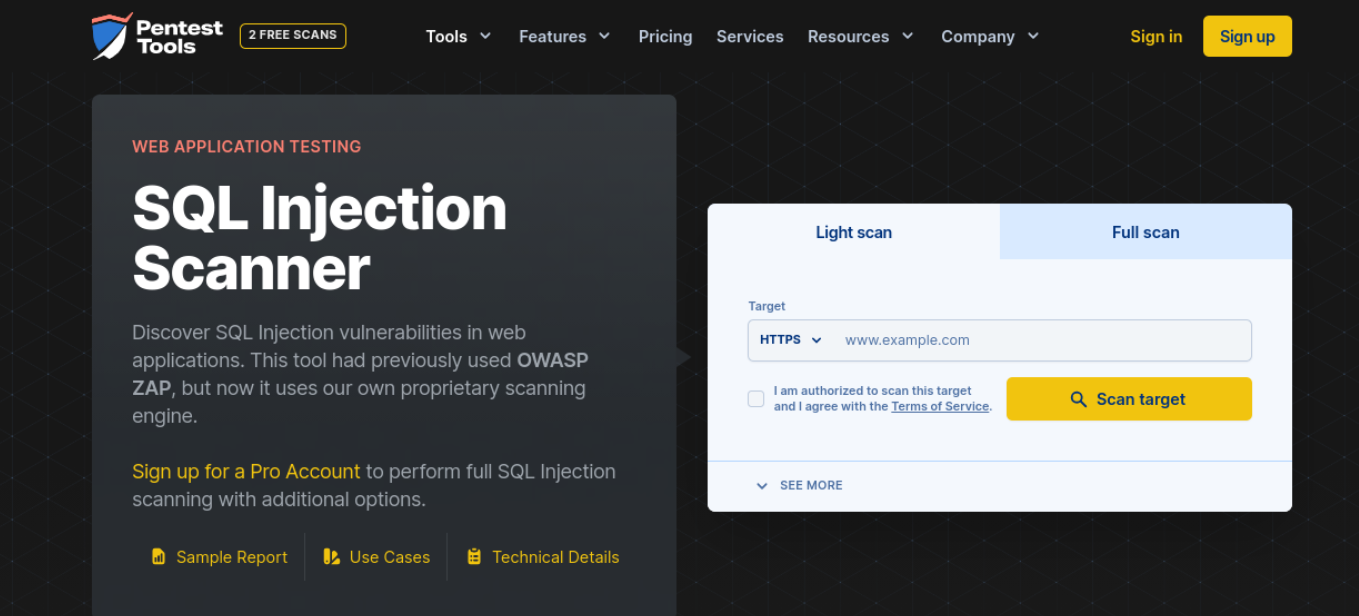
There are two options: a Light scan or a Full scan. For the latter, you’ll need to upgrade to a paid plan. Simply enter your website’s URL and click on the Scan target button. If there are any vulnerabilities present, the scan will reveal them.
How to remove SQL injections from your WordPress website
1. Restore a backup
Your best option to remove SQL injections is to restore a backup of your site. If you’re using Jetpack Backup, all you have to do is use the activity log to determine when the attack happened, then restore a backup from before that point. Your site will be returned to the state it was in before the hack.
However, it is important to note that, in some cases, SQL injections are done little by little, over time. You may need to go back pretty far to find a clean backup, which could result in data loss.
And though restoring a backup may get your site up and running again, if sensitive data was stolen, you’ll still have to deal with the ramifications of the breach.
2. Use a website cleaning service
Another option is to use a third-party website cleaning service to scan your site and fix any SQL injections. Sucuri is one option — simply submit your website to their team and let them take care of everything else. Since they’re experts, they can remove malware from your database more effectively than the average developer.
3. Remove the injections yourself
Finally, if you have experience managing and working with MySQL, you can manually clean up your database. Note, though, that this is an advanced technique and if you don’t know what you’re doing, making any changes can lead to issues.
How to prevent SQL injection attacks in the future
There’s no way to ensure that your site is ever 100 percent secure, but there are measures you can take to minimize your risk of attack. Let’s take a look at eight methods you can use to prevent SQL injections in WordPress.
1. Validate (or sanitize) your data
The key to preventing SQL injections in WordPress is to secure any entry field that can be used to enter data or content on your website. This includes comment sections and forms. Therefore, it’s important to validate and sanitize data entered into these fields upon submission.
Input validation and sanitization let you check the commands submitted by users. Sanitization even lets you change the commands. It’s an effective way to ensure that these commands don’t contain malicious code or strings of characters.
Validation ensures that the information entered in a form matches the requested format before processing the request. For example, if you had an entry field for an email address, the data wouldn’t be validated if the ‘@’ symbol wasn’t present.
The easiest way to create validation for your form data is by establishing rules for your forms. The process for doing so will depend on the specific plugin you’re using. For instance, if you use the premium version of Formidable Forms, you can add your own custom Input Mask Format for text fields.
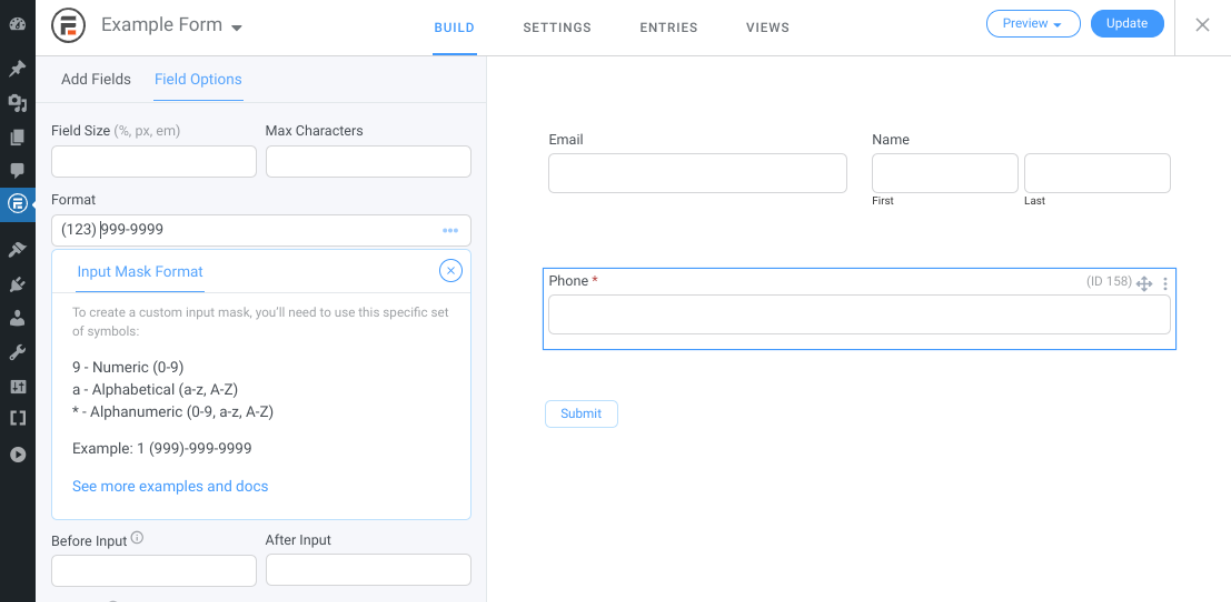
Adding input format requirements can limit the risk of SQL injection. Sanitization can help ensure that the data entered is safe to process once it’s been validated.
Most WordPress form plugins automatically sanitize form data. However, you can add additional security measures. Rather than open-ended answers, consider using drop-down menus and multiple choice options. You could also restrict the use of special characters.
2. Install a WordPress security tool
Jetpack’s WordPress security plugin can monitor your site for vulnerabilities that could lead to SQL injections. This gives you the opportunity to fix them before someone takes advantage.
With downtime monitoring, you’ll know the second your site goes down so you can react quickly. And with real-time backups, you can restore your site in full.
As one of the best security plugins on WordPress, it also provides security tools like:
- Malware scanning for your WordPress files, along with one-click fixes for the majority of problems
- Anti-spam solutions to protect your comment and contact forms
- Brute force attack protection to keep hackers out
3. Keep your website and database updated at all times
Using outdated software and tools can introduce a whole range of vulnerabilities on your site for hackers to exploit. This is why it’s important to make sure that you keep your WordPress website updated at all times.
Currently, nearly half of WordPress installations aren’t using the most updated version. Therefore, you may want to consider enabling automatic updates to ensure that you’re always running the most recent version of WordPress.
To do this for Core updates, you can navigate to the wp-config.php file in the root directory of your website. Next, copy and paste the following code snippet to the file:
define( 'WP_AUTO_UPDATE_CORE', true );You can enable automatic updates for your plugins by navigating to the Pluginsscreen from your admin dashboard. Then, click on Enable Automatic Updates from the far-right column.

To minimize vulnerabilities, we recommend removing any unused plugins or themes from your site. It’s also wise to update your SQL version. If you’re using cPanel for your hosting control panel, you can update your MySQL software from your dashboard. Depending on your hosting provider, you may be able to enable automatic SQL updates.
4. Change your WordPress database prefix
By default, every time you install WordPress, the CMS uses “wp_” as its database prefix. We highly recommend changing this to something else, since hackers can use it to exploit vulnerabilities via SQL injection.
Before getting started, you should back up your database. This way, if anything goes wrong, you have a safe version to restore.
Next, connect to your site via FTP client or your host’s File Manager and browse to the wp-config.php file, which is located in the root directory of your site. In the file, look for the table_prefix line, then change “wp_” to something else:
$table_prefix = 'wp_a12345_';When you’re done, save the file. That’s it!
5. Use a firewall
Another strategy you can use to protect against SQL injection is to install a firewall. This is a network security system that helps you monitor and control the data coming into your WordPress site. This can catch and filter out malicious code, including those from SQL injection attacks.
There is a wide variety of WordPress firewall tools you can use. Some popular options include Wordfence and Sucuri. These tools won’t prevent attackers from submitting commands, but they can help block them from actually accessing your site.
6. Hide the version of WordPress you’re using
Having the version of your WordPress site publicly available can make it easier for attackers to exploit known vulnerabilities, as each version comes with its own set. Therefore, to safeguard your site, we recommend hiding the version you’re using.
Doing so is quick and easy. To get started, simply copy the following code snippet:
remove_action(‘wp_head’, ‘wp_generator’);Next, navigate to the functions.php file of your current WordPress theme. You can do this directly from the Theme Editor in WordPress, using an FTP client, or using your host’s File Manager. Paste the code within the file, then save your changes.
7. Eliminate unnecessary database functionality
The more functionality that your WordPress database has, the more susceptible it is to attack. To minimize your risk of SQL injection, consider normalizing your database and eliminating any unnecessary functions and content.
In a nutshell, database normalization refers to the process of organizing your data. The purpose of doing this is to eliminate any redundant data in your database and make sure that all data dependencies make sense. You can do this by putting your database in First Normal Form.
If you want a more beginner-friendly option to cleaning up your WordPress database, you can use a plugin. There are a handful of solid options to choose from, like WP-Optimize.
This freemium plugin helps you clean your database without needing to manually run SQL commands through phpMyAdmin. Instead, you can use it to optimize your database directly from your WordPress dashboard.
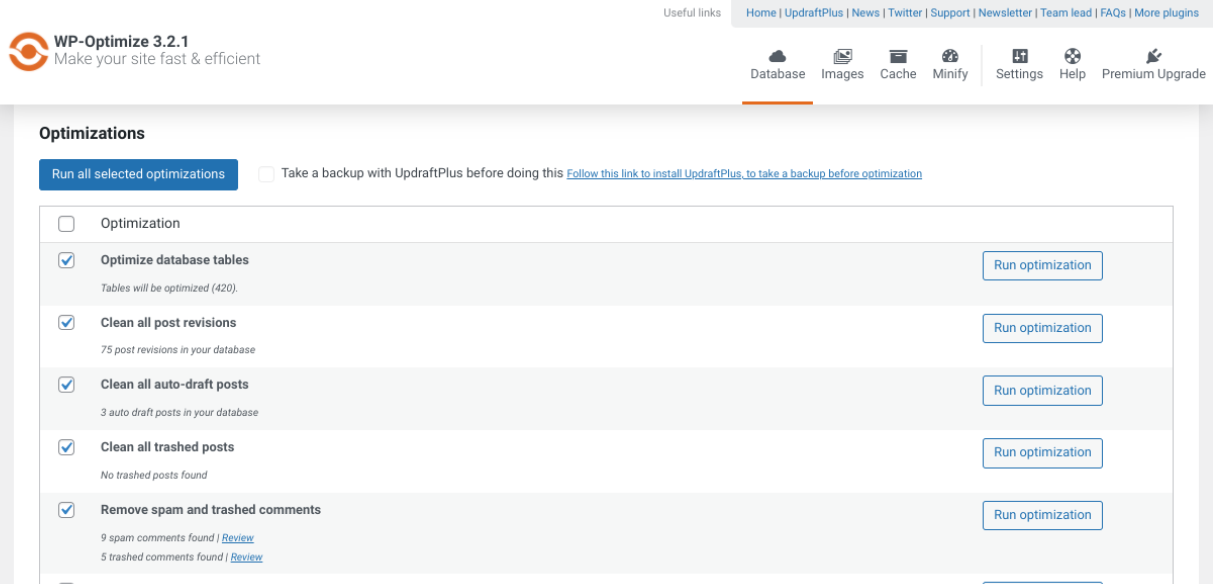
It removes all unnecessary information from your database, including trash and unapproved comments. WP-Optimize also lets you defragment your MySQL database tables with a single click.
8. Limit user access and permissions
You can assign various roles for WordPress users on your website. These can range anywhere from a subscriber to an administrator. With each role, you can control how much access is granted and which “capabilities” they’re given.
To help strengthen your security, it’s best to limit the number of roles with full admin access and user permissions. The fewer people who are able to change and enter data, the less likely you are to face an SQL injection attack.
To customize the user roles and permissions in WordPress, you can navigate to Users → All Users.
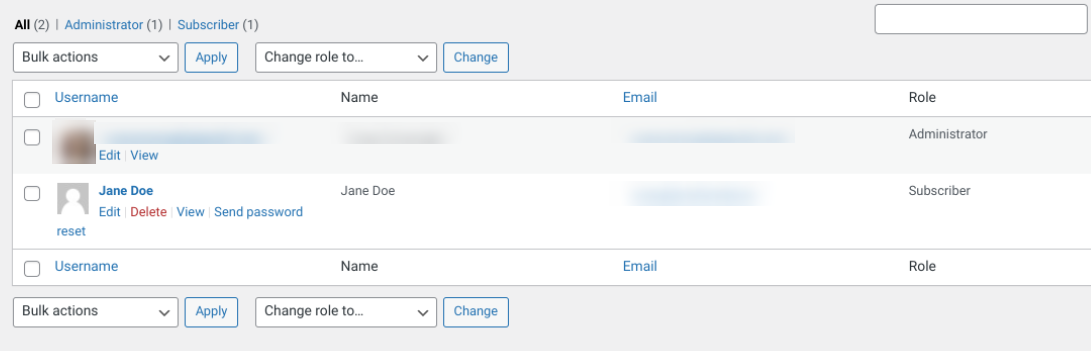
Then, click on the Edit link below the name of the user you want to limit access and permissions for. On the next screen, you can change their role using the dropdown Role menu.
When managing your WordPress user roles, we also recommend deleting any accounts that are no longer in use. Eliminating roles that are outdated can minimize your vulnerabilities.
9. Avoid using nulled plugins
Nulled plugins are premium tools that have been stolen and are offered for free. While they may seem like a great deal, not only are you hurting the original developer by not paying them for their work, you’re also risking a hack.
Nulled plugins are very often full of malicious code and backdoors that give hackers an easy gateway into your site. Avoid them at all costs and, instead, use plugins from reputable sources.
Safeguard your WordPress site from SQL injections
To protect your WordPress site and data from the threat of cybercriminals, it’s important to be aware of some of the most common methods used to gain access to your site. When it comes to strengthening the security of your database, this means being well-versed in SQL injections.
As we discussed in this post, an SQL injection can have damaging effects on your WordPress site, from exposure of sensitive data to the loss of content and revenue. Fortunately, there are a handful of steps you can take to detect, remove, and prevent injection attacks.
No website is ever entirely safe, but by following the above tips and techniques, you can significantly reduce your chances of falling victim to SQL injections.
Frequently asked questions
What is the most effective way to prevent SQL injection in WordPress?
The most effective method to prevent SQL injection in WordPress is using prepared statements for every database query you write. Prepared statements separate the SQL code from the user-supplied data. This ensures that the database treats user input strictly as data, not as executable commands.
In WordPress, you achieve this by using the $wpdb->prepare() function. This function automatically handles escaping and quoting for you. It replaces placeholders in your SQL query with sanitized values. Relying on manual escaping or sanitization functions alone is risky because it is easy to miss a spot. Prepared statements provide a robust layer of defense that works reliably across different types of input.
Using a security plugin adds a necessary second layer of protection, but prepared statements are the primary defense at the code level.
How does the $wpdb->prepare() function actually protect my database?
The $wpdb->prepare() function protects your database by forcing a strict separation between your SQL query structure and the data you want to insert. When you use this function, you write your SQL query with placeholders like %s for strings or %d for numbers instead of inserting variables directly. WordPress then takes your safe query structure and sends it to the database separately from the user’s input.
The database engine knows exactly what the command is before it sees the data. Even if a hacker tries to insert malicious SQL code into a form field, the database will treat that code as just a meaningless string of text. It will not execute the hacker’s commands. This method neutralizes the attack before it can ever run. It is the standard for secure coding in WordPress development.
Why are outdated plugins a major risk for SQL injection vulnerabilities?
Outdated plugins are a massive risk because hackers actively study old versions of software to find security holes. When a plugin developer discovers a vulnerability, they release an update to fix it. The moment that update is public, hackers know exactly where the weakness is in the older versions. They then use automated scripts to scan thousands of websites looking for anyone still using the old, vulnerable version.
If you have not updated your plugins, your site is an easy target. These known vulnerabilities are often well-documented on hacker forums. Keeping everything updated ensures you have the latest security patches. It is one of the simplest yet most critical maintenance tasks you can do to keep your site safe.
What is the difference between sanitizing and validating user input?
Sanitizing and validating are two distinct steps in processing user data securely. Validation checks if the data matches what you expect before you accept it. For example, if you ask for an email address, validation ensures the input actually looks like an email address. If the user types “12345,” validation rejects it.
Sanitizing, on the other hand, cleans the data to make it safe to store or display. It removes or encodes potentially dangerous characters. For instance, sanitization might strip out HTML tags or script commands from a comment. You need to do both. Validate first to reject bad data immediately, then sanitize what is left to ensure it cannot harm your database or your visitors. Using both creates a strong filter against malicious input.
How do I identify if my WordPress site has already been compromised by SQL injection?
Detecting a successful SQL injection attack requires checking several key areas of your site. First, look for new, unauthorized admin accounts in your users list. Hackers often create these to maintain access. Next, check your posts and pages for spam links or strange content you did not add. You might also notice your site redirecting visitors to unusual websites. Performance issues, such as your site loading very slowly or crashing frequently, can also be a sign.
Security plugins often have logs that show failed login attempts or blocked attacks. Reviewing these logs can give you a clue. If you suspect a breach, use a malware scanner immediately. It will search your database and files for known malicious code signatures that are invisible to the naked eye.
Is it necessary to change the default wp_ database prefix?
Changing the default wp_ database prefix is a smart security hardening measure known as “security by obscurity.” While it does not stop a determined hacker who has already found a way to inject SQL commands, it does stop automated bot attacks.
Many mass-scale attacks are scripted to target the default wp_users or wp_options tables. If your tables are named x9z_users instead, those basic scripts will fail because they cannot find the tables they are programmed to attack. It adds a small hurdle that forces an attacker to work harder. It is not a silver bullet, but when combined with other security practices, it reduces the noise from automated attacks and makes your site a slightly less attractive target.
Why are custom contact forms a common target for SQL injection?
Custom contact forms are frequent targets because they accept direct user input that is often processed and stored in the database. Developers building custom forms sometimes forget to sanitize this input properly. They might take the text directly from the “Message” field and insert it into a database query.
This is the exact scenario hackers look for. They will type SQL commands into the name or message fields instead of real text. If the code does not use prepared statements or sanitization, that command executes on your database. Because forms are public-facing and designed to take data, they are the most obvious entry point for an attacker. Always use reputable form plugins or strictly vetted code to handle form submissions.
What specific WordPress functions should I use to sanitize text input?
WordPress provides a set of specific helper functions designed to clean different types of data. For standard text fields like names or titles, use sanitize_text_field(). This function removes all HTML tags and strips out extra whitespace. If you are handling email addresses, use sanitize_email() to remove invalid characters. For filenames, use sanitize_file_name().
When dealing with URLs, use esc_url_raw() for saving to the database or esc_url() for displaying on the screen. Using the correct function for the specific data type is crucial. A function meant for email might not be strict enough for a URL. Knowing which tool to use ensures you are cleaning the data appropriately without breaking the functionality of your site.
How often should I scan my WordPress database for vulnerabilities?
You should scan your WordPress database for vulnerabilities on a regular, automated schedule. A daily scan is the best practice for most active websites. Automated security tools can run in the background without disrupting your work. These daily checks ensure you catch any issues immediately.
In addition to automated scans, you should perform a manual review or a deeper scan whenever you install a new plugin, change your theme, or modify custom code. Security is not a one-time setup. New vulnerabilities are discovered every day. Regular scanning using a reputable solution like Jetpack Security minimizes the window of time a hacker has to exploit a weakness on your site. Consistency is key to staying ahead of potential threats.

 Jetpack