

Often the first line of defense in cybersecurity, passwords can be vulnerable to various threats, leading to unauthorized access, data breaches, and a cascade of other security issues. Understanding why passwords are compromised and learning how to prevent this kind of issue is therefore essential.
This comprehensive look into compromised passwords will go into the techniques used to breach them, and the risks a breach poses. More importantly, it will offer actionable strategies to protect against these vulnerabilities.
What is a compromised password?
A compromised password is one that’s been disclosed, intentionally or unintentionally, to unauthorized individuals. This exposure places the account or data it protects at risk from those with bad intentions. Compromised passwords are a significant concern in cybersecurity because they can lead to a range of security breaches, from personal data theft to large-scale corporate hacks.
The concept is straightforward, but the implications can be quite severe. When a password falls into the wrong hands, it can lead to serious damage that might go undetected until it’s too late. This makes understanding the anatomy of password compromises crucial for individuals and organizations alike.
It’s not just about a password being stolen — it’s about the potential consequences of the password theft.
Common causes of compromised passwords
There are dozens, if not hundreds, of possible causes behind leaked passwords. Sometimes they’re the result of a simple mistake. Other times they’re the result of an intricate scheme. We’ll look at a few of the most common causes below.
Weak passwords and password reuse
One of the most common causes of compromised passwords is the use of weak passwords that are easy to guess. Simple passwords, such as “123456” or “password”, are effortless for attackers to crack.
Additionally, reusing passwords across multiple accounts significantly elevates the risk. If one account is breached, all accounts using the same password are potentially compromised.
Phishing and social engineering tactics
Phishing, a form of social engineering, involves tricking individuals into revealing their passwords. This deception often occurs through emails or messages that mimic legitimate sources, persuading users to enter their credentials on fake websites. The sophistication of these tactics can make them difficult to detect, leading to inadvertent password disclosure.
Data breaches and third-party vulnerabilities
Data breaches at large organizations can lead to the exposure of millions of passwords. These breaches often occur due to vulnerabilities in the company’s security systems or successful hacking attempts. When third-party services are compromised, all users relying on these platforms become vulnerable.
Malware and keylogger intrusions
Malware, particularly keyloggers, pose a significant threat. These malicious programs covertly install themselves on a user’s device and record keystrokes, including password entries. This information is then transmitted to the attacker.
How passwords are compromised
Understanding the mechanisms and techniques behind password compromises is essential for effective protection. The sophistication and variety of these breaches highlight the need for robust security measures and informed user practices. By learning about the risks, individuals and organizations alike can better anticipate and mitigate the risks.
Password cracking
Password cracking is a method used by cybercriminals to gain unauthorized access to accounts by essentially “guessing” passwords.
Brute force attacks
Brute force attacks involve systematically checking all possible password combinations until the correct one is found. This method is simple, but can be effective against weak passwords. The time it takes to crack a password using brute force depends on its complexity and length.
Dictionary attacks
Dictionary attacks use a list of common words and phrases to guess passwords. Unlike brute force attacks that try every combination, dictionary attacks rely on the likelihood that someone is using common words or simple variations of them as their password.
Rainbow tables
Rainbow tables are precomputed tables used to reverse cryptographic hash functions, primarily for cracking password hashes. By using rainbow tables, attackers can quickly find a password if its hashed value is known, circumventing the need to try every possible password combination.
These techniques highlight the importance of strong, complex passwords and advanced security measures to protect against such attacks.
Social engineering
Social engineering is a tactic used by cybercriminals to manipulate individuals into divulging confidential information, such as passwords. This method relies more on human psychology than on technical hacking techniques.
Phishing
Phishing involves sending fraudulent communications that appear to come from a reputable source, usually through email. These emails often urge the recipient to enter their information on a fake website that looks strikingly similar to the legitimate one.
Spear phishing
Spear phishing is a more targeted form of phishing. Attackers customize their approach to fit their specific victim, often using personal information to make the attack more convincing. This could involve posing as a trusted colleague or organization and sending personalized messages to the victim.
Impersonation
Impersonation in the digital realm involves pretending to be someone else to gain trust and access sensitive information. This could be achieved through fake social media profiles, hijacked email accounts, or other means. The attacker, once trusted, can coax out passwords and other confidential data.
Awareness and education are crucial in defending against social engineering attacks. By understanding these tactics, individuals and organizations can more effectively identify and avoid deceptive practices.
Data breaches and leaks
Data breaches and leaks represent a significant threat to password security. In fact, these are often the primary goal of many data breaches. A breach occurs any time sensitive, protected, or confidential data is accessed or disclosed in an unauthorized way. This often involves personal information such as passwords, financial details, and health records.
Data breaches can occur through various means. We’ll outline a few of the most pervasive ones below.
Cyberattacks
Hackers can exploit vulnerabilities in a system to gain unauthorized access to the data.
Insider threats
Sometimes, breaches are caused by individuals within an organization who misuse their access to sensitive information.
Accidental exposure
In some cases, data leaks can occur through accidental exposure, such as an employee mistakenly sending sensitive data to the wrong person or leaving it unprotected.
Inadequate security measures
Breaches often happen due to insufficient security measures, where systems lack the necessary defenses to protect against hacking attempts.
The consequences of data breaches are far-reaching. Not only do they lead to the immediate risk of compromised passwords and accounts, but they also damage trust, harm reputations, and impact finances.
Protecting against data breaches involves implementing strong cybersecurity practices, regularly monitoring systems, and educating employees about the importance of data security.
For individuals, staying informed about the latest security breaches and changing passwords regularly are key steps in safeguarding information.
The multifaceted risks of compromised passwords
Compromised passwords pose risks that extend far beyond unauthorized access to a single account. These risks often impact individuals and organizations in dozens of ways. Below, we’ll review the direct and secondary impacts of compromised passwords, highlighting the extensive nature of these risks.
Direct consequences
Unauthorized access
The most immediate consequence of a compromised password is unauthorized access. With this access, hackers can misuse personal accounts, corporate systems, or sensitive databases for malicious activities.
Data theft and privacy breaches
Compromised passwords often lead to general data theft, including personal information, confidential business data, and proprietary intellectual property. This can have severe privacy implications for individuals and competitive disadvantages for businesses.
Financial loss
Financial loss is a significant risk associated with compromised passwords. These can range from unauthorized purchases and transactions to more extensive financial frauds, impacting both individuals and organizations.
Identity theft and fraud
Compromised passwords can lead to identity theft, where an attacker uses stolen personal information to impersonate their victim. With this new identity in hand, criminals can commit fraudulent activities like opening new accounts or obtaining loans in the victim’s name.
Impact on personal and organizational reputation
The fallout from a password breach can severely damage the reputation of individuals and organizations. The perceived lack of security can erode trust with customers, partners, and the public, leading to long-term reputational harm.
These direct consequences demonstrate the critical importance of maintaining robust password security and the need for effective measures to prevent password compromise.
Secondary impacts
The domino effect on connected systems
These days, digital systems are so interconnected that access to one account can provide a gateway to numerous other accounts and systems. This is especially true when password reuse is so common. The resulting domino effect can magnify the impact of a single compromised password.
Legal actions and liabilities
Organizations suffering from password breaches often face legal consequences. They may be held liable for failing to protect customer data, leading to lawsuits, fines, and regulatory actions. These legal challenges can be costly and damaging to the organization’s credibility.
We guard your site. You run your business.
Jetpack Security provides easy‑to‑use, comprehensive WordPress site security, including real‑time backups, a web application firewall, malware scanning, and spam protection.
Secure your siteCompliance with data protection laws
Data breaches resulting from compromised passwords can result in non-compliance with data protection laws like GDPR and CCPA. This can attract hefty fines and require extensive measures to regain compliance, adding to the financial and operational burden.
Understanding these secondary impacts underscores the importance of robust password security practices, not only to prevent direct damages but also to mitigate broader risks that can have lasting effects on individuals and organizations.
How to avoid getting your passwords compromised
Create strong passwords
Creating strong, unique passwords is the first step in safeguarding your accounts. A strong password should be a complex combination of letters, numbers, and special characters. Avoid using easily guessable information like birthdays or common words.
Password length and complexity
The length and complexity of a password are pivotal in defining its strength. Longer passwords are inherently more secure due to the increased number of possible combinations that a bot must try in a brute force attack. A minimum of 12 to 15 characters is recommended.
Complexity is equally important. A complex password is a blend of uppercase and lowercase letters, numbers, and symbols. This complexity makes it exponentially harder for password-cracking tools to decipher the password, as each additional character type increases the number of possible combinations.
Use special characters, numbers, and mixed cases
Incorporating a mix of character types in your passwords is essential. Special characters (like !, @, #) and numbers add layers of difficulty. An effective strategy is to replace letters with similar-looking numbers or symbols (e.g., replacing “o” with “0” or “E” with “3”).
This approach, known as “leet” speak, can enhance password strength while keeping it memorable. Unfortunately, hackers are becoming increasingly skilled at cracking these kinds of tricks, so you shouldn’t rely on them alone.
Avoid common words and patterns
Passwords that contain common words, phrases, or sequential patterns (like “qwerty” or “12345”) are especially vulnerable to dictionary attacks. Attacks often use pre-compiled lists of common passwords and variations, so to enhance security, avoid using these predictable elements. Instead, opt for random combinations of characters or use a passphrase — a sequence of words that creates a longer password (e.g., “Blue#Coffee7!Rainbow”).
Avoid reusing passwords
Reusing passwords across multiple accounts is a common pitfall. If one account is compromised, all other accounts with the same password are at risk. To maintain security across all platforms, use a unique password for each account. This practice ensures that a breach on one site doesn’t lead to a domino effect of compromises on other sites.
Use password managers
Password managers are invaluable tools in maintaining strong, unique passwords for every account. They generate, retrieve, and store complex passwords, so you don’t have to remember each one.
Password managers also typically offer encrypted storage, ensuring that your passwords are secure. Many can automatically fill in your credentials on websites, reducing the risk of falling for phishing sites, since they only autofill on the legitimate website.
Implement multifactor authentication (MFA)
Multifactor authentication (MFA) adds a critical layer of security beyond a password. It requires one or more additional verifications, which significantly decreases the likelihood of unauthorized access. This system requires both something you know (a password) and something you have (a smartphone or a security token). Even if a password is compromised, MFA can often stop an attacker from gaining access.
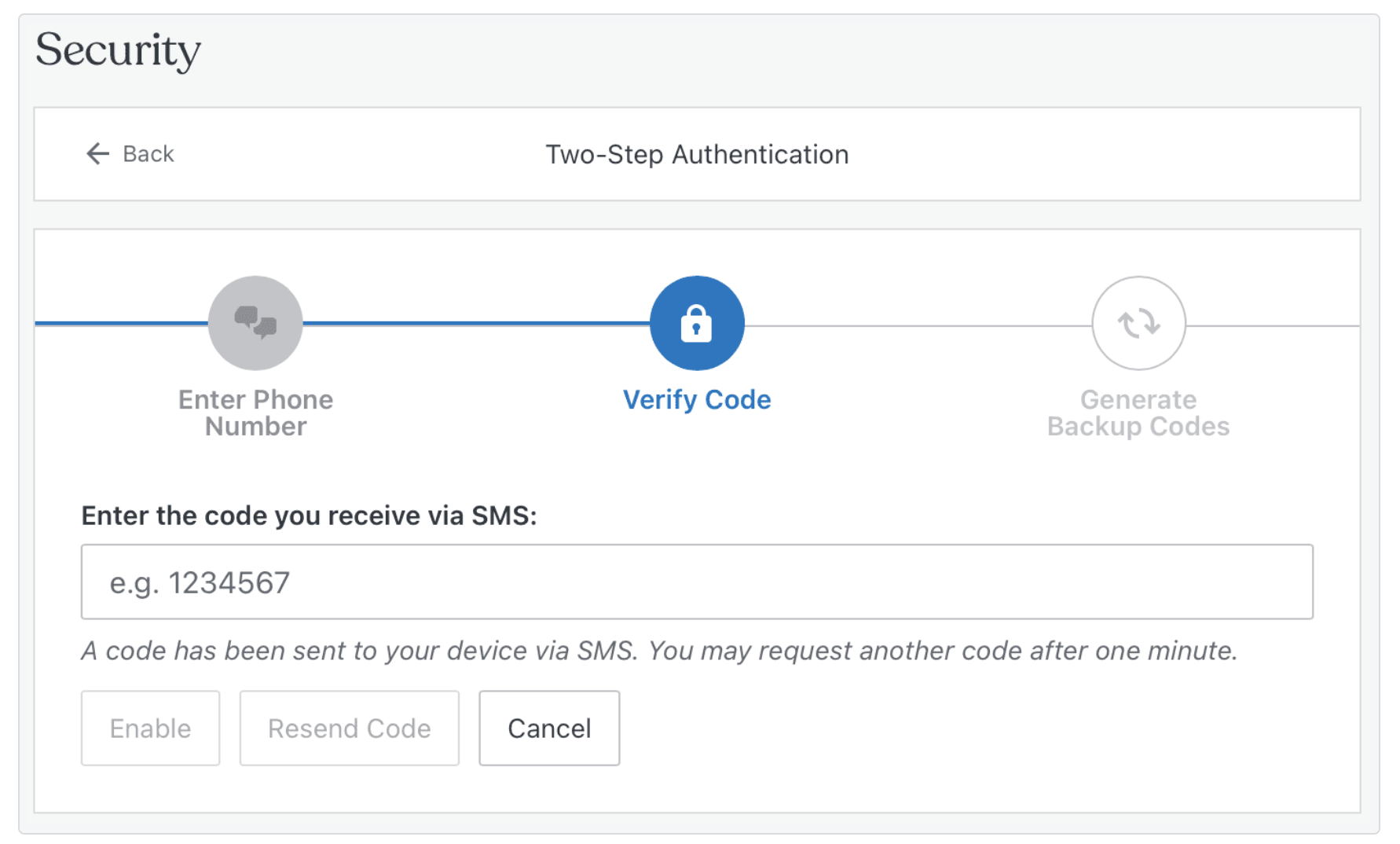
Update passwords regularly
Regularly updating passwords is a key practice in digital security. Changing passwords every three to six months is best, especially for sensitive accounts. This limits the exposure window if a password is compromised. When updating passwords, ensure that the new one is significantly different from the previous one to maximize the security benefit.
Monitor account activity for data breaches
Monitoring account activity is crucial for early detection of unauthorized access. Many services now offer alerts for new logins or unusual activities. Additionally, using services like “Have I Been Pwned” can inform you if your account details have been part of a data breach. Staying vigilant and responsive to these alerts allows you to take immediate action, like changing your password, to secure your account.
Enforce password policies in organizations
Organizations must enforce strong policies to protect sensitive data. This includes guidelines for complexity, rules against password sharing, and requirements for regular password changes. Additionally, organizations should consider implementing enterprise-grade password managers to help employees maintain secure passwords without the risk of forgetting them.
Educate employees and users on password hygiene
Education is a crucial component of cybersecurity. Regular training sessions, reminders, and educational materials can help team members understand the importance of strong passwords and how to create them.
This education should include the risks associated with weak passwords, the methods hackers use to compromise passwords, and best practices for password creation and management.
Use a website security solution if you run a website
For WordPress website managers, implementing a robust website security solution is vital. Jetpack Security for WordPress offers comprehensive protection. It includes features like protection from brute force attacks, secure login (2FA), and downtime monitoring.
By integrating Jetpack Security into their website management, WordPress admins can significantly enhance their site’s defenses against password-related attacks, ensuring the security and integrity of visitor data and website functionality.
Jetpack Security not only provides an additional layer of protection, but it also offers peace of mind, knowing that the website is guarded against the most prevalent and damaging types of cyber threats.
Learn more about Jetpack Security.
Frequently asked questions
What does ‘compromised password’ mean?
A compromised password is one that is no longer a secret. It means someone you did not authorize now knows your password. This can happen if a company you have an account with suffers a data breach.
Once your password is known by others, they can use it to access your account and personal information. Your account is not secure until you change the password to a new one that only you know. You should also change this password on any other site where you used it.
What does it mean if my password has been compromised?
If your password has been compromised, it means you are at risk. Strangers can now log into your account. They might be able to see your private information, like your name, address, or credit card numbers. They could also change your account settings or pretend to be you by sending messages to other people.
It is very important to act quickly. You must secure your account immediately by changing the password and checking for any activity you do not recognize.
How do password leaks happen?
Password leaks happen when a company’s computer systems are broken into. Hackers find weak spots and steal user data, including usernames and passwords.
Another common way is through phishing attacks. This is when a bad actor tricks you into typing your password into a fake website that looks real. Sometimes, people accidentally download harmful software, called malware, onto their computer. This software can record what you type, including your passwords, and send them to the attackers.
How common are password leaks?
Password leaks are very common and happen every day. Large companies and small businesses can both be targets for hackers. Billions of accounts have been exposed in data breaches over the past several years.
Because so many websites and services exist, there is a constant risk that one of them might be breached. This is why it is not safe to use the same password for multiple accounts. If one account is leaked, all your other accounts using that same password become unsafe.
What are the most common mistakes people make that lead to compromised passwords?
The journey to compromised passwords often begins with common, overlooked mistakes. The most frequent of these include:
- Using simple and predictable passwords. Opting for passwords that are easy to remember often means they’re easy to guess. This includes using personal information like names, birthdays, or simple sequences (e.g., “123456”).
- Reusing passwords across multiple accounts. Many individuals use the same password for multiple accounts. If one account is breached, all others are equally vulnerable.
- Ignoring software updates. Failing to update software can leave security vulnerabilities unpatched, making it easier for hackers to exploit weaknesses.
- Clicking on phishing links. Phishing attempts, which often look deceptively legitimate, can trick users into voluntarily giving away their passwords.
- Not using multifactor authentication (MFA). Skipping this additional layer of security makes accounts more susceptible to breaches.
How do cybercriminals use leaked passwords for further attacks?
Cybercriminals exploit leaked passwords in several ways:
- Credential stuffing. Using automated tools to test leaked passwords on various websites, exploiting password reuse.
- Targeted attacks. Utilizing personal information gleaned from one account to tailor phishing attacks or scam attempts on other platforms.
- Identity theft. Using personal information associated with compromised passwords to impersonate the victim for fraudulent activities.
Why are my passwords compromised?
Your passwords can be compromised for a few main reasons. The most frequent reason is a data breach at a service you use. This is not your fault. Another reason is using weak passwords that are easy to guess, such as “123456” or “password.”
You might also be tricked by a phishing scam into giving your password away. Reusing the same password across many different websites also makes you a bigger target. If one site gets hacked, criminals will try your leaked password on many other popular websites.
What should you do if you suspect your password has been compromised?
If you suspect that your password has been compromised, immediate action is crucial. You can start with these steps:
- Change your password. Do this for the affected account and any other accounts where you’ve used the same password.
- Check for anomalies. Review recent account activity for any unauthorized actions.
- Enable or update two-factor authentication. If you haven’t already, set up multifactor authentication. If it’s already set up, ensure it’s working correctly and update recovery codes if necessary.
- Notify the relevant parties. Contact the service provider of the compromised account and, if necessary, alert your financial institutions or legal authorities.
- Run a security scan. Use a reliable security tool to check your devices for malware.
Can a strong password still be compromised?
Yes, even a very strong password can be compromised. If the company that stores your password has a data breach, your strong password can be stolen along with everyone else’s. No password is safe if the system holding it is not secure.
This is why a strong password alone is not enough protection. You also need to use two-factor authentication. This security measure helps protect your account even if someone manages to steal your password, because they will not have your phone to get the login code.
How can I check if my password has been leaked?
You can use a free online service to check if your email address was part of a known data breach. A well-known and respected tool for this is called “Have I Been Pwned.” You enter your email address, and it will tell you which data breaches your account information has appeared in.
Some password manager tools also have this feature built-in. They can automatically monitor your passwords and alert you if one of them shows up in a new leak. This helps you find out quickly so you can take action.
What is a password manager and should I use one?
A password manager is a secure tool that creates and stores very strong, unique passwords for all of your online accounts. You only need to remember one main password to unlock the manager. It then fills in your login details for you automatically.
You should definitely consider using one. It is one of the best ways to improve your online security. Using a password manager helps you avoid using weak or repeated passwords. It makes it easy to have a different, complicated password for every single website you use.
What is two-factor authentication (2FA) and why is it important?
Two-factor authentication adds a second layer of security to your accounts. After you enter your password, you have to provide a second piece of information to prove it is you.
This is usually a temporary code sent to your phone or generated by an app. It is very important because even if a hacker steals your password, they cannot log into your account without also having your phone. It is one of the most effective ways to protect your accounts from being taken over.
Is it safe to save passwords in my web browser?
Saving passwords in your web browser is convenient, but it is not the safest option. If someone gets access to your computer while it is unlocked, they can easily view all the passwords saved in your browser. Also, some types of malware are designed specifically to steal passwords stored in browsers.
A dedicated password manager is a much safer choice. Password managers encrypt your passwords with strong protection, making them much harder for criminals to steal, even if your computer gets infected.
How often should I change my passwords?
You do not need to change your passwords on a regular schedule if they are strong and unique. The old advice to change passwords every 90 days is outdated. It is more important to have a different, strong password for every account.
You should only change a password for a specific reason. For example, change it immediately if you learn that a service you use has had a data breach or if you have any reason to think someone else might know your password. Otherwise, focus on using a password manager and two-factor authentication.
For website managers and owners, what are the best ways to avoid password compromise?
For website managers and owners, mitigating the risk of password compromise involves several steps:
- Implement strong password policies. Enforce the creation of complex passwords and regular updates for all users.
- Use security plugins. Using tools like Jetpack Security can greatly enhance your site’s defenses. Jetpack Security offers features like brute force attack protection, making it harder for attackers to gain unauthorized access.
- Regularly update and patch systems. Keeping your website’s software up to date is crucial in protecting against known vulnerabilities.
- Educate your team. Ensure that everyone involved in managing the website is aware of the best practices for password security and understands how to identify phishing attempts.
How can I secure my website from password cracking techniques like brute force attacks?
Securing your website from password cracking techniques involves a combination of good practices and robust security solutions:
Limit login attempts. Implement features that lock out users after a certain number of incorrect password attempts.
Use strong passwords and MFA. Encourage or enforce the use of complex passwords and multifactor authentication for all accounts.
Monitor for suspicious activity. Keep an eye on login patterns and watch out for unusual activity.
Implement security tools like Jetpack Security. For WordPress site owners, Jetpack Security provides a comprehensive security solution. It protects against brute force attacks, monitors for suspicious activity, and ensures secure logins. This integrated approach is crucial in shielding your site from the most common and damaging password attack techniques.
Learn more about Jetpack Security.

We guard your site. You run your business.
Jetpack Security provides easy‑to‑use, comprehensive WordPress site security, including real‑time backups, a web application firewall, malware scanning, and spam protection.
Secure your site Jetpack