New to Blogging? Install These Five Jetpack Features First

You just started a blog and you’re ready to share it with the world. (Welcome to the wonderful world of blogging!)

Lucky for you, you’ve stumbled onto our blog, so hopefully you’ve been given the good advice to install Jetpack. Jetpack is a plugin for WordPress with many features (cough, cough, more than 40) to make your life as a blogger a whole lot easier.

With so many features to explore, where to begin? We’ve got you covered.

If you’re new to blogging (or to Jetpack), activate these five features first.

copy-of-get-people-to-stay-on-your-website-longer_-2

1. Keep your site safe and secure with Brute Force Protection.

When you’re new to blogging, the last thing you want is to worry about your site’s security. Breathe easy knowing that your site is secure with Brute Force Protection.

This feature allows you to protect your site against brute force attacks, which sadly, are becoming more and more of a frequent concern for website owners. By enabling Brute force protection, your site will automatically block unwanted login attempts.

2. Spread the love on social media with Sharing.

Make it super simple for your blog readers to share your posts!

Sharing lets you add buttons to blog posts to give readers the ability to share a post to Facebook, Twitter, Tumblr, Pinterest, and a host of other social media/web services to amplify your message.

Screen Shot 2016-08-19 at 7.53.36 AM

3. Keep readers on your website longer with Related Posts.

Help readers better navigate your site by pointing them to related content you know they’ll love based on the blog post they’re currently reading.
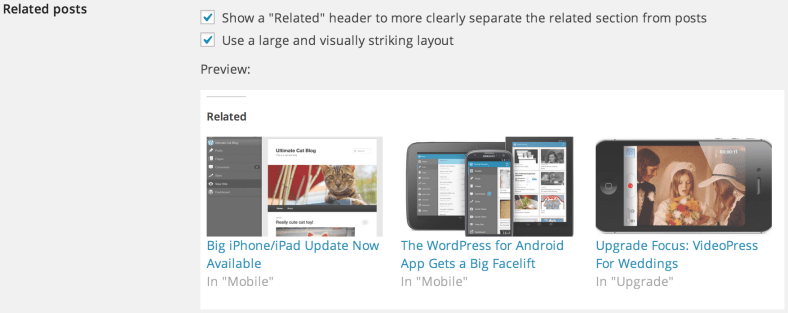
related-posts-configs

Related Posts scans all of your posts, analyzes them, and selects at least three related archived blog posts to showcase underneath or above your post. This helps readers figure out what to read next and keeps them on your site even longer.

4. Be the first to know when your website experienced downtime with Monitor.

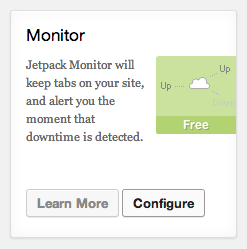
Ugh. Dreaded website downtime. It’s never fun when your site goes down. Monitor keeps tabs on your site and alerts you the moment downtime is detected.

Fun fact: Monitor checks your site every five minutes and notifies you as soon as a problem arises. We’ll also email you when your site is back up!

5. Make your blog a beautiful place to visit with Site Accelerator (Photon).

Photos are an incredibly important piece of the puzzle when it comes to finding success as a blogger. Compelling visuals help keep site visitors interested and engaged.

Screen Shot 2016-08-19 at 7.56.40 AM

If you don’t size your photos properly though, you can seriously slow down your site. That’s where Jetpack’s Site Accelerator comes in handy. Site Accelerator (Photon) is an image acceleration and editing service. What does this mean for you? Less load time on your host and faster image loading for your readers.

Seasoned bloggers, what do you think? Which Jetpack features would you recommend to a new blogger?

Don’t have Jetpack installed yet to try out these features? If you don’t currently have Jetpack, be sure to install it so you can begin taking advantage of all the plugin’s features. The easiest way to install Jetpack is via your site’s Dashboard. Please follow these instructions to install and connect Jetpack.

Posted in Tips & Tricks | Tagged , , , , | 10 Comments

Securing your Site with Jetpack

jetpack-security

Website security is important, although it can seem daunting or tedious — it doesn’t have to be. These six simple and effective best practices will help you protect your WordPress website from malicious, unwanted attention (hint: Jetpack can help!).

Continue reading → Securing your Site with Jetpack

Posted in Security | Tagged , , , , , , | 5 Comments

“Hear it from us first”: Why every site should run Jetpack

Jetpack is a WordPress plugin that helps you optimise your site on various fronts: traffic, development and user experience amongst others. There is one feature however which I feel is critical: Jetpack Monitor. Simply put, Jetpack Monitor keeps tabs on your site and alerts you the moment that downtime is detected.

angryclients2

Like a lot of people who work in web, before I joined the Jetpack team I did quite a bit of client work: both freelance and at agencies. For me the absolute worst thing in this business is receiving a call from a client, most likely while you’re relaxing on a beach or just waking up, desperately asking you to fix her site because she’s losing money, clients or brand value while her site is down.

Jetpack Monitor might not do away with the frantic scrabbling you’ll need to do to fix the site but it will put you back in the driving seat. Because you get notified first you can turn the tables around and call your client yourself, calmly saying “Hey, as I’ve been keeping tabs on your site I noticed it just went down 10 seconds ago. Don’t panic, I’m on it.” At times the problem might even be a trivial one meaning that you can actually call your client and say that its already sorted!

Of course the same applies if you maintain your own site. You’ll get notified by us rather than by one of readers (or customers) making it more likely you can fix the problem before it affects too many of your users.

That’s it. With Jetpack Monitor, if your site goes down, you’ll hear it from us first.

Its entirely likely, indeed desirable, that you will turn this feature on when you install Jetpack and then never think about it again. But if, for whatever reason, your site or your client’s site does go down you will be thanking your lucky stars this feature is enabled.

Try Jetpack for yourself by connecting it to your site or by downloading the plugin files directly if you prefer that route. Oh, and do let us know in the comments if you have any questions or suggestions.

Posted in Features | Tagged , , , | 14 Comments
Jetpack Monitor Module Card

Jetpack 2.8: Introducing Markdown and Improving Monitor

We’re thrilled to announce that our latest update is out the door! Jetpack 2.8 includes improvements to Jetpack Monitor and also introduces a brand new Markdown module.

Jetpack Monitor Module Card

Improved Jetpack Monitor notifications

Multiple users can now receive Jetpack Monitor email notifications. As an admin user linked to WordPress.com, you can opt in to receive these notifications right from your dashboard. Just navigate to the Jetpack page, find the Monitor module card, and click on Configure. Then, check the “Receive Monitor Email Notifications” setting and save your changes. Now if your site ever goes down you will receive notifications to your WordPress.com linked account email!

Write more efficiently with Markdown

Since introducing Markdown on WordPress.com, we’ve had a lot of requests to bring it over to Jetpack. Well, queue the trumpets, start the drumroll, Markdown is here!

For those who don’t know, Markdown is a quick way to add formatted text without writing out any HTML. Markdown lets you compose links, lists, and other styles using regular characters and punctuation marks. If you want a quick, easy way to write and edit rich text without having to take your hands off the keyboard or learn a lot of complicated codes and shortcuts, then Markdown might be right for you. We do strongly suggest sticking with the “Text” tab in the Editor when using Markdown.

Here is an example of Markdown in the text editor:

Markdown in text editor

And here is that same Markdown converted to HTML in the Reddle theme:

Markdown converted to HTML in Reddle

Isn’t that pretty awesome? You can check out the announcement post over at WordPress.com for more information about Markdown and see our Markdown support page.

Publicize Support for Custom Post Types

For our developer friends out there, we’ve added Publicize support for custom post types, allowing you and your clients to automatically post new entries from any CPT to your social media networks. You’d need to make one small tweak in the code defining the CPT—just add 'publicize' to the CPT’s 'supports' array.

For example, to enable the title, editor, Publicize, and Jetpack’s new support for Markdown: 'supports' => array( 'title', 'editor', 'publicize', 'wpcom-markdown' ),

As always, if you notice any issues with this release, just give us a shout over at the forums or send us a message through our contact form. Thank you for flying with Jetpack!

Posted in Releases | Tagged , , , , , | 29 Comments
  • Enter your email address to receive news and updates from Jetpack

  • Join 98.8K other subscribers
  • Browse by Topic