Jetpack 6.7 is now available for download. This release brings you a few exciting new features that make your site faster and safer.
Continue reading → Jetpack 6.7: New Site Accelerator and Activity View

Jetpack 6.6 is now available for download. This release brings you two features that will make your website more attractive to readers and search engines alike (and a slew of the usual bug fixes and small enhancements).
Continue reading → Jetpack 6.6: Better Site Verification Tools

Publishing content on a regular basis is a great strategy to increase your website’s organic traffic — website visitors who didn’t get to your site by clicking on an ad. But getting those readers is only half the battle.
If you want visitors to subscribe to your newsletter, make a purchase, or engage with your content in any way, you have to keep their attention long enough for a meaningful interaction.
Here are three tips that will help you publish engaging content.
Continue reading → How To Create Content That Keeps Your Readers Coming Back

You just started a blog and you’re ready to share it with the world. (Welcome to the wonderful world of blogging!)
Lucky for you, you’ve stumbled onto our blog, so hopefully you’ve been given the good advice to install Jetpack. Jetpack is a plugin for WordPress with many features (cough, cough, more than 40) to make your life as a blogger a whole lot easier.
With so many features to explore, where to begin? We’ve got you covered.
1. Keep your site safe and secure with Brute Force Protection.
When you’re new to blogging, the last thing you want is to worry about your site’s security. Breathe easy knowing that your site is secure with Brute Force Protection.
This feature allows you to protect your site against brute force attacks, which sadly, are becoming more and more of a frequent concern for website owners. By enabling Brute force protection, your site will automatically block unwanted login attempts.
2. Spread the love on social media with Sharing.
Make it super simple for your blog readers to share your posts!
Sharing lets you add buttons to blog posts to give readers the ability to share a post to Facebook, Twitter, Tumblr, Pinterest, and a host of other social media/web services to amplify your message.

3. Keep readers on your website longer with Related Posts.
Help readers better navigate your site by pointing them to related content you know they’ll love based on the blog post they’re currently reading.
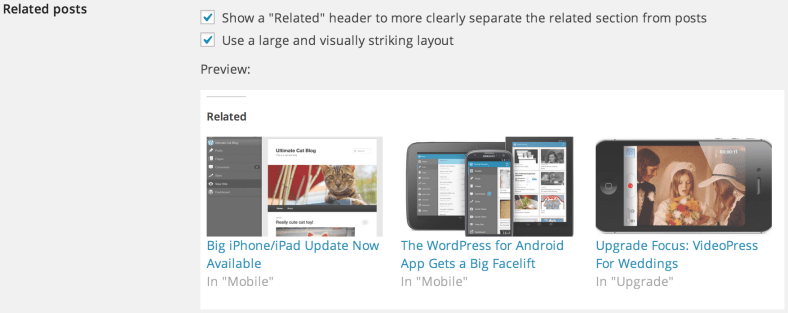
Related Posts scans all of your posts, analyzes them, and selects at least three related archived blog posts to showcase underneath or above your post. This helps readers figure out what to read next and keeps them on your site even longer.
4. Be the first to know when your website experienced downtime with Monitor.
Ugh. Dreaded website downtime. It’s never fun when your site goes down. Monitor keeps tabs on your site and alerts you the moment downtime is detected.
Fun fact: Monitor checks your site every five minutes and notifies you as soon as a problem arises. We’ll also email you when your site is back up!
5. Make your blog a beautiful place to visit with Site Accelerator (Photon).
Photos are an incredibly important piece of the puzzle when it comes to finding success as a blogger. Compelling visuals help keep site visitors interested and engaged.

If you don’t size your photos properly though, you can seriously slow down your site. That’s where Jetpack’s Site Accelerator comes in handy. Site Accelerator (Photon) is an image acceleration and editing service. What does this mean for you? Less load time on your host and faster image loading for your readers.
Seasoned bloggers, what do you think? Which Jetpack features would you recommend to a new blogger?
Don’t have Jetpack installed yet to try out these features? If you don’t currently have Jetpack, be sure to install it so you can begin taking advantage of all the plugin’s features. The easiest way to install Jetpack is via your site’s Dashboard. Please follow these instructions to install and connect Jetpack.

Jetpack 3.8.2 is out! In this release, we focused on fixing a few specific and annoying bugs that popped up.
We fixed a regression created in version 3.8.1 where Photon did not respect some custom image sizes from other plugins or themes. Photon respects all image sizes again.
WordPress 4.4 made some changes to the way Shortcodes are parsed, which broke our YouTube shortcode. We’re now filtering this shortcode to output properly so you don’t need to go back update your shortcodes in your existing posts – we’ve taken care of that for you.
We’ve tightened up security in the Wufoo shortcode. If you use this shortcode, you should upgrade to 3.8.2 as soon as possible.
We’ve also cleared up a couple very minor bugs with Carousel, Publicize, Google+ widget, and Infinite Scroll.
Contributors for this release include Aaron Graham, Alex Mills, Alexander Concha, Brandon Kraft, Derek Smart, Eduardo Reveles, Elio Rivero, Eric Binnion, Igor Zinovyev, Jeremy Herve, Kat Hagan, Lance Willett, Miguel Lezama, Rocco Tripaldi, Sam Hotchkiss, and Takashi Irie.
Thank you for your contributions!

We always strive to make your sites run as quickly and smoothly as possible, both on the front end and under the hood. Our most recent improvement? All self-hosted Jetpack-connected sites who have the Photon image service activated can now enjoy seamless support for the WebP image format.
What does this mean for you and your audience? This new feature provides size reductions of up to 34 percent for served images compared to a JPEG image of an equivalent visual quality level. Your viewers will save a lot of time loading your pages — time they can better spend enjoying the content you publish.

|
 |
| JPEG File Size – 43.84KB | WebP File Size – 29.61KB |
Visually identical images in JPEG and WebP format with their respective sizes.
While WebP isn’t currently supported by all browsers (see the WebP FAQ for more details), you don’t have to worry about anything. We auto-detect which browsers your readers are using to make sure they can enjoy your images in the best quality and highest speed possible.
We should note that by default, Photon is compressing the WebP images at a high quality setting. If you want to get the most out of this new feature, utilizing the quality parameter will yield the best results.
If you’d like to learn more about this fast-loading image format, check out the following links:
With the WordPress 4.4 Release Candidate now available, we wanted to release our fully-compatible version of Jetpack a little early. So here it is, along with some minor bug fixes and accessibility improvements.
There are some cool things coming in WordPress 4.4, such as responsive images. To take full advantage of this, we made sure that Photon serves responsive images as well.
If you’ve had the pleasure of testing out Twenty Sixteen, we’ve included some compatibility styling to make sure Jetpack features such as Related Posts, Share Buttons, Likes, and Infinite Scroll all look great.
WordPress made some adjustments to the heading levels in 4.4 to improve accessibility. We scrubbed Jetpack to make sure our heading levels are semantic and accessible to screen readers as well.
We went through and optimized the images that we display within the Jetpack Admin, which dropped our image directory from 1.8 MB to 856 KB. Every little bit counts!
Fixed some minor bugs with Carousel, Markdown, Single Sign On, and Subscriptions.
Contributors for this release include Adam Heckler, Alex Kirk, Brandon Kraft, Chris Wiegman, Derek Smart, Eduardo Reveles, Enej Bajgoric, Ian Dunn, Igor Zinovyev, Jake Jackson, Jeff Golenski, Jeremy Herve, Joey Kudish, Konstantin Obenland, Michael Cain. Miguel Lezama, Rocco Tripaldi, Sam Hotchkiss, Scott Grant, and Takashi Irie.

Theme crafters often ask whether Photon — the free Image Content Delivery Network module in Jetpack — can be used to speed up page loads and save on bandwidth when delivering images from their themes. The short answer: Yes! Read on for the how-to.
Continue reading → Photon and Themes

Posting photo galleries on your WordPress blog is a fun way to share your experiences with the world, but do plain old thumbnail grids truly express your artistic side? No, they don’t. That’s why we’ve added tiled galleries to Jetpack.

Tiled galleries allow you to create beautiful photo mosaics for your blog posts. Just activate the Tiled Gallery module (and optionally set the tiled layout as the default) to create gorgeous galleries in seconds. Your friends will envy you, and your enemies will fear you.

You might be thinking, “Are tiled galleries the only new feature in Jetpack 2.1? If they are, that’s certainly understandable, because it’s an amazing addition to an already feature-rich plugin.” No, tiled galleries are not the only new feature; we’ve also added a slideshow mode for galleries. Just choose Slideshow from the Type dropdown when creating your gallery, and you’ll instantly have a dynamic photo display. Slideshows and tiled galleries both look amazing on mobile devices, and they both integrate seamlessly with the Carousel module.

In addition to giving you new ways to show off your photographs, we’ve spent a lot of time fixing bugs, too. Photon, Infinite Scroll, Publicize, Sharing, and the Contact Form modules have all been given some TLC, and the Custom CSS editor has been updated. For a complete list of changes, see the changelog.
Update: Jetpack 2.1.1 has been released to fix a bug that was preventing updates from Jetpack 1.9.2 and older.
This release continues to refine Jetpack’s handling of images in Photon (our image accelerator) and enhances theme and plugin compatibility with Infinite Scroll.
Jetpack’s Custom CSS Editor also gets a major overhaul for this release. The editing experience is now more streamlined and supports Sass and LESS as alternatives to traditional CSS. Write your site’s styles in your preferred language, and Jetpack handles the rest.
Those are the highlights, but this release also fixes many other issues you reported. For a complete list of changes, see the official Jetpack Changelog.
The update will be available in your WordPress dashboard shortly. Alternatively, you can always download the latest version of Jetpack here at jetpack.me.
Remember these fixes are made possible by bug reports submitted by you (thanks!), so please contact support or post in the support forum if you need help.
Enter your email address to receive news and updates from Jetpack
