

Jetpack Privacy Center
Last updated:
The Jetpack Privacy Center explains how Jetpack handles your data and your visitors’ data, including analytics tracking, cookies, the JSON API and REST API proxy (which can expose live site data such as WooCommerce order details), and your options for managing email preferences and privacy compliance.
We are fully committed to the privacy and security of our customers and their personal data. In addition to the Jetpack-specific privacy information below, you can also consult our Automattic Privacy Notice and Privacy Policy.
How Jetpack uses your data
For a better understanding of how Jetpack uses your data, please refer to the Automattic Privacy Notice (Automattic owns and operates the Jetpack plugin), the Automattic Privacy Policy and our detailed What Data Does Jetpack Sync? support article.
The specifics around Jetpack’s data usage will depend on the features you have activated on your site; note that some features are auto-activated. Click on any feature below to review its respective privacy information and deactivation instructions. Please note that some of this documentation is still in progress.
JSON API and REST API proxy
The JSON API module (also called the REST API proxy) lets WordPress.com and Automattic services make authenticated REST API requests to your connected site on your behalf. This proxy is what allows you to manage your site from WordPress.com and Jetpack Cloud. When an authenticated request is made through this proxy, it can read and write live data directly from your site’s database in real time.
Because these requests run against your live site, the JSON API proxy can expose the full contents of your site’s REST API endpoints.
For sites running WooCommerce, this includes complete order details, which can contain personally identifiable information (PII) such as customer names, email addresses, physical addresses, phone numbers, and order contents. The proxy accesses this data live at the time of the request; it does not create a separate copy.
The JSON API proxy differs from Jetpack Sync. Jetpack Sync maintains a mirror of selected site data on WordPress.com and explicitly excludes PII, including WooCommerce customer order details.
The JSON API proxy does not rely on that mirror; it reads live data on demand and can therefore return PII that Jetpack Sync does not store.
Automattic support staff can access your live site data through the JSON API proxy using the Switch to User feature, which lets an authorized support representative make authenticated requests as a user on your site. For more detail on how the JSON API module operates, see JSON API in the Jetpack plugin.
Cookies
You can find Automattic’s comprehensive Cookie Policy here.
Cookies are used by Jetpack in a variety of ways to improve your experience and provide the core functionality of some features. You can find specific details about these cookies and their purposes in our dedicated support document here.
If you’d like to add a cookie banner to your site, you can take advantage of our Cookies & Consent Banner widget.
General analytics tracking
In order to better understand how our customers use Jetpack — and so that we can efficiently and effectively improve the product — we actively track activities around the product, including:
- Page views on WordPress.com, Cloud.Jetpack.com, and within WP Admin on your WordPress site where Jetpack is installed
- Clicks on any links or banners used when managing your site via WordPress.com, Cloud.Jetpack.com, or within WP Admin on your WordPress site where Jetpack is installed
- When using the dashboard quick switcher to move between your WordPress site WP Admin and the WordPress.com Dashboard
- When the Jetpack plugin is deactivated or Jetpack is disconnected (tracking events related to the disconnection dialog box)
- Product suggestions activities, depending on which selections or user flows are taken when using the Jetpack Assistant
- Partner coupon code usage.
Emails sent to you by Jetpack and WordPress.com will also include standard tracking, including open and click activities. Learn how to unsubscribe from these emails.
These kinds of analytics events will be attached directly to your WordPress.com account and are handled via a first-party system that Automattic owns and maintains. This data collection is done in various ways, including embedding an invisible g.gif or v.gif image in a page. We also add a from parameter to pre-connection button links for source tracking. In general, the following data will be sent with each such usage event:
- IP address
- WordPress.com user ID and username
- WordPress.com-connected site ID
- User agent
- Referring URL
- Timestamp of event
- Browser language
- Country code
For users of both WooCommerce and Jetpack, additional usage tracking is in place by default. Specifically, this includes activity on site product pages, as well as cart and checkout. Learn more about this feature as well as finding out how to disable this.
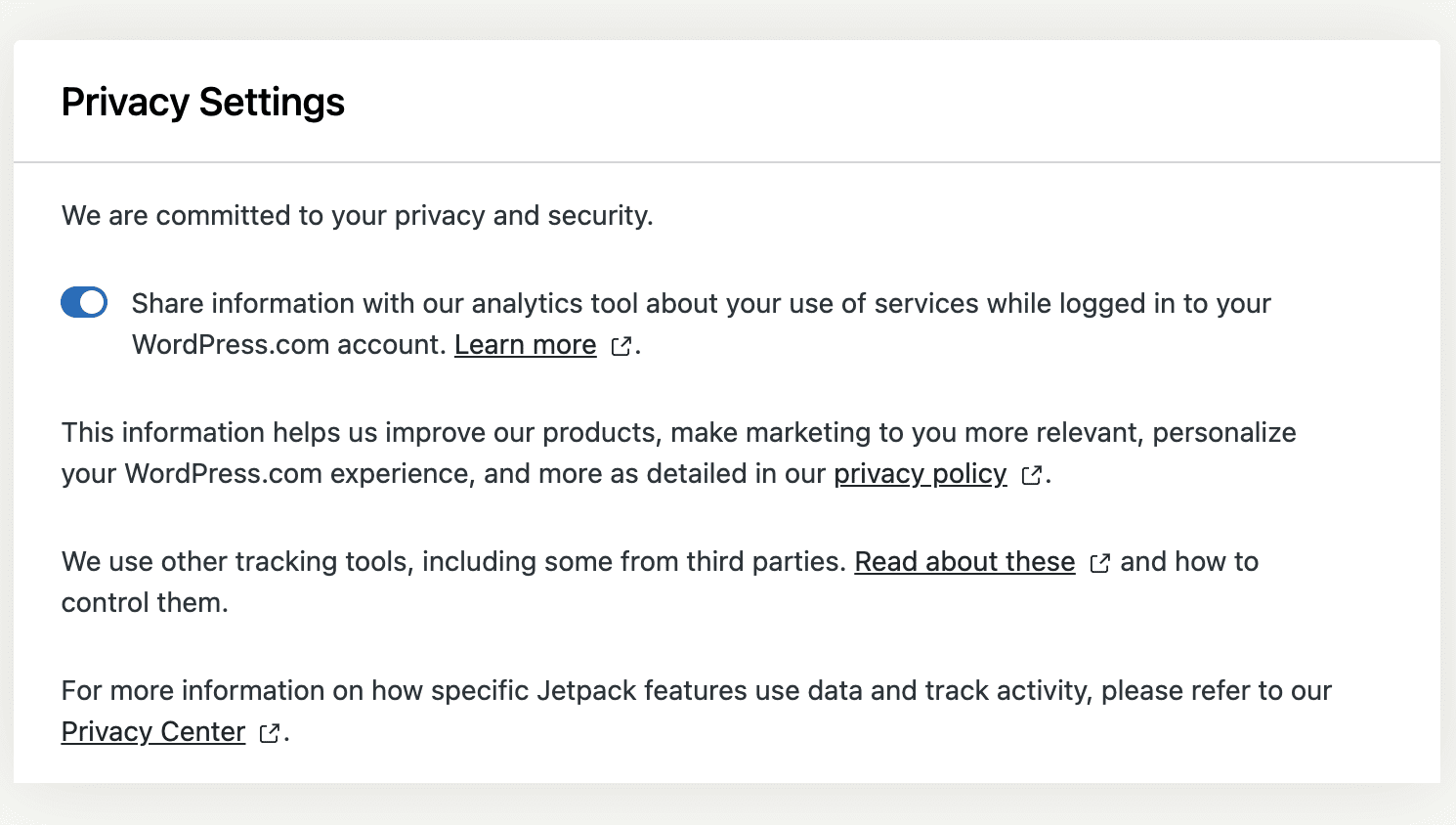
In order to opt out of both general analytics and WooCommerce tracking (if WooCommerce is in use), click on the Privacy link in the footer of the Jetpack page within your WordPress WP Admin and toggle the following option off:
Share information with our analytics tool about your use of services while logged in to your WordPress.com account.
Managing your email preferences
You have full control over email communications sent to you by WordPress.com and Jetpack. To manage these preferences, go to https://WordPress.com/me/notifications/updates, toggle the checkboxes as desired, and click on the Save Settings button when finished.
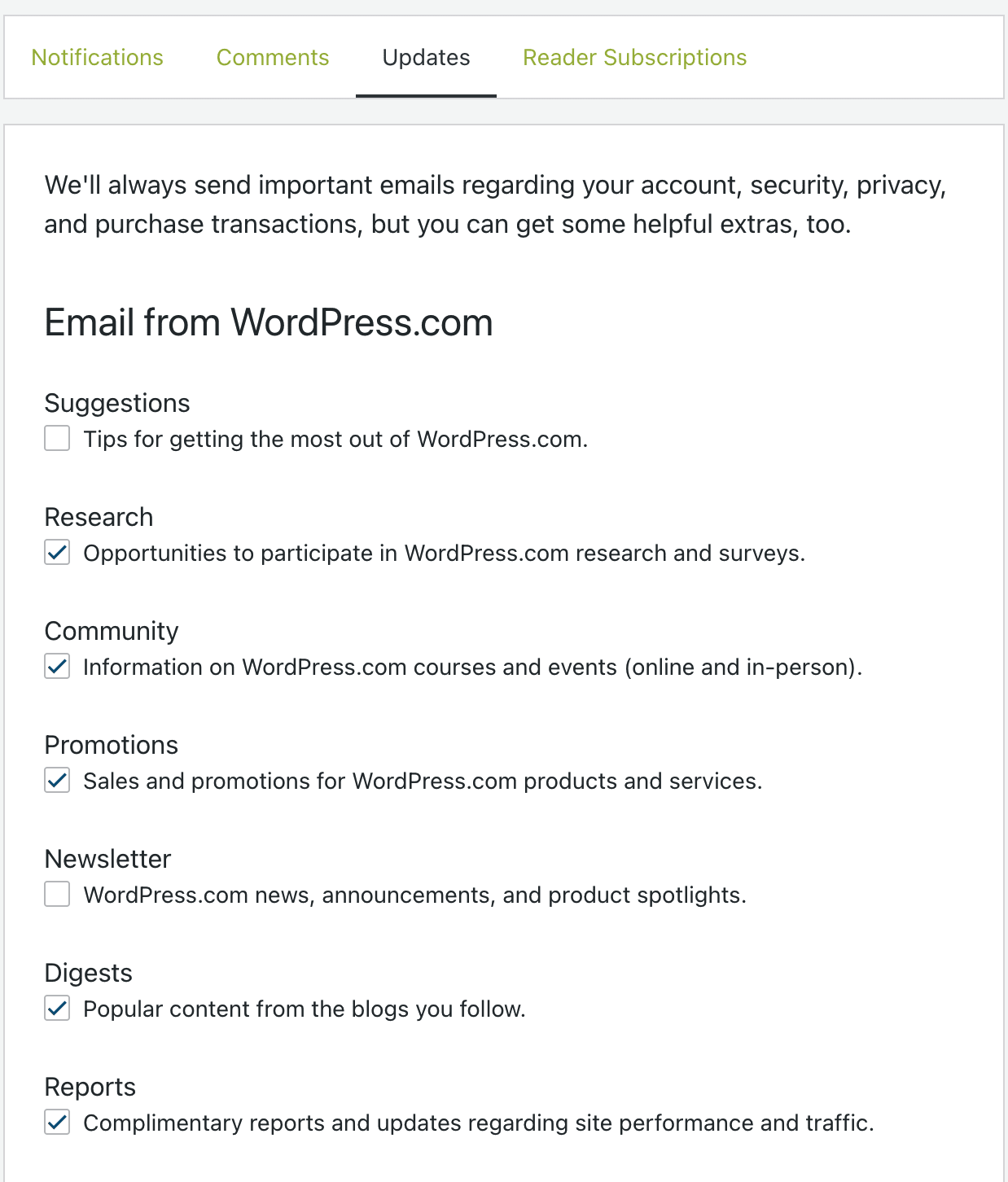
You will also find an Unsubscribe link in the footer of all emails relating to marketing or promotions.
Privacy policy helper
If you’re constructing your site’s own privacy policy, you can use our Privacy Policy Helper tool that allows you to select which Jetpack features you’ve activated on your site, generate the appropriate visitor-focused privacy policy content, and copy it (text or HTML) directly to your clipboard.
This tool will be integrated directly into the plugin in a future release.
GDPR compliance
We at Automattic have added new privacy features and updated our policies in order to comply with Europe’s General Data Protection Regulation (GDPR). You can read more about these updates here.
HIPAA compliance
Jetpack is not explicitly designed with HIPAA compliance in mind. It may be possible to use Jetpack on HIPAA-compliant sites, but it is the site owner’s responsibility to ensure compliance with HIPAA standards.
Still need help?
Please contact support. We’re happy to advise.

